I recently had the opportunity to run through a VMware Cloud on Disaster Recovery deployment with a customer and thought I’d run through the basics. It’s important to note that there a variety of topologies supported with VCDR, and many things that need to be considered before you click deploy, and this is just one way of doing it. In any case, there’s a new document outlining the process on the articles page.
Category Archives: VMConAWS
Random Short Take #82
Happy New Year (to those who celebrate). Let’s get random.
- Those of you who know me well will know I’m a big fan of Debian. I find running manual apt commands on my various Raspberry Pis therapeutic, but an automated approach is probably better. This is a great article on how to configure automated security updates on Debian automatically.
- I miss Tru64, and Solaris for that matter. I don’t miss HP-UX. And I definitely won’t miss AIX. Read about the death of Unix over at El Reg – Unix is dead. Long live Unix!
- The I3.metal is going away very soon. Remember this is from a sales perspective, VMware is still supporting the I3.metal in the wild, and you’ll still have access to deploy on-demand if required (up to a point).
- I do miss using Rubrik, so I thought this article on how to run a script with 2FA enabled on Rubrik might fill the gap.
- You think you have thoughts on online disk archives? Read this piece over at Blocks and Files – Opinion: Online disk archives are just wrong.
- Oh VVols – I was just thinking about you recently. So was Alastair, and he even bothered to put some thoughts out there – VVols, Oh VVols, wherefore art thou VVols?
- Speaking of VVols, Nicholson also has some thoughts – NFS Native Snapshots, Should I just use vVols instead?
- But really, when I think about VVols, I can’t go past my man Cody from Pure Storage. Here’s his piece on multiple vVol datastores on FlashArray.
VMware Cloud on AWS – TMCHAM – Part 8 – TRIM/UNMAP
In this edition of Things My Customers Have Asked Me (TMCHAM), I’m going to delve into some questions around TRIM/UNMAP and capacity reclamation on the VMware-managed VMware Cloud on AWS platform.
Why TRIM/UNMAP?
TRIM/UNMAP, in short, is the capability for operating systems to reclaim no longer used space on thin-provisioned filesystems. Why is this important? Imagine you have a thin-provisioned volume that has 100GB of capacity allocated to it. It consumes maybe 1GB when it’s first deployed. You then add 50GB of data to it. You then delete 50GB of data from the volume. You’ll still see 51GB of capacity being consumed on the filesystem. This is because older operating systems just mark the blocks as deleted, but don’t zero them out. Modern operating systems do support TRIM/UNMAP though, but the hypervisor needs to understand the commands being sent to it. You can read more on that here.
How I Do This For VMware Cloud on AWS?
You can contact your account team, and we raise a ticket to get the feature enabled. We had some minor issues recently that meant we weren’t enabling the feature, but if you’re running M16v12 or M18v5 (or above) on your SDDCs, you should be good to go. Note that this feature is enabled on a per-cluster basis, and you need to reboot the VMs in the cluster for it to take effect.
What About Migrating With HCX?
Do the VMs come across thin? Do you need to reclaim space first? If you’re using HCX to go from thick to thin, you should be fine. If you’re migrating thin to thin, it’s worth checking whether you’ve got any space reclamation in place on your source side. I’ve had customers report back that some environments have migrated across with higher than expected storage usage due to a lack of space reclamation happening on the source storage environment. You can use something like Live Optics to report on your capacity consumed vs allocated, and how much capacity can be reclaimed.
Why Isn’t This Enabled By Default?
I don’t know for sure, but I imagine it has something to do with the fact that TRIM/UNMAP has the potential to have a performance impact from a latency perspective, depending on the workloads running in the environment, and the amount of capacity being reclaimed at any given time. We recommend that you “schedule large space reclamation jobs during off-peak hours to reduce any potential impact”. Given that VMware Cloud on AWS is a fully-managed service, I imagine we want to control as many of the performance variables as possible to ensure our customers enjoy a reliable and stable platform. That said, TRIM/UNMAP is a really useful feature, and you should look at getting it enabled if you’re concerned about the potential for wasted capacity in your SDDC.
Random Short Take #78
Welcome to Random Short Take #78. We’re hurtling towards the silly season. Let’s get random.
- I mentioned verge.io in one of my recent short takes. Chris M. Evans has done the heavy lifting for me and written about test driving the verge.io Software-Defined Data Centre. Worth checking out.
- Speaking of SDDCs, this article on automating VM Migration AND their Firewall rules to VMC was super useful.
- I’ve been a Dropbox user for some time, and as disk-slinger in a former life, I really enjoy reading the company’s tech blog. This post on cloud storage abstraction with Object Store was great.
- Data breaches – everyone’s having them. Are you missing out? It’s probably just a matter of time. While you’re waiting, check out this article from Preston – John Proctor and Data Breaches.
- It’s always sad when a startup stops. Mellor writes that Pavilion Data – last NVMe over Fabrics flash array startup – has died. I had the opportunity to take the kit for a spin in a previous role, and spent some time with some of their people. Smart folks doing interesting things. I hope those impacted land on their feet.
- In press release news, Imply has announced a major Open Source Contribution for Apache Druid; as well as a new financial guarantee for Apache Druid users.
- I always enjoy talking to Chris about his Plex setup, because he’s taken it to the next level. Here’s a great article he put together on how to automate lighting with Plex playback.
- Finally, our old friend VMware vCenter Converter is back. You can download it from here.
VMware Cloud on AWS – I4i.metal – A Few Notes …
At VMware Explore 2022 in the US, VMware announced a number of new offerings for VMware Cloud on AWS, including a new bare-metal instance type: the I4i.metal. You can read the official blog post here. I thought it would be useful to provide some high-level details and cover some of the caveats that punters should be aware of.
By The Numbers
- The CPU is 3rd generation Intel Xeon Ice Lake @ 2.4GHz / Turbo 3.5GHz
- 64 physical cores, supporting 128 logical cores with Hyper Threading (HT)
- 1024 GiB memory
- 30 TiB NVMe (Raw local capacity)
- Up to 75 Gbps networking speed
-
- US East (N. Virginia) – use1-az1, use1-az2, use1-az4, use1-az5, use1-az6
- US West (Oregon) – usw2-az1, usw2-az2, usw2-az3, usw2-az4
- US West (N. California) – usw1-az1, usw1-az3
- US East (Ohio) – use2-az1, use2-az2, use2-az3
- Canada (Central) – cac1-az1, cac1-az2
- Europe (Ireland) – euw1-az1, euw1-az2, euw1-az3
- Europe (London) – euw2-az1, euw2-az2, euw2-az3
- Europe (Frankfurt) – euc1-az1, euc1-az2, euc1-az3
- Europe (Paris) – euw3-az1, euw3-az2, euw3-az3
- Asia Pacific (Singapore) – apse1-az1, apse1-az2, apse1-az3
- Asia Pacific (Sydney) – apse2-az1, apse2-az2, apse2-az3
- Asia Pacific (Tokyo) – apne1-az1, apne1-az2, apne1-az4
Other Regions will have availability over the coming months.
Thoughts
The i3.metal isn’t going anywhere, but it’s nice to have an option that supports more cores and it a bit more storage and RAM. The I4i.metal is great for SQL workloads and VDI deployments where core count can really make a difference. Coupled with the addition of supplemental storage via VMware Cloud Flex Storage and Amazon FSx for NetApp ONTAP, there are some great options available to deal with the variety of workloads customers are looking to deploy on VMware Cloud on AWS.
On another note, if you want to hear more about all the cloudy news from VMware Explore US, I’ll be presenting at the Brisbane VMUG meeting on October 12th, and my colleague Ray will be doing something in Sydney on October 19th. If you’re in the area, come along.
Brisbane VMUG – October 2022
The October 2022 edition of the Brisbane VMUG meeting will be held on Wednesday 12th October at the Cube (QUT) from 5pm – 7pm. It’s sponsored by NetApp and promises to be a great afternoon.
Two’s Company, Three’s a Cloud – NetApp, VMware and AWS
NetApp has had a strategic relationship with VMware for over 20 years, and with AWS for over 10 years. Recently at VMware Explore we made a significant announcement about VMC support for NFS Datastores provided by the AWS FSx for NetApp ONTAP service.
Come and learn about this exciting announcement and more on the benefits of NetApp with VMware Cloud. We will discuss architecture concepts, use cases and cover topics such as migration, data protection and disaster recovery as well as Hybrid Cloud configurations.
There will be a lucky door prize as well as a prize for best question on the night. Looking forward to see you there!
Wade Juppenlatz – Specialist Systems Engineer – QLD/NT
Chris (Gonzo) Gondek – Partner Technical Lead QLD/NT
PIZZA AND NETWORKING BREAK!
This will be followed by:
All the News from VMware Explore – (without the jet lag)
We will cover a variety of cloudy announcements from VMware Explore, including:
- vSphere 8
- vSAN 8
- VMware Cloud on AWS
- VMware Cloud Flex Storage
- GCVE, OCVS, AVS
- Cloud Universal
- VMware Ransomware Recovery for Cloud DR
Dan Frith – Staff Solutions Architect – VMware Cloud on AWS, VMware
And we will be finishing off with:
Preparing for VMware Certifications
With the increase of position requirements in the last few years, certifications help you demonstrate your skills and move you a step forward on getting better jobs. In this Community Ssession we will help you understand how to prepare for a VMware certification exam and some useful tips you can use during the exam.
We will talk about:
- Different types of exams
- How to schedule an exam
- Where to get material to study
- Lessons learned from the field per type of exam
Francisco Fernandez Cardarelli – Senior Consultant (4 x VCIX)
Soft drinks and vBeers will be available throughout the evening! We look forward to seeing you there!
Doors open at 5pm. Please make your way to The Atrium, on Level 6.
You can find out more information and register for the event here. I hope to see you there. Also, if you’re interested in sponsoring one of these events, please get in touch with me and I can help make it happen.
VMware Cloud on AWS – Supplemental Storage – A Few Notes …
At VMware Explore 2022 in the US, VMware announced a number of new offerings for VMware Cloud on AWS, including something we’re calling “Supplemental Storage”. There are some great (official) posts that have already been published, so I won’t go through everything here. I thought it would be useful to provide some high-level details and cover some of the caveats that punters should be aware of.
The Problem
VMware Cloud on AWS has been around for just over 5 years now, and in that time it’s proven to be a popular platform for a variety of workloads, industry verticals, and organisations of all different sizes. However, one of the challenges that a hyper-converged architecture presents is that resource growth is generally linear (depending on the types of nodes you have available). In the case of VMware Cloud on AWS, we (now) have 3 node types available for use: the I3, I3en, and I4i. Each of these instances provides a fixed amount of CPU, RAM, and vSAN storage for use within your VMC cluster. So when your storage grows past a certain threshold (80%), you need to add an additional node. This is a longwinded way of saying that, even if you don’t need the additional CPU and RAM, you need to add it anyway. To address this challenge, VMware now offers what’s called “Supplemental Storage” for VMware Cloud on AWS. This is ostensibly external datastores presented to the VMC hosts over NFS. This comes in two flavours: FSx for NetApp ONTAP and VMware Cloud Flex Storage. I’ll cover this in a little more detail below.
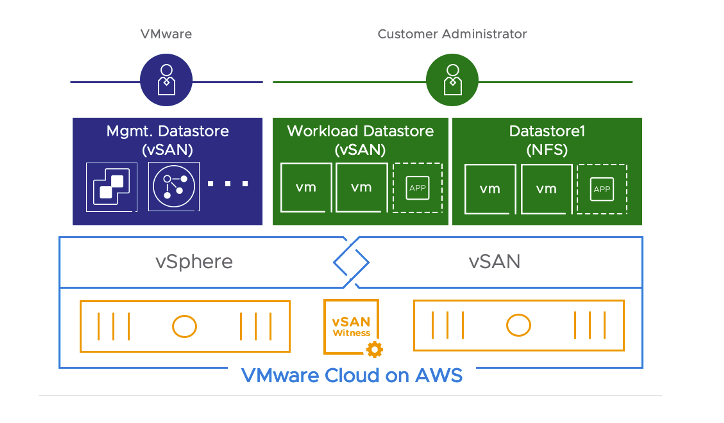
[image courtesy of VMware]
Amazon FSx for NetApp ONTAP
The first cab off the rank is Amazon FSx for NetApp ONTAP (or FSxN to its friends). This one is ONTAP-like storage made available to your VMC environment as a native service. It’s fully customer managed, and VMware managed from a networking perspective.
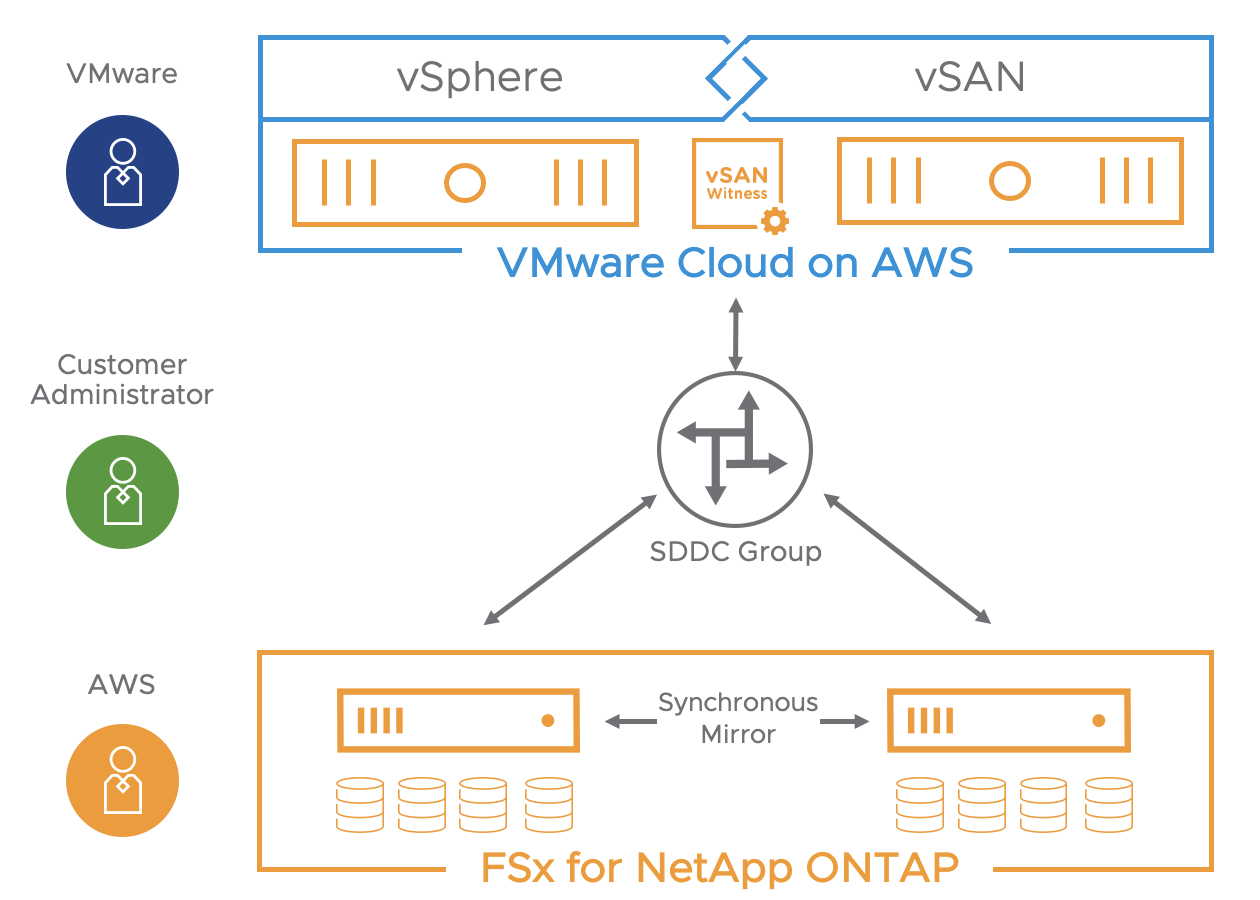
[image courtesy of VMware]
There’s a 99.99% Availability SLA attached to the service. It’s based on NetApp ONTAP, and offers support for:
- Multi-Tenancy
- SnapMirror
- FlexClone
The other option for supplemental storage is VMware Cloud Flex Storage (sometimes referred to as VMC-FS). This is a datastore presented to your hosts over NFSv3.
Overview
VMware Cloud Flex Storage is:
- A natively integrated cloud storage service for VMware Cloud on AWS that is fully managed by VMware;
- Cost effective multi-cloud storage solution built on SCFS;
- Delivered via a two-tier architecture for elasticity and performance (AWS S3 and local NVMe cache); and
- Provides integrated Data-Management.
In short, VMware has taken a lot of the technology used in VMware Cloud Disaster Recovery (the result of the Datrium acquisition in 2020) and used it to deliver up to 400 TiB of storage per SDDC.
Random Short Take #75
Welcome to Random Short Take #75. Half the year has passed us by already. Let’s get random.
- I talk about GiB all the time when sizing up VMware Cloud on AWS for customers, but I should take the time to check in with folks if they know what I’m blithering on about. If you don’t know, this explainer from my friend Vincent is easy to follow along with – A little bit about Gigabyte (GB) and Gibibyte (GiB) in computer storage.
- MinIO has been in the news a bit recently, but this article from my friend Chin-Fah is much more interesting than all of that drama – Beyond the WORM with MinIO object storage.
- Jeff Geerling seems to do a lot of projects that I either can’t afford to do, or don’t have the time to do. Either way, thanks Jeff. This latest one – Building a fast all-SSD NAS (on a budget) – looked like fun.
- You like ransomware? What if I told you you can have it cross-platform? Excited yet? Read Melissa’s article on Multiplatform Ransomware for a more thorough view of what’s going on out there.
- Speaking of storage and clouds, Chris M. Evans recently published a series of videos over at Architecting IT where he talks to NetApp’s Matt Watt about the company’s hybrid cloud strategy. You can see it here.
- Speaking of traditional infrastructure companies doing things with hyperscalers, here’s the July 2022 edition of What’s New in VMware Cloud on AWS.
- In press release news, Aparavi and Backblaze have joined forces. You can read more about that here.
- I’ve spent a lot of money over the years trying to find the perfect media streaming device for home. I currently favour the Apple TV 4K, but only because my Boxee Box can’t keep up with more modern codecs. This article on the Best Device for Streaming for Any User – 2022 seems to line up well with my experiences to date, although I admit I haven’t tried the NVIDIA device yet. I do miss playing ISOs over the network with the HD Mediabox 100, but those were simpler times I guess.
VMware Cloud on AWS – TMCHAM – Part 7 – Elastic DRS and Host Failure Remediation
In this edition of Things My Customers Have Asked Me (TMCHAM), I’m going to delve into some questions around managing host additions and failures on the VMware-managed VMware Cloud on AWS platform.
Elastic DRS
One of the questions I frequently get asked by customers is what happens when you reach a certain capacity in your VMware Cloud on AWS cluster? The good news is we have a feature called Elastic DRS that can take care of that for you. Elastic DRS is a little different to what you might know as the vSphere Distributed Resource Scheduler (DRS). Elastic DRS operates at a host level and takes care of capacity constraints in your VMC environment. The idea is that, when your cluster reaches a certain resource threshold (be it storage, vCPU, or RAM), Elastic DRS takes care of adding in additional host resources as required.
The algorithm runs every 5 minutes and uses the following parameters:
- Minimum and maximum number of hosts the algorithm should scale up or down to.
- Thresholds for CPU, memory and storage utilisation such that host allocation is optimized for cost or performance.
Note also that your cluster may scale back in, assuming the resources stay consistently below the threshold for a number of iterations.
Settings
There are a few different options for Elastic DRS, with the default being the “Elastic DRS Baseline Policy”. With this policy, a host is automatically added when there’s less than 20% free vSAN storage. Note that this doesn’t apply to single-node SDDC configurations, and only the baseline policy is available with 2-node configurations. Beyond those limitations, though, there are a number of other configurations available and these are outlined here. The neat thing is that there’s some amount of flexibility in how you have your SDDC automatically managed, with options for best performance, lowest cost, or rapid scale-out also available.
Can I Turn It Off?
No, but you can fiddle with the settings from your VMC cloud console.
Other Questions
What happens if I’m adding a host manually? The Elastic DRS recommendations are ignored. Same goes with planned maintenance or SDDC maintenance, where the support team may be adding in an additional host. But what if you’ve lost a host? The auto-remediation process kicks in and the Elastic DRS recommendations are ignored while the failed host is being replaced. You can read more about that process here.
Thoughts
One of the things I like about the VMware Cloud on AWS approach is that VMware has looked into a number of common scenarios that occur in the wild (hosts running out of capacity, for example) and built some automation on top of an already streamlined SDDC stack. Elastic DRS and the Auto-Scaler features seem like minor things, but when you’re managing an SDDC of any significant scale, it’s nice to have the little things taken care of.
Random Short Take #74
Welcome to Random Short Take #74. Let’s get random.
- Chris Colotti put together a great article on VMware vSphere networking. It seems like a fairly fundamental issue, but one that I’ve seen plenty of times in the field.
- Speaking of VMware, if you’re working in the financial services sector and looking at VMware Cloud on AWS, this blog about compliance for financial services (Asia Pacific and Japan) might be just the thing for you.
- Pure Storage recently had its annual shindig, resulting in a few announcements, including the FlashBlade//S. Chris M. Evans goes into more detail in this post.
- Speaking of storage hardware announcements, StorCentric recently launched the Nexsan EZ-NAS. You can find the specs here.
- I just can’t seem to shut up about storage. This article from Chin-Fah stating the case for a Storage Appliance approach made for great reading.
- More on storage? Datadobi’s StorageMAP apparently solves the top four areas of concern for IT leaders, according to a ew ESG Global Insight Report.
- A take inside a take? Is that even possible, Dan?! Yes, yes it is. Here’s the good Doctor J’s Storage Short Take #44.
- And finally, some humour for you. Breaking: Local Man Buys Best Subwoofer He’s Ever Heard.