Nexsan Announces Unity NV4000

Nexsan recently announced the Nexsan Unity NV4000. I had the chance to speak to Vincent Phillips (CEO), Judy Kaldenberg (SVP Sales & Marketing), and Mircea Turcu (VP of Engineering) about it, and thought I’d share some thoughts here.


What Is It?

[image courtesy of Nexsan]

I’ve said it before (a little over a year ago as it happens), and I’ll say it again … in the immortal words of Silicon Valley: “It’s a box“. And a reasonably powerful one at that, coming loaded with the following specifications.

Supported Protocols SAN (Fibre Channel, iSCSI), NAS (NFS, SMB 1.0 to 3.0, FTP), Object (S3)
Disk Bays | Rack U 24 | 4RU
Supported Expansion Systems N/A
Maximum Raw Capacity 576 TB Raw
System Memory (DRAM) per controller up to 128GB
FASTier 2.5″ SSD Drives (TB) 1.92 | 3.84 | 7.68 | 15.36
SAS SSDs (TB) 1.92 | 3.84 | 7.68 | 15.36 | 30.72
SAS HDDs (TB) 4 | 6 | 8 | 10 | 12 | 14 | 16| 18 | 20 | 22 | 24
Host Connectivity 16/32Gb FC | 10/25/40/100 GbE

It’s a dual-controller platform, with dual Intel Xeon Silver 4309Y CPUs (2.8 GHz CPU, 8 cores, 16 threads) per controller, and you get access to the following features included as part of the platform license:

  • Nexsan’s FASTier® Caching – Use solid-state to accelerate the performance of the underlying spinning disks
  • Nexsan Unity software version 7.2, with important enhancements to power, enterprise-class security, compliance, and ransomware protection
  • Enhanced Performance – Up to 1,000,000 IOPs
  • Third-Party Software Support – Windows VSS, VMware, VAAI, Commvault, Veeam Ready Repository, and more
  • Multi-Protocol Support – SAN (Fibre Channel, iSCSI), NAS (NFS, CIF, SMB1 to SMB3, FTP), Object (S3), 16/32GB FC, 10/25/40/100 GbE
  • High Availability – No single point-of-failure architecture with dual redundant storage controllers, redundant power supplies and RAID


Other Features (via Unity 7.2)

Along with the standard Unity features, with the release of Unity 7.2, you also get access the new Cloud Connector, offering bi-directional sync for files / directories with cloud storage solutions such as AWS S3, Azure Blob, and Unity Object store. As well as this, an SMB Access Audit capability has been introduced with the new version of Unity, given administrators the ability to view file access by user via the SMB protocol.


Use Cases

The Unity NV series of arrays is well suited to the following workloads:

  • Media and entertainment;
  • Hypervisor storage (primary and secondary);
  • Digital video surveillance; and
  • Backup and recovery storage.


Thoughts and Further Reading

I wrote about the NV6000 when it was announced in January last year. At the time I wondered, somewhat tongue in cheek, who really cared about storage array announcements in this age of hyperscaler storage solutions. But I think plenty of people should and do care that these kinds of products are out there in the market. As with the other Unity solutions, the NV4000 provides users some degree of flexibility when it comes to the protocols they want to use (SMB, NFS, iSCSI) and the transport mechanisms (FC, Ethernet). For every pundit pronouncing the death of fibre channel, there are any number of folks out in the field still running those networks from a bygone era, and quite happily to boot. The smaller footprint of the NV4000 may not be that exciting for those of us craving large scale storage capacities and high performance arrays to do the heavy lifting for our critical workloads, but these kinds of solutions are great at the edge or in places where you can’t simply roll in a full rack of storage. As well as this, in a society increasingly fascinated with surveillance, solutions like the NV4000 provide a robust solution for the storage of CCTV footage, and Nexsan also seems very focussed on solving this problem efficiently and cost-effectively.

Hybrid storage is still a real thing in the wild, because people are still looking for ways to store more and more data in a cost effective manner, and providing support for spinning disks in storage arrays, with some clever caching / storage tiering up front, is one way of doing that. Particularly when that storage needs to happen at the edge, or in places where clouds can’t be easily reached. While it seems like an odd concept for people working with data in places where big fibre runs exist to their hyperscaler of choice, there are plenty of places (like most of Australia) where moving large volumes of data between the cloud and local workloads still isn’t a terribly fast (or cheap) activity. Until that problem is somehow solved (and I know it’s being worked on by many companies) midrange, on-premises storage isn’t dead yet.
StorPool Announces Disaster Recovery Engine For KVM-based Clouds

StorPool recently announced its Disaster Recovery Engine (DRE) for KVM-based clouds. I had the chance to talk to Dave Henry and Beth Caltagirone about the announcement and thought I’d share some thoughts here.


What It Does

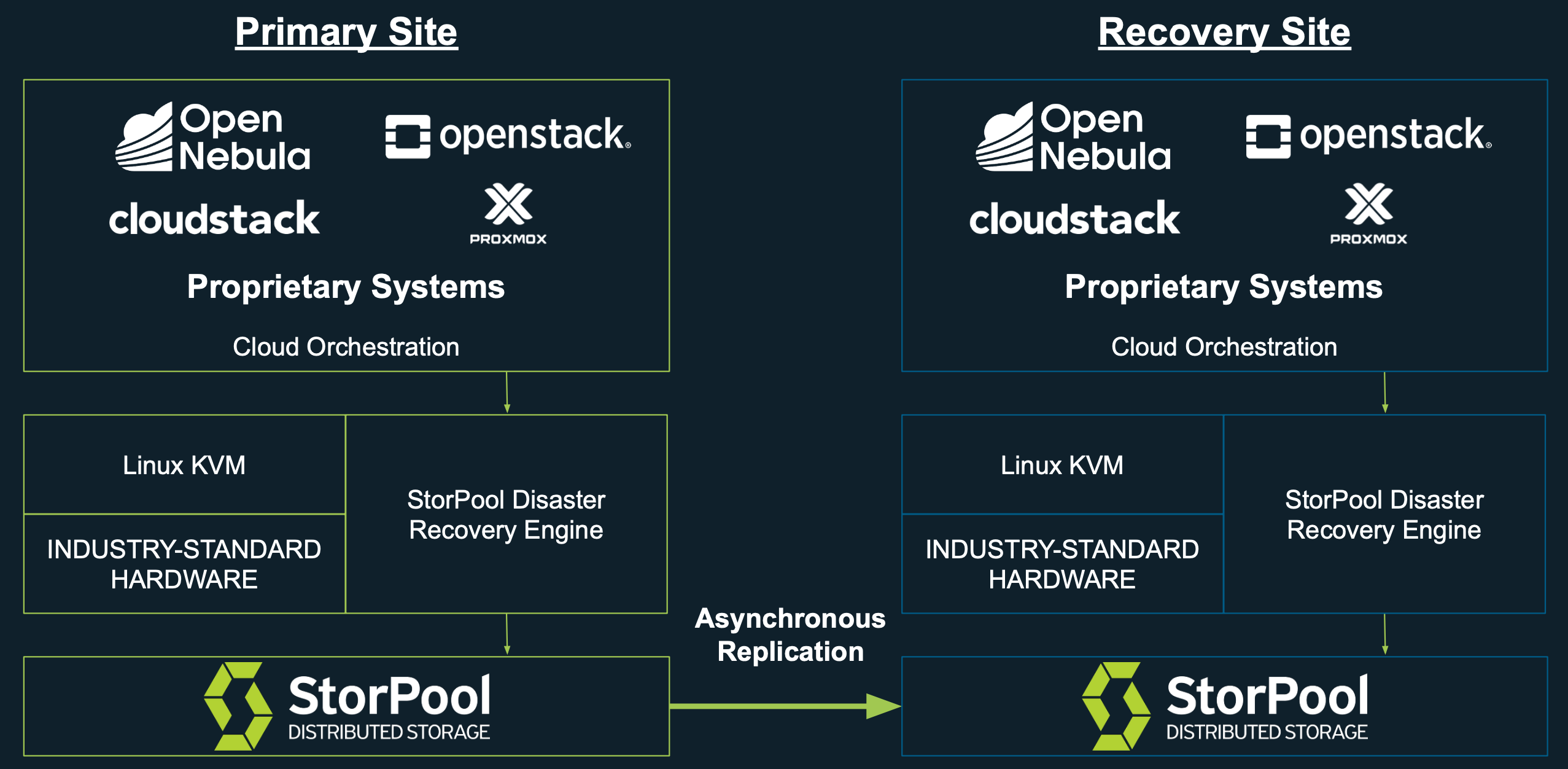
According to StorPool, the DRE “can protect environments with tens to thousands of VMs. It simplifies disaster recovery scenarios like 1:1, many to 1, many to many, and delivers industry-leading recovery point objective (RPO) and recovery time objective (RTO) of virtual machines in disaster scenarios, to ensure uninterrupted business operations.” At its core, it’s a way to get data from point A to point B, and use that data in the event that point A goes away.

[image courtesy of StorPool]

It supports asynchronous replication down to a 15-minute recovery point objective, and, according to Henry, can deliver some pretty snappy recovery times (depending on the hardware deployed at the recovery site).

Supported Topologies

There are several topologies supported, including:

  • Active – Passive;
  • Bi-directional;
  • Many-to-one; and
  • Multi-site mesh.

The choice of topology will be dependent on various environmental factors, such as distance between sites, the type of disaster you’re looking to recover from, etc. But I’m sure this level of flexibility would be appreciated by StorPool customers.

Licensing

Existing and new customers will be pleased to hear that the StorPool Disaster Recovery Engine is fully integrated with StorPool’s existing licensing – no additional license is required.


Who’s Using It?

“StorPool customers are IT service providers building public, private and hybrid clouds – Managed Service Providers, Hosting Service Providers, Cloud Service Providers, Enterprises and SaaS vendors. The StorPool Storage platform is a Storage-as-a-Service (STaaS) offering, with a bring your own server model.” CloudSigma has been using the product to offer DR capabilities to its customers across 31 sites globally.


Thoughts

In terms of hypervisors, I’ve been working almost exclusively with VMware for the last twenty years (well, except for that weird XenServer dalliance in the early 2000s), so my knowledge of KVM-based solutions, particularly when it comes to disaster recovery and orchestration, is fairly limited. That said, I’ve been following StorPool for some time, and have seen the offering develop over time to meet the needs of service providers looking to do cool stuff with software-defined storage solutions. The ability to provide some useful DR replication and orchestration seems to be a logical progression for a company that helps service providers deliver storage and cloud services to its customers, and that slo offers its own managed services as part of the arrangement. The company has always been focussed on an API-first approach, and this carries over to the DRE offering as well. I’m always happy to hear about companies working to deliver more DR capabilities to their products, particularly when there’s been a bit of a gap in the capability previously. And I’m especially happy to hear that this capability is being included at no additional cost.

The StorPool DRE is now in public beta and GA is scheduled for Q2 2025. I’m keen to hear how the solution is being adopted with StorPool customers and looking forward to hearing more about how StorPool are innovating in the market.

NetApp Cloud Storage Announcements – February 2025


NetApp recently made some announcements around its cloud storage capabilities as part of a larger series of product announcements. I thought I’d share some notes and some brief thoughts here.


Azure NetApp Files

New capability – Cost optimisation

New capability – Resilience

There’s also preview support for backing up large volumes and performing single file restores from backup.


Amazon FSx for NetApp ONTAP

There’s a new AWS CloudFormation package Amazon FSx for NetApp ONTAP that unlocks advanced ONTAP operations, including:

  • SnapMirror creation (including ClusterPeer and SVM Peer);
  • iSCSI (LUN and iGroup) creation;
  • CIFS Share creation;
  • Snapshot and Snapshot Policy creation; and
  • Advanced Volume creation.

[image courtesy of NetApp]


Thoughts

Why am I writing about FSx for NetApp ONTAP on my weblog? And why should you be interested in a few minor enhancements to this and to Azure NetApp Files? How do these technologies even make sense when the benefits of public cloud are right there? Why would organisations not just use the hyperscaler-native storage solutions available to them? It’s for the same reason that numerous organisations have adopted VMware Cloud on AWS and Azure VMware Solution, sometimes your applications need something different to what the public cloud can offer, at least until those applications have undergone some kind of transformation. I have plenty of customers in my day job taking advantage of FSx for NetApp ONTAP with their VMware Cloud on AWS deployments because the linear scalability of hyper-converged infrastructure has proven problematic for storage-heavy workloads. Additionally, they get the benefit of being able to leverage the NetApp tools they know and love, just in a cloud context. It’s great to see NetApp continue to add features and functionality to both Azure NetApp Files and FSx for NetApp ONTAP. If you’re struggling with shifting storage-dense workloads to public cloud while needing to stay within the confines of a VMware-based solution, these offerings can really help the economics make sense, even for enterprises, not just the t-shirt and jeans cloud-native types.

NetApp Enterprise Storage Announcements – February 2025

NetApp recently made some announcements about enhancements to its enterprise storage line of products. I thought I’d share a few notes here.


ASA A-Series

If you’re unfamiliar with the ASA line of devices, it’s NetApp’s all-flash SAN solution. There are a few models already available (see the data sheet here) and now there are three more A-series models: the ASA A50, ASA A30, and ASA A20.

[image courtesy of NetApp]

Major Hardware Innovations

There’s an integrated compression offload engine with Intel® QAT®1 (this is not available with the ASA A20), delivering the following benefits:

  • Next generation CPU architecture provides increased performance for resource-intensive tasks and processing
  • Always-on enhanced storage efficiency without impacting performance
  • Up to 160Gb/s data compression

It takes advantage of PCIe Gen 5, as well as DDR 5 Memory. According to NetApp, this delivers twice the clock speed for faster memory access and 50% more throughput for large data transfers. Additionally, there’s support for 64Gb Fibre Channel and NVMe/FC, as well as 100GbE and NVMe/TCP support. They use Titanium power supplies with a 95% efficiency rating.

Storage efficiency

You also get access to “always on, inline, data reduction”. There’s no cold data policy to manage, nothing for customers to configure and, according to NetApp, it’s easy to meet Storage Efficiency Guarantee ratios. Thanks to QAT, you’ll never need to choose between performance or efficiency.


New FAS and EF-Series systems

FAS50

The FAS50 delivers quite a punch in a small 2U form factor, with:

  • Optimised I/O flexibility;
  • Improved price/performance value;
  • Enabled for future security hardware offload; and
  • Released with ONTAP 9.16.1 GA.

[image courtesy of NetApp]

EF Series

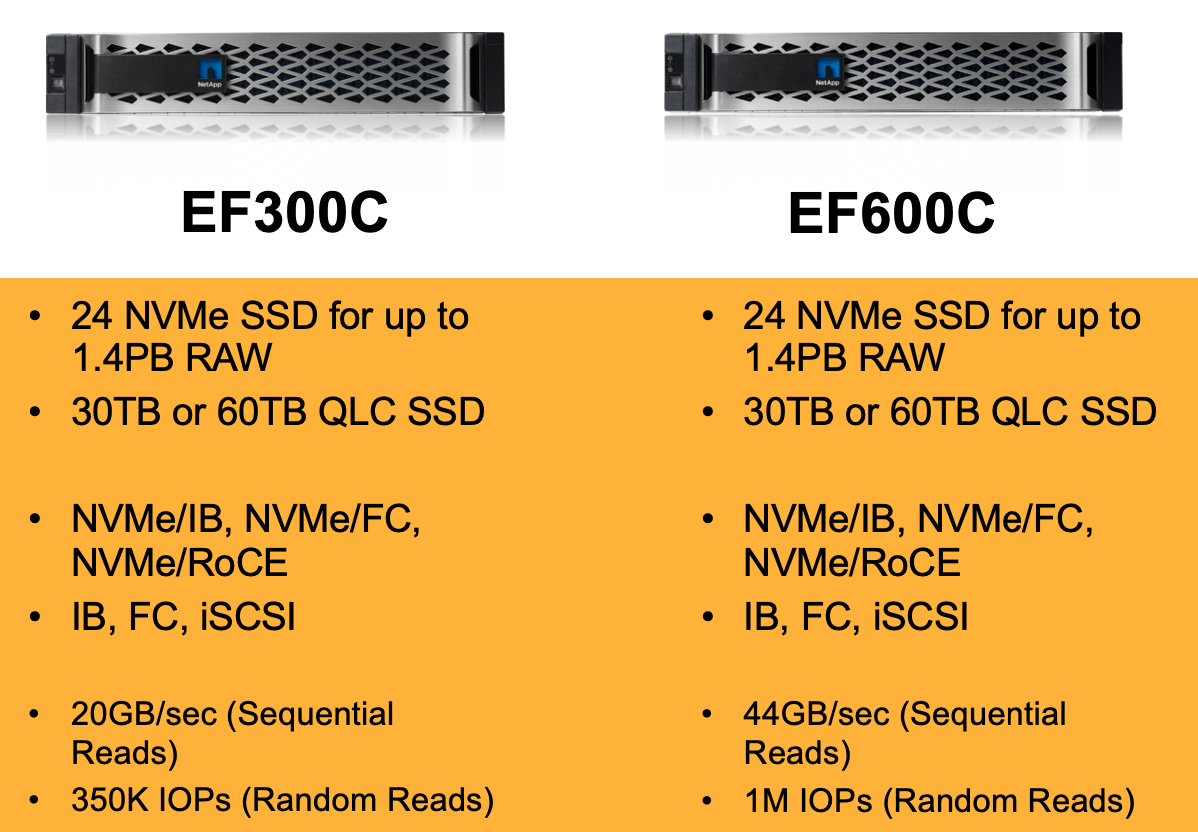
NetApp has also announced the availability of new EF-Series arrays – the EF300C and EF600C.

[image courtesy of NetApp]

A few things to note with the EF300C and EF600C:

  • The default configuration is a single Dynamic Disk Pool (DDP) which is automatically created using all available drives for simplicity in management
  • There is support for 30TB or 60TB capacities (but by default there is no mixing of capacities in a shelf)
  • There is only support for QLC NVMe SSDs (No mixing of QLC or TLC NVMe SSDs allowed)
  • Available with a minimum of 12x up to a maximum of 24x QLC NVMe SSDs (No expansion shelf capability)


Thoughts

It’s been a minute since I wrote about a storage company’s product announcement. The news from NetApp piqued my interest, however, as it seems like the portfolio of products and options has developed into something broader than what NetApp was traditionally known for (and I know there’s even more news that was announced that I haven’t covered here). Whilst I talk a lot about how useful the cloud is in my day job, it’s hard to dispute that I/O (and storage in general) can still have a massive impact on the performance and usability of critical and not so critical applications alike. Additionally, having options in terms of scalability, performance, and transport mechanisms, is key to delivering the right storage platforms to the applications (and end users) that need them. But while I’ve dumped a lot of speeds and feeds into this article, ultimately the success of a storage company like NetApp is more about how the platforms can be managed, integrated with other systems, and upgraded from one version to the next.

If you’re running everything in one of the hyperscalers (or more than one, for that matter). you’re not going to be terribly interested in what NetApp is selling. Despite the fact that NetApp is doing some cool stuff with hyperscalers as well (that I’ll cover in a separate post). But a large percentage of the world’s critical workloads are still hosted on what we might term “traditional” storage appliances hosted in data centres across the globe and accessed and managed in a similar fashion to the way they were 5 or 10 years ago. But that doesn’t mean that companies like NetApp aren’t innovating. Indeed, looking at some of the specs and numbers being touted here, it’s easy to see why companies are sticking with the likes of NetApp when it comes to hosting enterprise workloads on enterprise storage. I don’t think the end of traditional storage is here by any stretch, and I’m pretty sure there’s more innovation to come.

Arcitecta Announces Key Mediaflux Features

I recently had the opportunity to speak to Eric Polet from Arcitecta about the company’s recent Mediaflux announcements. This is some cool stuff, and I figured I’d share some brief thoughts here.


The News?

Artitecta has announced three new features: Mediaflux Multi-Site, Mediaflux Edge and Mediaflux Burst. I’ll share the highlights here.

Mediaflux Multi-Site

Mediaflux Multi-Site provides a single Global Namespace for all your data. Customers can choose between two options: 1) a global file system (GFS) that leverages a single global namespace, and 2) a federated file system (FFS) that uses multiple independent synchronised namespaces for data sets that are separated by greater distances – across oceans, for example. FFS is great for content and creative organisations, where teams may collaborate between New York and Tokyo, or Los Angeles and the United Kingdom.

Mediaflux Edge

According to Arcitecta, MediaFlux Edge significantly reduces redundant data transfers, eases network traffic and meets applications’ low-latency requirements. It uses a hub-and-spoke model for caching data at the edge, and keeps frequently accessed content close to users.  Data is secured by maintaining a copy of the data within a central repository to provide a full recovery capability should a threat or unplanned event occur at the edge.

Mediaflux Burst

Mediaflux Burst allows organisations to expand access to compute resources and processing power in the cloud or any another site that has additional resource availability, when they exceed their current on-premises computing resources. Mediaflux Burst decouples computing from the data’s location, allowing it to be stored for optimal cost or security, while computing tasks are optimised for performance or scalability.

[image courtesy of Arcitecta]


Thoughts

Getting data to the place it’s needed most remains a problem that many organisations still face today. We haven’t magically solved the problem of global data access, at scale, and at speed, with the performance that applications need. Getting data out to the edge can be tricky, and having teams across the world collaborating effectively can be difficult at the best of times, without having to also deal with supporting that data with the right amount of performance, availability, and compute facilities. The great thing about this announcement is that the Arcitecta solution is moving things in the right direction by looking at delivering flexibility within its solution by offering a single global namespace or federated file system access. It helps with the challenges of network traffic, particularly at the edge, by somewhat engineering around the challenge that not every endpoint has 100Gbps of bandwidth available to it. And it looks at more effective use of compute by giving users the ability to easily attach storage (and the data hosted on it) to available compute as required. It’s not exactly automatic at the moment, and relies on user intervention, but I can only imagine this will change in the future.

I’ve been out of the storage game for a little while, but it’s always nice to talk to companies like Arcitecta that are working on solving real problems for customers via innovative means. The company offers per-user (as opposed to capacity-based) licensing, and has also started doing some interesting stuff with Dell Technologies that you can read more about on the Resources page.

VMware Cloud on AWS – What’s New – February 2024

It’s been a little while since I posted an update on what’s new with VMware Cloud on AWS, so I thought I’d share some of the latest news.


M7i.metal-24xl Announced

It’s been a few months since it was announced at AWS re:Invent 2023, but the M7i.metal-24xl (one of the catchier host types I’ve seen) is going to the change the way we approach storage-heavy VMC on AWS deployments.

What is it?

It’s a host without local storage. There are 48 physical cores (96 logical cores with Hyper-Threading enabled). It has 384 GiB memory. The key point is that there are flexible NFS storage options to choose from – VMware Cloud Flex Storage or Amazon FSx for NetApp ONTAP. There’s support for up to 37.5 Gbps networking speed, and it supports always-on memory encryption using Intel Total Memory Encryption (TME).

Why?

Some of the potential use cases for this kind of host type are as follows:

  • CPU Intensive workloads
    • Image processing
    • Video encoding
    • Gaming servers
  • AI/ML Workloads
    • Code Generation
    • Natural Language Processing
    • Classical Machine Learning
    • Workloads with limited resource requirements
  • Web and application servers
    • Microservices/Management services
    • Secondary data stores/database applications
  • Ransomware & Disaster Recovery
    • Modern Ransomware Recovery
    • Next-gen DR
    • Compliance and Risk Management

Other Notes

New (greenfield) customers can deploy the M7i.metal-24xl in the first cluster using 2-16 nodes. Existing (brownfield) customers can deploy the M7i.metal-24xl in secondary clusters in the same SDDC. In terms of connectivity, we recommend you take advantage of VPC peering for your external storage connectivity. Note that there is no support for multi-AZ deployments, nor is there support for single node deployments. If you’d like to know more about the M7i.metal-24xl, there’s an excellent technical overview here.


vSAN Express Storage Architecture on VMware Cloud on AWS

SDDC Version 1.24 was announced in November 2023, and with that came support for vSAN Express Storage Architecture (ESA) on VMC on AWS. There’s some great info on what’s included in the 1.24 release here, but I thought I’d focus on some of the key constraints you need to look at when considering ESA in your VMC on AWS environment.

Currently, the following restrictions apply to vSAN ESA in VMware Cloud on AWS:
  • vSAN ESA is available for clusters using i4i hosts only.
  • vSAN ESA is not supported with stretched clusters.
  • vSAN ESA is not supported with 2-host clusters.
  • After you have deployed a cluster, you cannot convert from vSAN ESA to vSAN OSA or vice versa.
So why do it? There are plenty of reasons, including better performance, enhanced resource efficiency, and several improvements in terms of speed and resiliency. You can read more about it here.

VMware Cloud Disaster Recovery Updates

There have also been some significant changes to VCDR, with the recent announcement that we now support a 15-minute Recovery Point Objective (down from 30 minutes). There have also been a number of enhancements to the ransomware recovery capability, including automatic Linux security sensor installation in the recovery workflow (trust me, once you’ve done it manually a few times you’ll appreciate this). With all the talk of supplemental storage above, it should be noted that “VMware Cloud DR does not support recovering VMs to VMware Cloud on AWS SDDC with NFS-mounted external datastores including Amazon FSx for NetApp datastores, Cloud Control Volumes or VMware Cloud Flex Storage”. Just in case you had an idea that this might be something you want to do.


Thoughts

Much of the news about VMware has been around the acquisition by Broadcom. It certainly was news. In the meantime, however, the VMware Cloud on AWS product and engineering teams have continued to work on releasing innovative features and incremental improvements. The encouraging thing about this is that they are listening to customers and continuing to adapt the solution architecture to satisfy those requirements. This is a good thing for both existing and potential customers. If you looked at VMware Cloud on AWS three years ago and ruled it out, I think it’s worth looking at again.

Nexsan Announces Unity NV6000

Nexsan recently announced the Nexsan Unity NV6000. I had the chance to speak to Andy Hill about it, and thought I’d share some thoughts here.


What Is It?

[image courtesy of Nexsan]

I’ve said it before, and I’ll say it again … in the immortal words of Silicon Valley: “It’s a box”. And a reasonably powerful one at that, coming loaded with the following specifications.

Supported Protocols SAN (Fibre Channel, iSCSI), NAS (NFS, SMB 1.0 to 3.0, FTP), Object (S3)
Disk Bays | Rack U 60 | 4U
Maximum Drives with Expansion 180
Maximum Raw Capacity (chassis | total) 1.12 PB Raw | 3.36 PB Raw
System Memory (DRAM) per controller up to 128GB
FASTier 2.5″ SSD Drives (TB) 1.92 | 3.84 | 7.68 | 15.36
3.5” 7.2K SAS Drives (TB) 4 | 6 | 8 | 10 | 12 | 14 | 16 | 18 | 20
2.5″ NVME 1DWPD SSDs (TB) N/A
Host Connectivity 16/32Gb FC | 10/25/40/100 GbE
Max CIFS | NFS File Systems 512
Data Protection: Immutable Snapshots, S3 Object-Locking, and optional Unbreakable Backup.

It’s a dual-controller platform, with each controller containing 2x Intel Xeon Silver CPUs and a 12Gb/s SAS backplane. Note that you get access to the following features included as part of the platform license:

  • Nexsan’s FASTier® Caching – Use solid-state to accelerate the performance of the underlying spinning disks
  • Nexsan Unity software version 7.0, with important enhancements to power, enterprise-class security, compliance, and ransomware protection
  • Enhanced Performance – Up to 100,000 IOPs
  • Third-Party Software Support – Windows VSS, VMware, VAAI, Commvault, Veeam Ready Repository, and more
  • Multi-Protocol Support – SAN (Fibre Channel, iSCSI), NAS (NFS, CIF, SMB1 to SMB3, FTP), Object (S3), 16/32GB FC, 10/25/40/100 GbE
  • High Availability – No single point-of-failure architecture with dual redundant storage controllers, redundant power supplies and RAID


Other Features

Snapshot Immutability

The snapshot immutability claim caught my eye, as immutable means a lot of things to a lot of people. Hill mentioned that the snapshot IP used on Unity was developed in-house by Nexsan and isn’t the patched together solution that some other vendors promote as an immutable solution. There are some other smarts within Unity that should give users comfort that data can’t be easily gotten at. Once you’ve set retention periods for snapshots, for example, you can’t log in to the platform and the set the date forward and have those snapshots expire. The object storage componet also supports S3 Object Lock, which is good news for punters looking to take advantage of this feature.

Unified Protocol Support

It’s in the name, and Nexsan has done a good job of incorporating a variety of storage protocols and physical access methods into the Unity platform. There’s File, Block, and Object, and support for both FC and speedy Ethernet as well. In other words, something for everyone.

Assureon Integration

One of the other features I like about the Unity is the integration with Assureon. If you’re unfamiliar with Assureon, you can check it out here. It takes storage security and compliance to another level, and is worth looking into if you have a requirement for things like regulatory compliant storage, the ability to maintain chain of custody, and fun things like that.


Thoughts and Further Reading

Who cares about storage arrays any more? A surprising number of people, and with good reason. Some folks still need them in the data centre. And folks are also looking for storage arrays that can do more with less. I think this is where the Nexsan offering excels, with multi-protocol and multi-transport support, along with some decent security chops and an all-inclusive licensing model, it provides for cost-effective storage (thanks to a mix of spinning rust and solid-state drives) that competes well with the solutions that have traditionally dominated the midrange market. Additionally, integration with solutions like Assureon makes this a solution that’s worth a second look, particularly if you’re in the market for object storage with a lower barrier to entry (from a cost and capacity perspective) and the ability to deal with backup data in a secure fashion.

Arcitecta Announces Mediaflux Universal Data System

I had the opportunity to speak to Jason Lohrey and Robert Murphy from Arcitecta a little while ago about the company’s Mediaflux announcement. It was a great conversation, and I’m sad that I hadn’t heard about the company beforehand. In any case I figured I’d share some thoughts on the announcement.


What Is It?

The folks at Arcitecta describe the Mediaflux Universal Data System as “a convergence of data management, data orchestration, multi-protocol access, and storage in one platform”. The idea is that the system manages your data across all of your storage platforms. It’s not just clustered or distributed storage. It’s not just a control plane that gives you multi-protocol access to your storage platforms. It’s not just an orchestration engine that can move your data around as required. It’s all of these things and a bit more too. Features include:

  • Converges data management, orchestration and storage within a single platform – that’s right, it’s all in the one box.
  • Manages every aspect of the data lifecycle: On-premises and cloud, with globally distributed access.
  • Offers multi-protocol access and support. The system supports NFS, SMB, S3, SFTP and DICOM, among many others.
  • Empowers immense scalability. Mediaflux licensing is decoupled from the volume of data stored so organisations can affordably scale storage needs to hundreds of petabytes, accommodating hundreds of billions of files without the financial strain typically associated with such vast capacities. Note that Mediaflux’s pricing is based on the number of concurrent users.
  • Provides the option to forego third-party software and clustered file systems.
  • Supports multi-vendor storage environments, allowing customers to choose best-of-breed hardware.

Seem ambitious? Maybe, but it also seems like something that would be super useful.


Global Storage At A Worldwide Scale

One of the cool features of Mediaflux is how it handles distributed file systems, not just across data centres, but across continents. A key feature of the platform is the ability to deliver the same file system to every site.

[image courtesy of Arcitecta]

It has support for centralised file locking, as well as replication between sites. You can also configure variable retention policies for different site copies, giving you flexibility when it comes to how long you store your data in various locales. According to the folks at Arcitecta, it’s also happy to make the most of your bandwidth, and able to use up to 95% of the available bandwidth.


Thoughts And Further Reading

There have been a few data management / orchestration / unified control plane companies that have had a tilt at doing universal storage access well, across distances, and with support for multiple protocols. Sometimes the end result looks like an engineering project at best, and you have to hold your mouth right to have any hope of seeing your data again once you send it on its way. Putting these kinds of platforms together is no easy task, and that’s why this has been something of a journey for the team at Arcitecta. The company previously supported Mediaflux on top of third-party file and object systems, but customers needed a solution that was more flexible and affordable.

So why not just use the cloud? Because some people don’t like storing stuff in hyperscaler environments. And sometimes there’s a requirement for better performance than you can reasonably pay for in a cloud environment. And not every hyperscaler might have a presence where you want your data to be. All that said, if you do have data in the cloud, you can manage it with Mediaflux too.

I’m the first to admit that I haven’t had any recent experience with the type of storage systems that would benefit from something like Mediaflux, but on paper it solves a lot of the problems that enterprises come across when trying to make large datasets available across the globe, while managing the lifecycle of those datasets and keeping them readily available. Given some of the reference customers that are making use of the platform, it seems reasonable to assume that the company has been doing something right. As with all things storage, your mileage might vary, but if you’re running into roadblocks with the storage platforms you know and love, it might be time to talk to the nice people in Melbourne about what they can do for you. If you’d like to read more, you can download a Solution Brief as well.

StorPool Announces Version 21

StorPool recently announced version 21 of its storage platform, offering improvements across data protection, efficiency, availability, and compatibility. I had the opportunity to speak to Boyan Krosnov and Alex Ivanov and wanted to share some thoughts.


“Magic” Scale-out Erasure Coding

One of the main features announced with Version 21 was “magic” scale-out erasure coding. Previously, StorPool offered triple replication protection of data across nodes. Now, with at least five all-NVMe storage servers, you can take advantage of this new erasure coding. Key capabilities include:

  • Near-zero performance impact even for Tier 0/Tier 1 workloads;
  • Data redundancy across nodes, as information is protected across servers with two parity objects so that any two servers can fail and data remains safe and accessible;
  • Great flexibility and operational efficiency. With per-volume policy management, volumes can be protected with triple replication or Erasure Coding, with per-volume live conversion between data protection schemes;
  • Always-on, non-disruptive operations – up to two storage nodes can be rebooted or brought down for maintenance while the entire storage system remains running with all data remaining available; and
  • Incremental mesh encoding and recovery.


Other New Features

But that’s not all. There’s also been work done in the following areas:

  • Improved iSCSI scalability – with support for exporting up to 1000 iSCSI targets per server
  • CloudStack plug-in improvements – introduces support for CloudStack’s volume encryption and partial zone-wide storage that enables easy live migration between compute hosts.
  • OpenNebula add-on improvements – now supports multi-cluster deployments where multiple StorPool sub-clusters behave as a single large-scale primary storage system with a unified global namespace
  • OpenStack Cinder driver improvements – Easy deployment with Canonical Charmed OpenStack and OpenStack instances managed with kolla-ansible
  • Deep integration with Proxmox Virtual Environment – introduces end-to-end automation of all storage operations in Proxmox VE deployments
  • Additional hardware and software compatibility – increased the number of validated hardware and operating systems resulting in easier deployment of StorPool Storage in customers’ preferred environments


Thoughts and Further Reading

It’s been a little while since I’ve written about StorPool, and the team continues to add features to the platform and grow in terms of customer adoption and maturity in the market. Every time I speak to Alex and Boyan, I get a strong sense that they’re relentlessly focussed on making the platform more stable, more performance-oriented, and easier to operate. I’m a fan of many of the design principles the company has adopted for its platform, including the use of standard server hardware, fitting in with customer workflows, and addressing the needs of demanding applications. It’s great that it scales linearly, but it’s as equally exciting, at least to me, that it “fades into the background”. Good infrastructure doesn’t want to be mentioned every day, it just needs to work (and work well). The folks at StorPool understand this, and seem to working hard to ensure that the platform, and the service that supports it, meets this requirement to fade into the background. It’s not necessarily “magic”, but it can be done with good code. StorPool has been around since 2012, is self-funded, profitable, and growing. I’ve enjoyed watching the evolution of the product since I was first introduced to it, and am looking forward to seeing what’s next in future releases. For another perspective on the announcement, check out this article over at Gestalt IT.

VMware Cloud on AWS – Melbourne Region Added

VMware recently announced that VMware Cloud on AWS is now available in the AWS Asia-Pacific (Melbourne) Region. I thought I’d share some brief thoughts here along with a video I did with my colleague Satya.


What?

VMware Cloud on AWS is now available to consume in three Availability Zones (apse4-az1, apse4-az2, apse4-az3) in the Melbourne Region. From a host type – you have the option to deploy either I3en.metal or I4i.metal hosts. There is also support for stretched clusters and PCI-DSS compliance if required. The full list of VMware Cloud on AWS Regions and Availability Zones is here.


Why Is This Interesting?

Since the launch of VMware Cloud on AWS, customers have only had one choice when it comes to a Region – Sydney. This announcement gives organisations the ability to deploy architectures that can benefit from both increased availability and resiliency by leveraging multi-regional capabilities.

Availability

VMware Cloud on AWS already offers platform availability at a number of levels, including a choice of Availability Zones, Partition Placement groups, and support for stretched clusters across two Availability Zones. There’s also support for VMware High Availability, as well as support for automatically remediating failed hosts.

Resilience

In addition to the availability options customers can take advantage of, VMware Cloud on AWS also provides support for a number of resilience solutions, including VMware Cloud Disaster Recovery (VCDR) and VMware Site Recovery. Previously, customers in Australia and New Zealand were able to leverage these VMware (or third-party) solutions and deploy them across multiple Availability Zones. Invariably, it would look like the below diagram, with workloads hosted in one Availability Zone, and a second Availability Zone being used as the recovery location for those production workloads.

With the introduction of a second Region in A/NZ, customers can now look to deploy resilience solutions that are more like this diagram:

In this example, they can choose to run production workloads in the Melbourne Region and recover workloads into the Sydney Region if something goes pear-shaped. Note that VCDR is not currently available to deploy in the Melbourne Region, although it’s expected to be made available before the end of 2023.


Why Else Should I Care?

Data Sovereignty 

There are a variety of legal, regulatory, and administrative obligations governing the access, use, security and preservation of information within various government and commercial organisations in Victoria. These regulations are both national and state-based, and in the case of the Melbourne Region, provide organisations in Victoria the opportunity to store data in VMware Cloud on AWS that may not otherwise have been possible.

Data Locality

Not all applications and data reside in the same location. Many organisations have a mix of workloads residing on-premises and in the cloud. Some of these applications are latency-sensitive, and the launch of the Melbourne Region provides organisations with the ability to host applications closer to that data, as well as accessing native AWS services with improved responsiveness over applications hosted in the Sydney Region.


How?

If you’re an existing VMware Cloud on AWS customer, head over to https://cloud.vmware.com. Login to the Cloud Services Console. Click on the VMware Cloud on AWS tile. Click on Inventory. Then click on Create SDDC.


Thoughts

Some of the folks in the US and Europe are probably wondering why on earth this is such a big deal for the Australian and New Zealand market. And plenty of folks in this part of the world are probably not that interested either. Not every organisation is going to benefit from or look to take advantage of the Melbourne Region. Many of them will continue to deploy workloads into one or two of the Sydney-based Availability Zones, with DR in another Availability Zone, and not need to do any more. But for those organisations looking for resiliency across geographical regions, this is a great opportunity to really do some interesting stuff from a disaster recovery perspective. And while it seems delightfully antiquated to think that, in this global world we live in, some information can’t cross state lines, there are plenty of organisations in Victoria facing just that issue, and looking at ways to store that data in a sensible fashion close to home. Finally, we talk a lot about data having gravity, and this provides many organisations in Victoria with the ability to run workloads closer to that centre of data gravity.

If you’d like to hear me talking about this with my learned colleague Satya, you can check out the video here. Thanks to Satya for prompting me to do the recording, and for putting it all together. We’re aiming to do this more regularly on a variety of VMware-related topics, so keep an eye out.