Cohesity DataProtect Delivered As A Service – A Few Notes

As part of a recent vExpert giveaway the folks at Cohesity gave me a 30-day trial of the Cohesity DataProtect Delivered as a Service offering. This is a component of Cohesity’s Data Management as a Service (DMaaS) offering and, despite the slightly unwieldy name, it’s a pretty neat solution. I want to be clear that it’s been a little while since I had any real stick time with Cohesity’s DataProtect offering, and I’m looking at this in a friend’s home lab, so I’m making no comments or assertions regarding the performance of the service. I’d also like to be clear that I’m not making any recommendation one way or another with regards to the suitability of this service for your organisation. Every organisation has its own requirements and it’s up to you to determine whether this is the right thing for you.


Overview

I’ve added a longer article here that explains the setup process in more depth, but here’s the upshot of what you need to do to get up and running. In short, you sign up, select the region you want to backup workloads to, configure your SaaS Connectors for the particular workloads you’d like to protect, and then go nuts. It’s really pretty simple.

Workloads

In terms of supported workloads, the following environments are currently supported:

  • Hypervisors (VMware and Hyper-V);
  • NAS (generic SMB and NFS, Isilon, and NetApp);
  • Microsoft SQL Server;
  • Oracle;
  • Microsoft 365;
  • Amazon AWS; and
  • Physical hosts.

This list will obviously grow as some of the support for particular workloads with DataProtect and Helios improves over time.

Regions

The service is currently available in seven AWS Regions:

  • US East (Ohio)
  • US East (N. Virginia)
  • US West (Oregon)
  • US West (N. California)
  • Canada (Central)
  • Asia Pacific (Sydney)
  • Europe (Frankfurt)

You’ve got some flexibility in terms of where you store your data, but it’s my understanding that the telemetry data (i.e. Helios) goes to one of the US East Regions. It’s also important to note that once you’ve put data in a particular Region, you can’t then move that data to another Region.

Encryption

Data is encrypted in-flight and at rest, and you have a choice of KMS solutions (Cohesity-managed or DIY AWS KMS). Note that once you choose a KMS, you cannot change your mind. Well, you can, but you can’t do anything about it.


Thoughts

Data protection as a service offerings are proving increasingly popular with customers, data protection vendors, and service providers. The appeal for the punters is that they can apply some of the same thinking to protecting their investment in their cloud as they did to standing it up in the first place. The appeal for the vendors and SPs is that they can deliver service across a range of platforms without shipping tin anywhere, and build up annuity business as well.

With regards to this particular solution, it still has some rough edges, but it’s great to see just how much can already be achieved. As I mentioned, it’s been a while since I had some time with DataProtect, and some of the usability and functionality of both it and Helios has really come along in leaps and bounds. And the beauty of this being a vendor-delivered as a Service offering is that features can be rolled out on a frequent basis, rather than waiting for quarterly improvements to arrive via regularly scheduled software maintenance releases. Once you get your head around the workload, things tend to work as expected, and it was fairly simple to get everything setup and working in a short period of time.

This isn’t for everyone, obviously. If you’re not a fan of doing things in AWS, then you’re really not going to like how this works. And if you don’t operate near one of the currently supported Regions, then the tyranny of bandwidth (i.e. physics) may prevent reasonable recovery times from being achievable for you. It might seem a bit silly, but these are nonetheless things you need to consider when looking at adopting a service like this. It’s also important to think of the security posture of these kinds of services. Sure, things are encrypted, and you can use MFA with Helios, but folks outside the US sometimes don’t really dig the idea of any of their telemetry data living in the US. Sure, it’s a little bit tinfoil hat but it you’d be surprised how much it comes up. And it should be noted that this is the same for on-premises Cohesity solutions using Helios. Then again, Cohesity is by no means alone in sending telemetry data back for support and analysis purposes. It’s fairly common and something your infosec will likely already be across how to deal with it.

If you’re fine with that (and you probably should be), and looking to move away from protecting your data with on-premises solutions, or looking for something that gives you some flexible deployment and management options, this could be of interest. As I mentioned, the beauty of SaaS-based solutions is that they’re more frequently updated by the vendor with fixes and features. Plus you don’t need to do a lot of the heavy lifting in terms of care and feeding of the environment. You’ll also notice that this is the DataProtect component, and I imagine that Cohesity has plans to fill out the Data Management part of the solution more thoroughly in the future. If you’d like to try it for yourself, I believe there’s a trial you can sign up for. Finally, thanks to the Cohesity TAG folks for the vExpert giveaway and making this available to people like me.

MDP – Yeah You Know Me

Data protection is a funny thing. Much like insurance, most folks understand that it’s important, normally dread having to use it, and dislike the fact that it costs money “just in case something goes wrong”. But then they get hit by ransomware, or Judy in Accounting absolutely destroys a critical spreadsheet, and they realise it’s probably not such a bad thing to have this “data protection”. Books are weird too. Not the idea that we’ll put a whole bunch of information in a file and make it accessible to people. Rather, that sometimes that information is given context and then printed out, sold, read, and stuck on a shelf somewhere for future reference. Indeed, I was a voracious consumer of technical books early in my career, particularly when many vendors were insisting that this was the way to share knowledge with end users. YouTube wasn’t a thing, and access to manuals and reference guides was limited to partners or the vendors themselves. The problem with technical books, however, is that if they cover a specific version of software (or hardware or whatever), they very quickly become outdated in potentially significant ways. As enjoyable as some of those books about Windows NT 4.0 might have been for us all, they quickly became monitor stands when Windows 2000 was released. The more useful books were the ones that shared more of the how, what, when, and why of the topic, rather than digging in to specific guidance on how to do an activity with a particular solution. Particularly when that solution was re-written by the vendor between major versions.

Early on in my career I got involved in my employer’s backup and recovery solution. At the time it was all about GFS backup schemes and DDS-2 drives and per-server protection schemes that mostly worked. It was viewed as an unnecessary expense and given to junior staff to look after. There was a feeling, at least with some of the Windows stuff, that if anything went wrong it would likely go wrong in a big way. I generally felt ill at ease when recovery requests would hit the service desk queue. As a result of this, my interest in being able to bring data back from human error, disaster, or other kinds of failure was piqued, and I went out and bought a copy of Unix Backup and Recovery. As a system administrator, it was a great book to have at hand. There was a nice combination of understandable examples and practical application of backup and recovery principles covered throughout that book. I used to joke that it even had a happy ending, and everyone got their data back. As I moved through my career, I maintained an interest in data protection (it seemed, at one stage, to go hand in hand with storage for whatever reason), and I’ve often wondered what people do when they aren’t given the appropriate guidance on how to best do data protection to meet their needs.

All of this is an extremely long-winded way of saying that my friend W. Curtis Preston has released his fourth book, the snappily titled “Modern Data Protection“, and it makes for some excellent reading. If you listen to him talk about why he wrote another book on his podcast, you’ll appreciate that this thing was over 10 years in the making, had an extensive outline developed for it, and really took a lot of effort to get done. As Curtis points out, he goes out of his way not to name vendors or solutions in the book (he works for Druva). Instead, he spends time on the basics (why backup?), what you should backup, how to backup, and even when you should be backing up things.

This one doesn’t just cover off the traditional centralised server / tape library combo so common for many years in enterprise shops. It also goes into more modern on-premises solutions (I think the kids call them hyper-converged) and cloud-native solutions of all different shapes and sizes. He talks about how to protect a wide variety of workloads and solution architectures, drills in on the importance of recovery testing, and even covers off the difference between backup and archive. Yes, they are different, and I’m not just saying that because I contributed that particular chapter. There’s talk of traditional data sources, deduplication technologies, and more fashionable stuff like Docker and Kubernetes.

The book comes in at a svelte 350ish pages, and you know that each chapter could have almost been a book on its own (or at least a very long whitepaper). That said, Preston does a great job of sticking to the topic at hand, and breaking down potentially complex scenarios in a concise and simple to digest fashion. As I like to say to anyone who’ll listen, this stuff can be hard to get right, and you want to get it right, so it helps if the book you’re using gets it right too.

Should you read this book? Yes. Particularly if you have data or know someone who has data. You may be a seasoned industry veteran or new to the game. It doesn’t matter. You might be a consultant, an architect, or an end user. You might even work at a data protection vendor. There’s something in this for everyone. I was one of the technical editors on this book, fancy myself as knowing about about data protection, and I learnt a lot of stuff. Even if you’re not directly in charge of data protection for your own data or your organisation’s data, this is an extremely useful guide that covers off the things you should be looking at with your existing solution or with a new solution. You can buy it directly from O’Reilly, or from big book sellers. It comes in electronic and physical versions and is well worth checking out. If you don’t believe me, ask Mellor, or Leib – they’ll tell you the same thing.

  • Publisher: O’Reilly
  • ISBN: 9781492094050

Finally, thanks to Preston for getting me involved in this project, for putting up with my English (AU) spelling, and for signing my copy of Unix Backup and Recovery.

Rubrik Basics – Multi-tenancy – Create An Organization

I covered multi-tenancy with Rubrik some time ago, but things have certainly advanced since then. One of the useful features of Rubrik CDM (and something that’s really required for Envoy to make sense) is the Organizations feature. This is the way in which you can use a combination of LDAP sources, roles, and tenant workloads to deliver a packaged multi-tenancy feature to organisations either within or external to your company. In this article I’ll run through the basics of setting up an Organization. If you’d like to see how it can be applied in a practical sense, it’s worth checking out my post on deploying Rubrik Envoy.

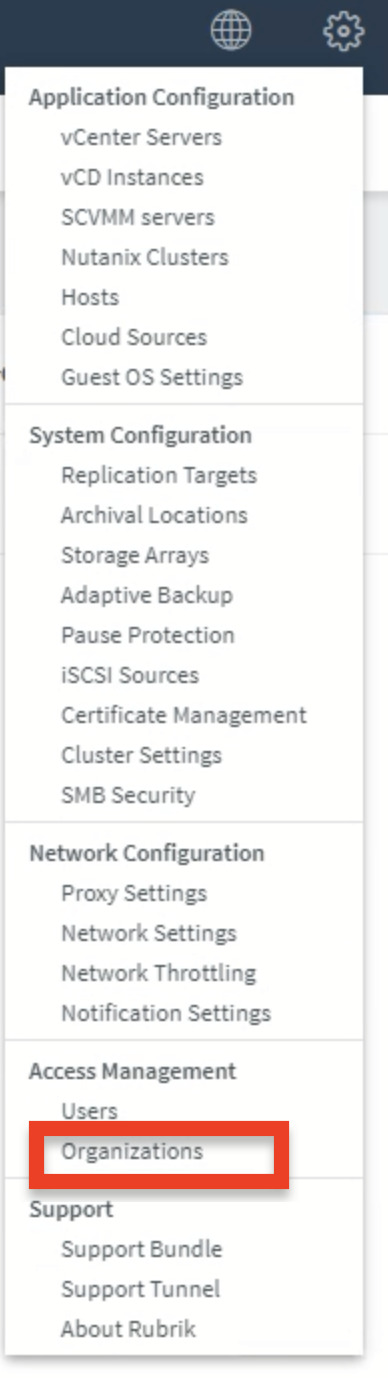
It starts, as these things often do, by clicking on the gear in the Rubrik CDM UI. Select Organizations (located under Access Management).

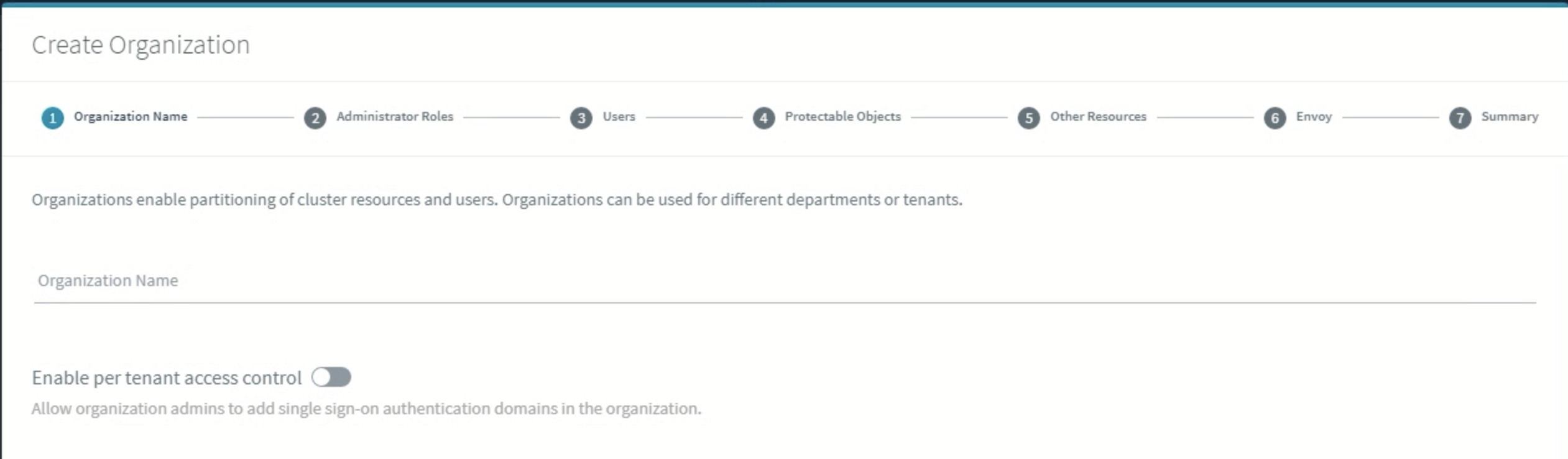
Click on Create Organization.

You’ll want to give it a name, and think about whether you want to give your tenant the ability to do per-tenant access control.

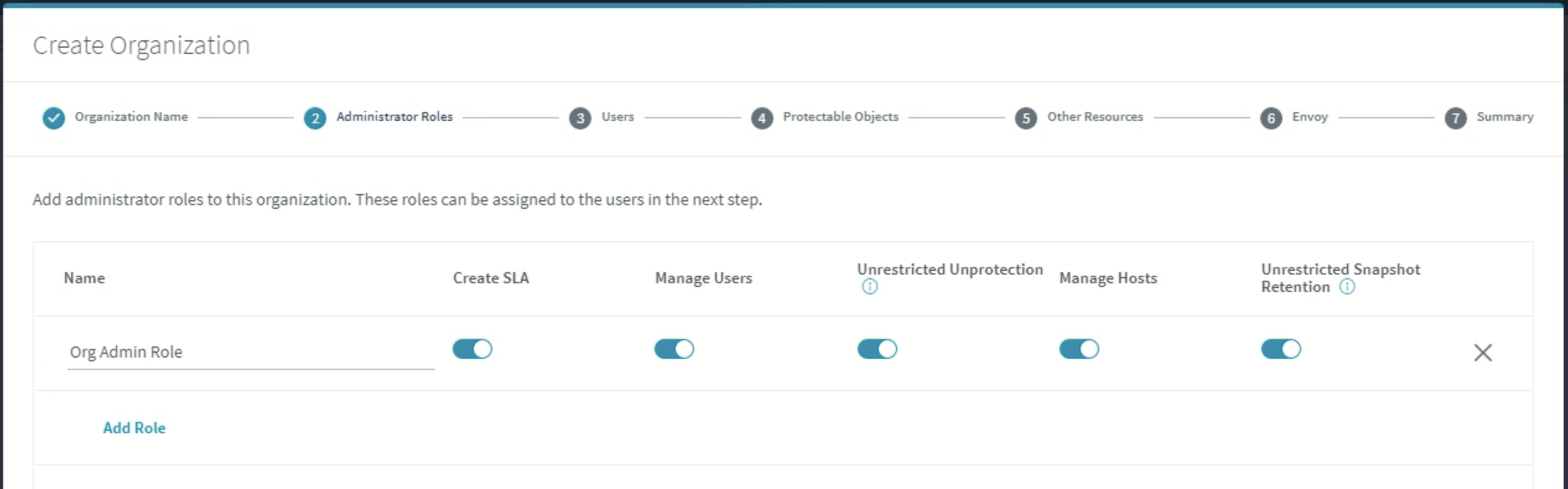
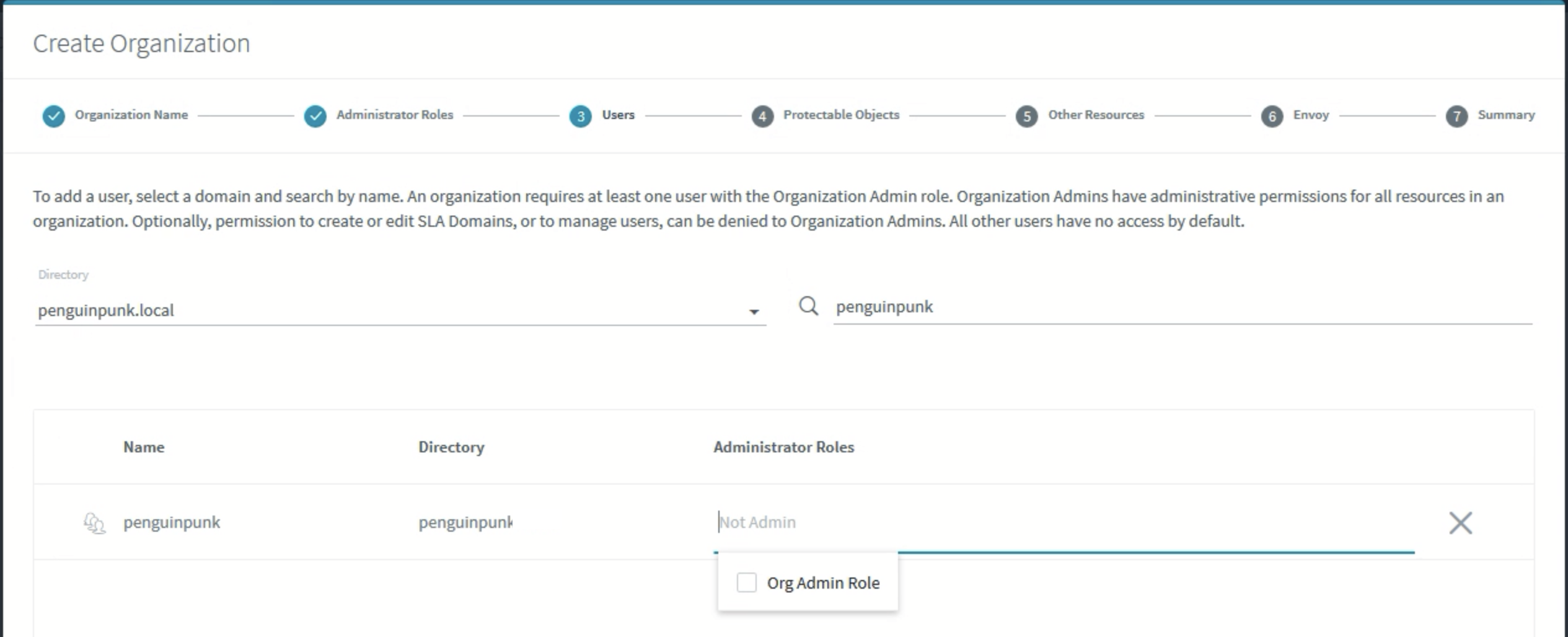
You’ll want an Org Admin Role to have particular abilities, and you might like to get fancy and add in some additional roles that will have some other capabilities.

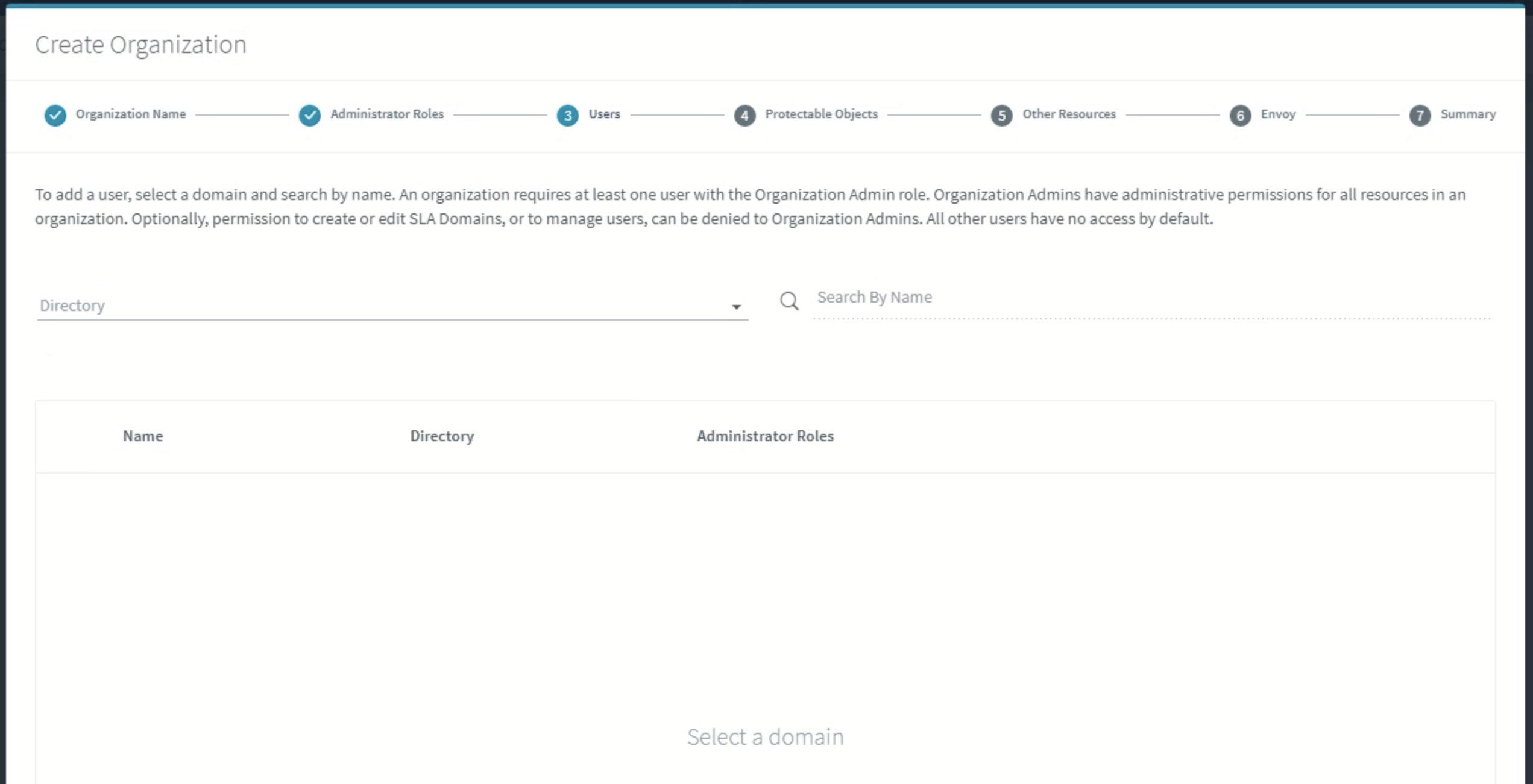
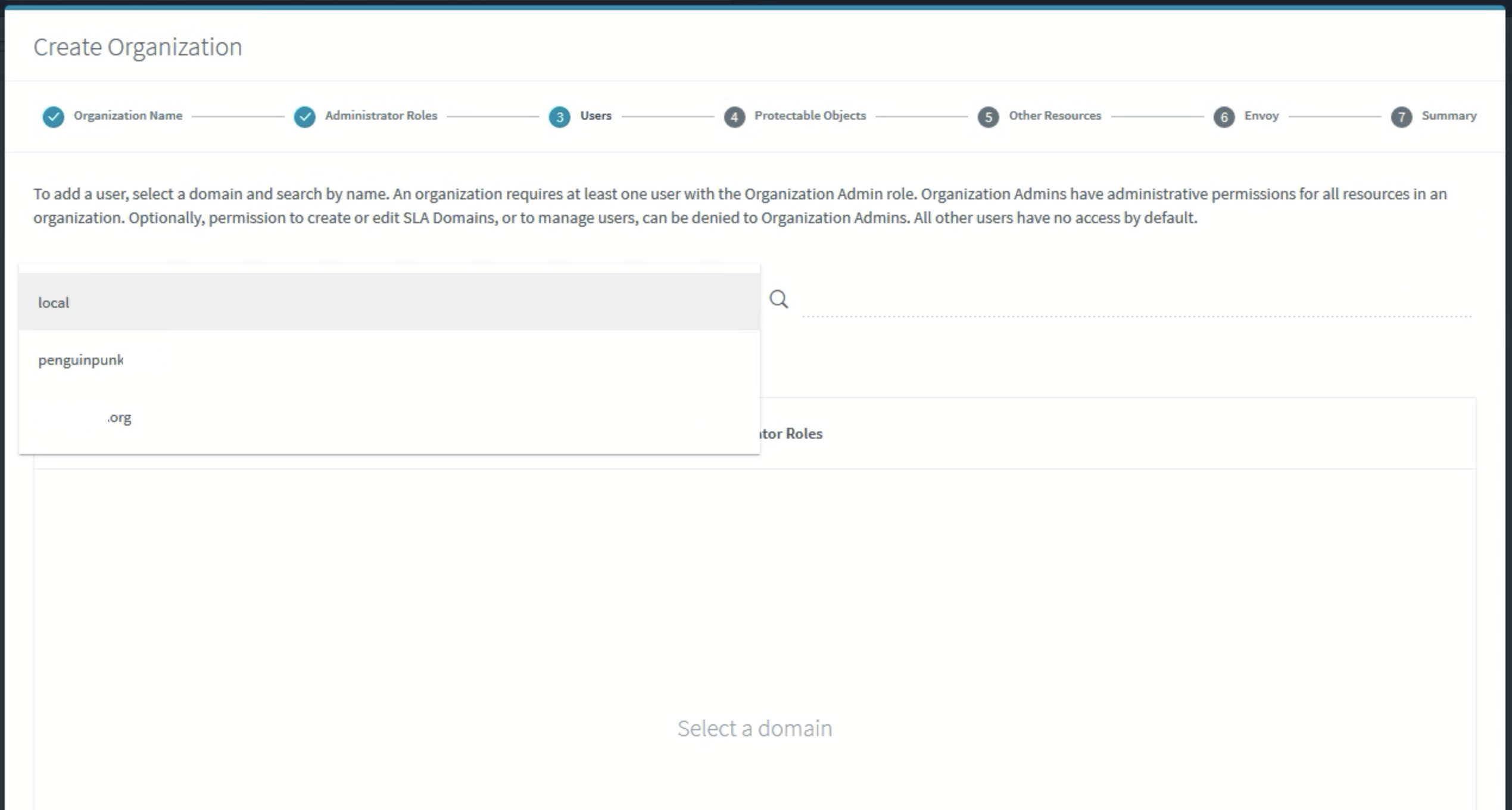
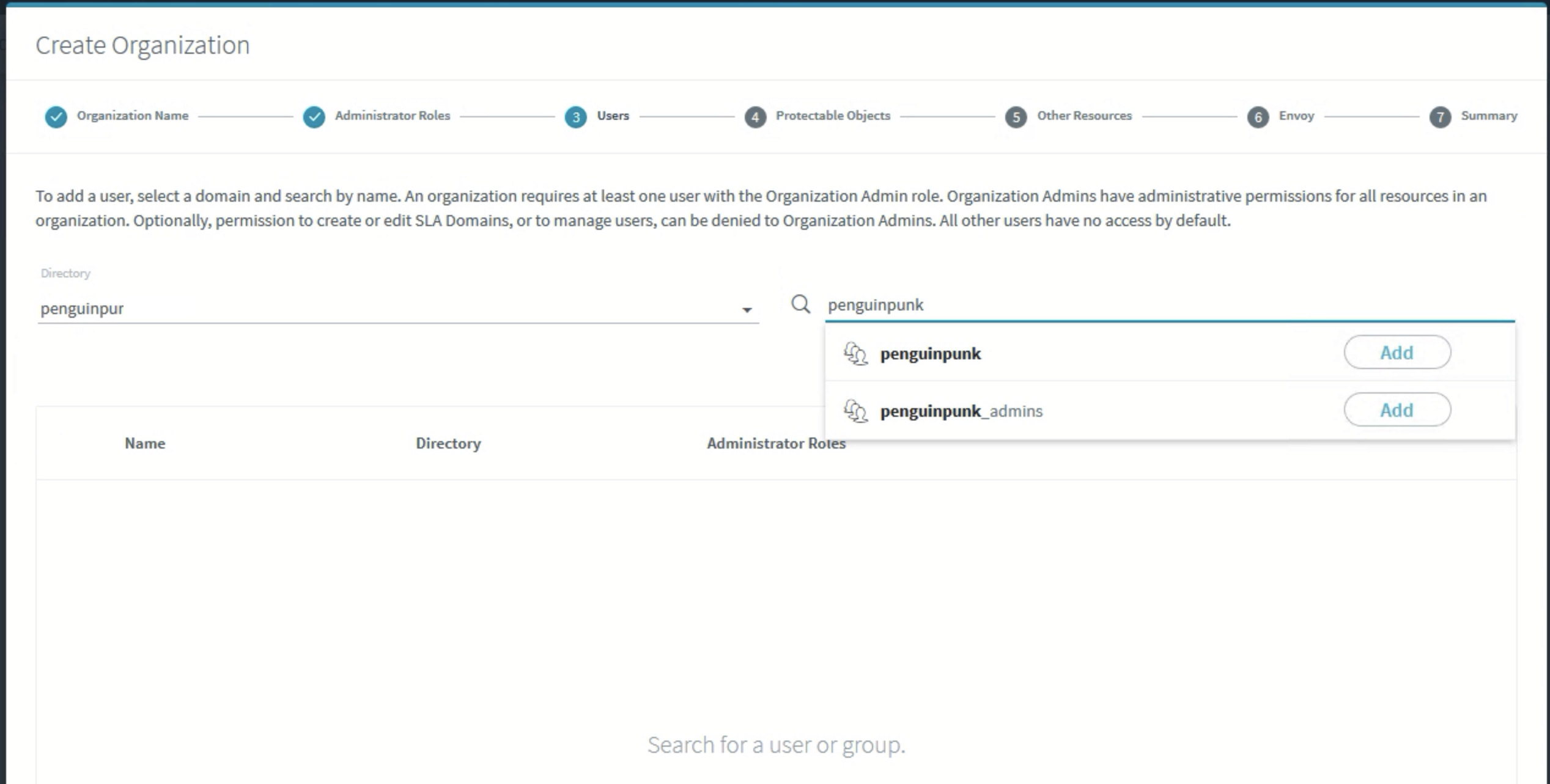
At this point you’ll get to select which users you want in your Organization.

Hopefully you’ve added the tenant’s LDAP source to your environment already.

And it’s worth thinking about what users and / or groups you’ll be using from that LDAP source to populate your Organization’s user list.

You’ll also need to consider which role will be assigned to these users (rather than relying on Global Admins to do things for tenants).

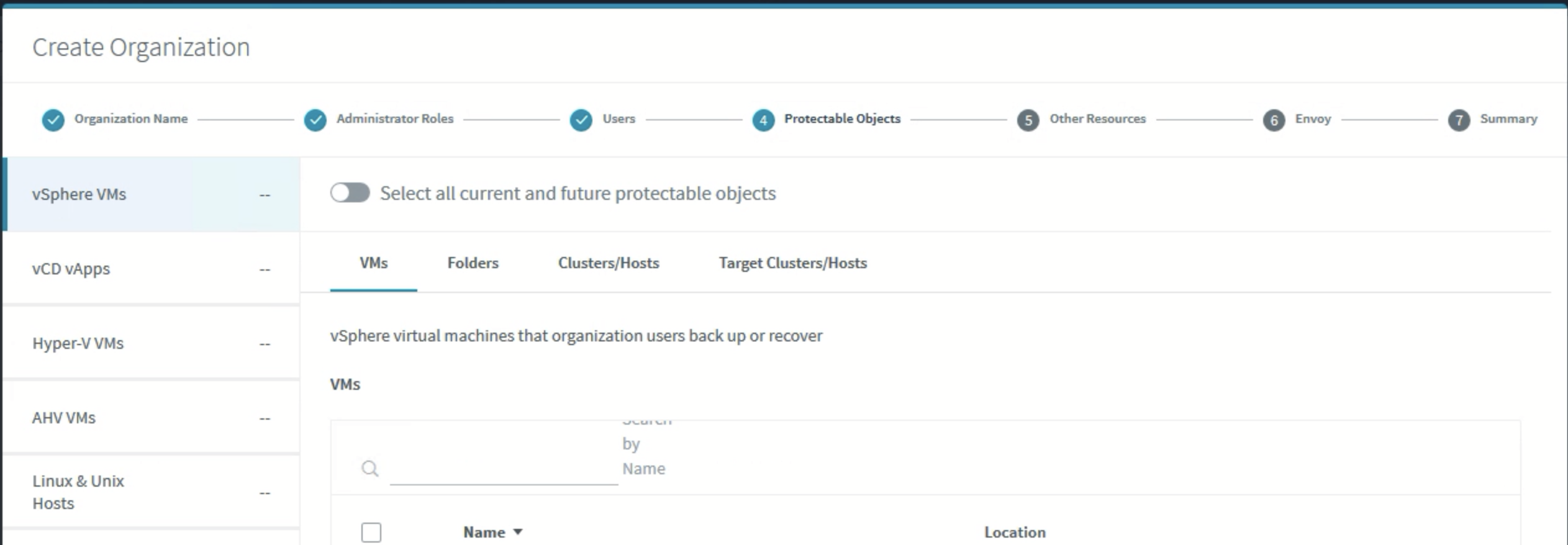
You can then assign particular resources, including VMs, vApps, and so forth.

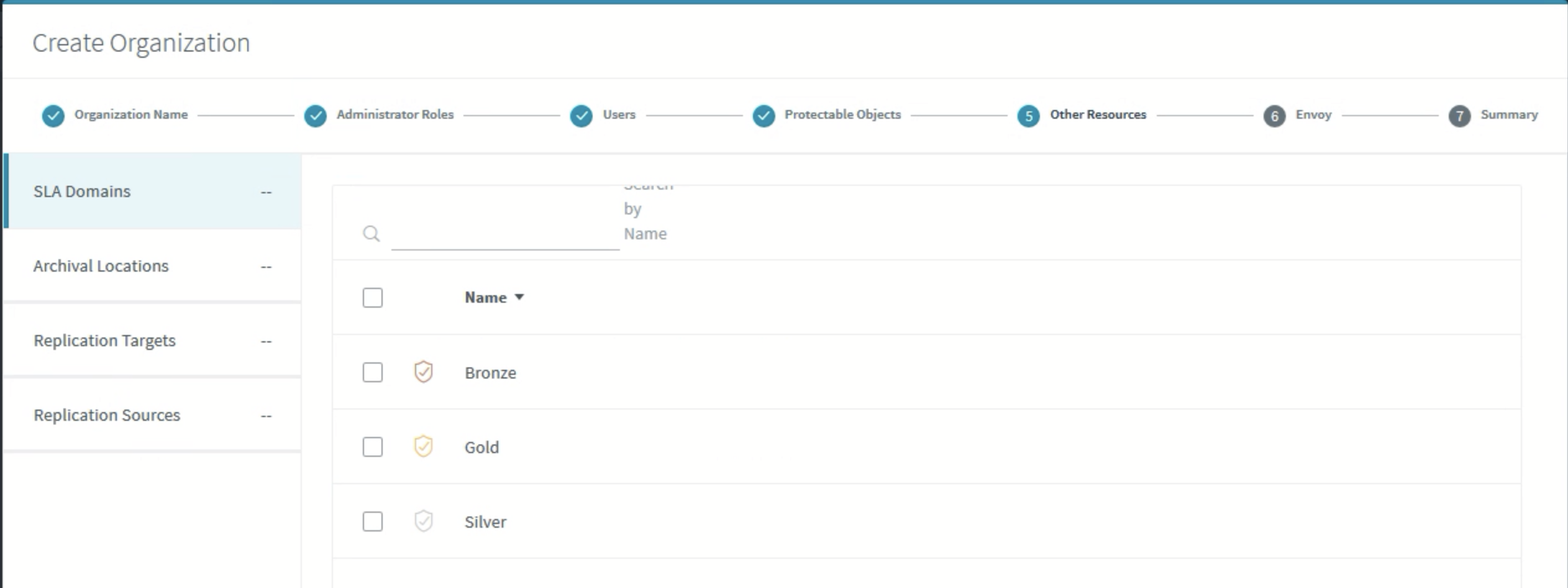
You can also select what SLA Domains the Organization has access to, as well as Archival locations, and replication targets and sources. This becomes important in a multi-tenanted environment as you don’t want folks putting data where they shouldn’t.

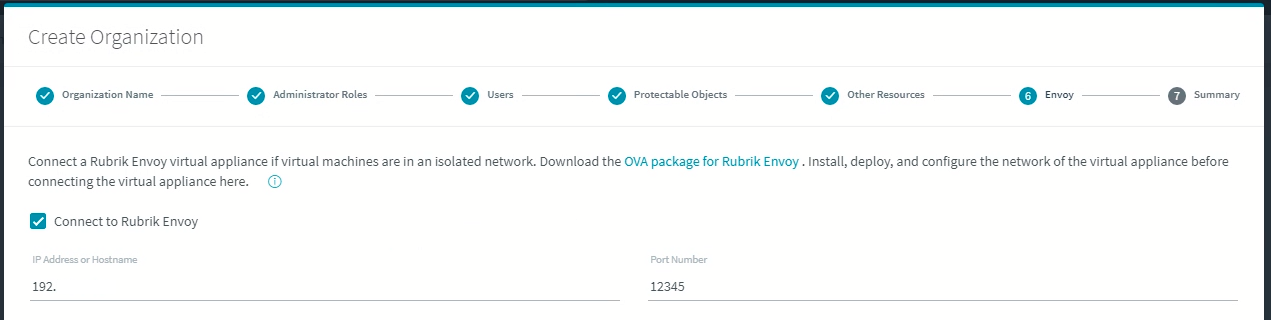
At this point you can download the Rubrik Envoy OVA, deploy it, and connect it to your Organization.

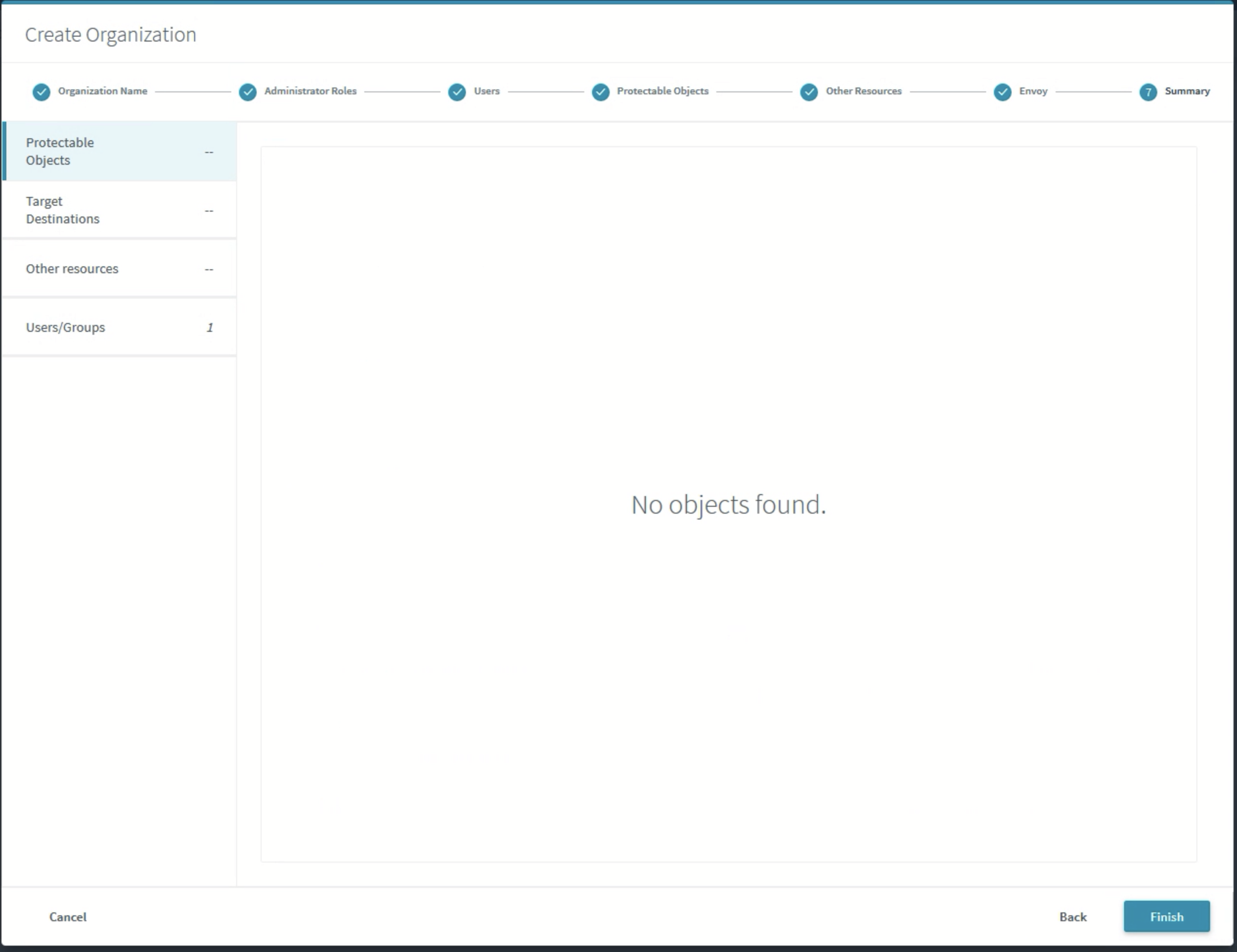
And then you’re done. Well, normally you would be, but I didn’t select a whole lot of objects in this example. Click Finish and you’re on your way.

Assuming you’ve assigned your roles correctly, when your tenant logs in, he or she will only be able to see and control resources that belong to that particular Organization.


Rubrik Basics – Envoy Deployment

I’ve recently been doing some work with Rubrik Envoy in the lab and thought I’d run through the basics. There’s a new document outlining the process on the articles page.


Why Envoy?

This page explains it better than I do, but Envoy is ostensibly a way for service providers to deliver Rubrik services to customers sitting on networks that are isolated from the Rubrik environment. Why would you need to do this? There are all kinds of reasons why you don’t want to give your tenants direct access to your data protection resources, and most of these revolve around security (even if your Rubrik environment is secured appropriately). As many SPs will also tell you, bringing private networks from a tenant / edge into your core is usually not a great experience either.

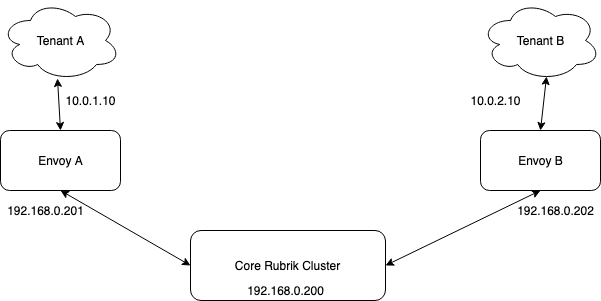
At a high level, it looks like this.

In this example, Tenant A sits on a private network, and the Envoy Tenant Network is 10.0.1.10. The Rubrik Routable Network on the Envoy appliance is 192.168.0.201, and the data management interface on the Rubrik cluster is 192.168.0.200. The Envoy appliance talks to tenant hosts over ports 12800 and 12801. The Rubrik cluster communicates with Envoy over ports 7500 and 7501. The only time the tenant network communicates with the Rubrik cluster is when the Envoy / Rubrik UI is used by the tenant. This is accessed over a port specified when the Organization is created (see below), and the Envoy to cluster communication is over port 443.

Other Notes

Envoy isn’t a data mover in its current iteration, but rather a way for SPs to present some self-service capabilities to tenants in a controlled fashion without relying on third-party portals or network translation tools. So if you had a bunch of workloads sitting in a tenant’s environment, you’d be better served deploying Rubrik Air / Edge appliances and then replicating that data into the core. If your tenant has a vCenter environment with a few VMs, you can use the Rubrik Backup Service to backup those VMs, but you couldn’t setup vCenter as a source for the tenant unless you opened up networks between your environments by some other means and added it to your Rubrik cluster. This would be ugly at best.

Note also that the deployment assumes you’re creating an Organization in the Rubrik appliance that will be used to isolate the tenant’s data and access from other tenants in the environment. To get hold of the Envoy OVA appliance and credentials, you need to run through the Organization creation process and connect the Envoy appliance when prompted. You’ll also need to ensure that you’ve configured Roles correctly for your tenant’s environment.

If, for some reason, you need to change or view the IP configuration of the Envoy appliance, it’s important to note that the articles on the Rubrik support site are a little out of step with CentOS 7 (i.e. written for Ubuntu). I don’t know whether this is because I’m using Rubrik Air appliances in the lab, but I think it’s maybe just a shift. In any case, to get IP information, you need to login to the console and go to /etc/sysconfig/network-scripts. You’ll find a couple of files (ifcfg-eth0 and ifcfg-eth1) that will tell you whether you’ve made a boo boo with your configuration or not.


Conclusion

I’m the first to admit it took a little while to understand the utility of something like Envoy. Most SPs struggle to deliver self-service capabilities for services that don’t always do network multi-tenancy very well. This is a good step in the direction of solving some of the problems associated with that. It’s also important to understand that, if your tenant has workloads sitting in VMware Cloud Director, for example, they’ll be accessing Rubrik resources in a different fashion. As I mentioned before, if there is a bit to protect on the edge site, it’s likely a better option to deploy a virtualised Rubrik appliance or a smaller cluster and replicate that data. In any case, I’ll update this post if I come across anything else useful.

Druva Update – Q3 2020

I caught up with my friend W. Curtis Preston from Druva a little while ago to talk about what the company has been up to. It seems like quite a bit, so I thought I’d share some notes here.


DXP and Company Update

Firstly, Druva’s first conference, DXP, is coming up shortly. There’s an interesting range of topics and speakers, and it looks to be jam packed with useful info. You can find out more and register for that here. The company seems to be going from strength to strength, enjoying 50% year-on-year growth, and 70% for Phoenix in particular (its DC product).

If you’re into Gartner Peer Insights – Druva has taken out the top award in 3 categories – file analysis, DRaaS, and data centre backup. Preston also tells me Druva is handling around 5 million backups a day, for what it’s worth. Finally, if you’re into super fluffy customer satisfaction metrics, Druva is reporting an “industry-leading NPS score of 88” that has been third-party verified.


Product News

It’s Fun To Read The CCPA

If you’re unfamiliar, California has released its version of the GDPR, know as the California Consumer Privacy Act. Druva has created a template for data types that shouldn’t be stored in plain text and can flag them as they’re backed up. It can also do the same thing in email, and you can now do a federated search against both of these things. If anything turns up that shouldn’t be there, you can go and remove problematic files.

ServiceNow Automation

Druva now has support for automated SNOW ticket creation. It’s based on some advanced logic, too. For example, if a backup fails 3 times, a ticket will be created and can be routed to the people who should be caring about such things.

More APIs

There’s been a lot of done work to deliver more APIs, and a more robust RBAC implementation.

DRaaS

DRaaS is currently only for VMware, VMC, and AWS-based workloads. Preston tells me that users are getting an RTO of 15-20 minutes, and an RPO of 1 hour. Druva added failback support a little while ago (one VM at a time). That feature has now been enhanced, and you can failback as many workloads as you want. You can also add a prefix or suffix to a VM name, and Druva has added a failover prerequisite check as well.


Other Notes

In other news, Druva is now certified on VMC on Dell. It’s added support for Microsoft Teams and support for Slack. Both useful if you’ve stopped storing your critical data in email and started storing it in collaboration apps instead.

Storage Insights and Recommendations

There’s also a storage insights feature that is particularly good for unstructured data. Say, for example, that 30% of your backups are media files, you might not want to back them up (unless you’re in the media streaming business, I guess). You can delete bad files from backups, and automatically create an exclusion for those file types.

Support for K8s

Support for everyone’s favourite container orchestration system has been announced, not yet released. Read about that here. You can now do a full backup of an entire K8s environment (AWS only in v1). This includes Docker containers, mounted volumes, and DBs referenced in those containers.

NAS Backup

Druva has enhanced its NAS backup in two ways, the first of which is performance. Preston tells me the current product is at least 10X faster than one year ago. Also, for customers already using a native recovery mechanism like snapshots, Druva has also added the option to backup directly to Glacier, which cuts your cost in half.

Oracle Support

For Oracle, Druva has what Preston describes as “two solid options”. Right now there’s an OVA that provides a ready to go, appliance-like experience, uses the image copy format (supporting block-level incremental, and incremental merge). The other option will be announced next week at DxP.


Thoughts and Further Reading

Some of these features seem like incremental improvements, but when you put it all together, it makes for some impressive reading. Druva has done a really impressive job, in my opinion, of sticking with the built in the cloud, for the cloud mantra that dominates much of its product design. The big news is the support for K8s, but things like multi-VM failback with the DRaaS solution is nothing to sneeze at. There’s more news coming shortly, and I look forward to covering that. In the meantime, if you have the time, be sure to check out DXP – I think it will be quite an informative event.


Datadobi Announces DobiProtect

Datadobi recently announced DobiProtect. I had the opportunity to speak with Michael Jack and Carl D’Halluin about the announcement, and thought I’d share some thoughts here.


The Problem

Disaster Recovery

Modern disaster recovery solutions tend more towards business continuity than DR. The challenge with data replication solutions is that it’s a trivial thing to replicate corruption from your primary storage to your DR storage. Backup systems are vulnerable too, and most instances you need to make some extra effort to ensure you’ve got a replicated catalogue, and that your backup data is not isolated. Invariably, you’ll be looking to restore to like hardware in order to reduce the recovery time. Tape is still a pain to deal with, and invariably you’re also at the mercy of people and processes going wrong.

What Do Customers Need?

To get what you need out of a robust DR system, there are a few criteria that need to be met, including:

  • An easy way to select business-critical data;
  • A simple way to make a golden copy in native format;
  • A bunker site in a DC or cloud;
  • A manual air-gap procedure;
  • A way to restore to anything; and
  • A way to failover if required.


Enter DobiProtect

What Does It Do?

The idea is that you have two sites with a manual air-gap between them, usually controlled by a firewall of some type. The first site is where you run your production workload, and there’ll likely be a subset of data that is really quirte important to your business. You can use DobiProtect to get that data from your production site to DR (it might even be in a bunker!). In order to get the data from Production to DR, DobiProtect scans the data before it’s pulled across to DR. Note that the data is pulled, not pushed. This is important as it means that there’s no obvious trace of the bunker’s existence in production.

[image courtesy of Datadobi]

If things go bang, you can recover to any NAS or Object.

  • Browse golden copy
  • Select by directory structure, folder, or object patterns
  • Mounts and shares
  • Specific versions

Bonus Use Case

One of the more popular use cases that Datadobi spoke to me about was heterogeneous edge-to-core protection. Data on the edge is usually more vulnerable, and not every organisation has the funding to put robust protection mechanisms in place at every edge site to protect critical data. With the advent of COVID-19, many organisations have been pushing more data to the edge in order for remote workers to have better access to data. The challenge then becomes keeping that data protected in a reliable fashion. DobiProtect can be used to pull data from the core once data has been pulled back from the edge. Because it’s a software only product, your edge storage can be anything that supports object, SMB, or NFS, and the core could be anything else. This provides a lot of flexibility in terms of the expense traditionally associated with DR at edge sites.

[image courtesy of Datadobi]


Thoughts and Further Reading

The idea of an air-gapped site in a bunker somewhere is the sort of thing you might associate with a James Bond story. In Australia these aren’t exactly a common thing (bunkers, not James Bond stories), but Europe and the US is riddled with them. As Jack pointed out in our call, “[t]he first rule of bunker club – you don’t talk about the bunker”. Datadobi couldn’t give me a list of customers using this type of solution because all of the customers didn’t want people to know that they were doing things this way. It seems a bit like security via obscurity, but there’s no point painting a big target on your back or giving clues out for would-be crackers to get into your environment and wreak havoc.

The idea that your RPO is a day, rather than minutes, is also confronting for some folks. But the idea of this solution is that you’ll use it for your absolutely mission critical can’t live without it data, not necessarily your virtual machines that you may be able to recover normally if you’re attacked or the magic black smoke escapes from one of your hosts. If you’ve gone to the trouble of looking into acquiring some rack space in a bunker, limited the people in the know to a handful, and can be bothered messing about with a manual air-gap process, the data you’re looking to protect is clearly pretty important.

Datadobi has a rich heritage in data migration for both file and object storage systems. It makes sense that eventually customer demand would drive them down this route to deliver a migration tool that ostensibly runs all the time as sort of data protection tool. This isn’t designed to protect everything in your environment, but for the stuff that will ruin your business if it goes away, it’s very likely worth the effort and expense. There are some folks out there actively looking for ways to put you over a barrel, so it’s important to think about what it’s worth to your organisation to avoid that if possible.

BackupAssist Announces BackupAssist ER

BackupAssist recently announced BackupAssist ER. I recently had the opportunity to speak with Linus Chang (CEO), Craig Ryan, and Madeleine Tan about the announcement.


BackupAssist

Founded in 2001, BackupAssist is focussed primarily on the small to medium enterprise (under 500 seats). They sell the product via a variety of mechanisms, including:

  • Direct
  • Partners
  • Distribution channels


Challenges Are Everywhere

Some of the challenges faced by the average SME when it comes to data protection include the following:

  • Malware
  • COVID-19
  • Compliance

So what does the average SME need when it comes to selecting a data protection solution?

  • Make it affordable
  • Automatic offsite backups with history and retention
  • Most recoveries are local – make them fast!
  • The option to recover in the cloud if needed (the fallback to the fallback)


What Is It?

So what exactly is BackupAssist ER? It’s backup and recovery software.

[image courtesy of BackupAssist]

It’s deployed on Windows servers, and has support for disk to disk to cloud as a protection topology.

CryptoSafeGuard

Another cool feature is CryptoSafeGuard, providing the following features:

  • Shield from unauthorised access
  • Detect – Alert – Preserve

Disaster Recovery

  • VM Instant boot (converting into a Hyper-V guest)
  • BMR (catering for dissimilar hardware)
  • Download cloud backup anywhere

Data Recovery

The product supports the granular recovery of files, Exchange, and applications.

Data Handling and Control

A key feature of the solution is the approach to data handling, offering:

  • Accessibility
  • Portability
  • Retention

It uses the VHDX file format to store protection data. It can also backup to Blob storage. Chang also advised that they’re working on introducing S3 compatibility at some stage.

Retention

The product supports a couple of different retention schemes, including:

  • Local – Keep N copies (GFS is coming)
  • Cloud – Keep X copies
  • Archival – Keep a backup on a HDD, and retain for years

Pricing

BackupAssist ER is licensed in a variety of ways. Costs are as follows:

  • Per physical machine – $399 US annually;
  • Per virtual guest machine – $199 US annually; and
  • Per virtual host machine – $699 US annually.

There are discounts available for multi-year subscriptions, as well as discounts to be had if you’re looking to purchase licensing for more than 5 machines.


Thoughts and Further Reading

Chang noted that BackupAssist is “[n]ot trying to be the best, but the best fit”. You’ll see that a lot of the capability is Microsoft-centric, with support for Windows and Hyper-V. This makes sense when you look at what the SME market is doing in terms of leveraging Microsoft platforms to deliver their IT requirements. Building a protection product that covers every platform is time-consuming and expensive in terms of engineering effort. What Chang and the team have been focussed on is delivering data protection products to customers at a particular price point while delivering the right amount of technology.

The SME market is notorious for wanting to consume quality product at a particular price point. Every interaction I’ve had with customers in the SME segment has given me a crystal clear understanding of “Champagne tastes on a beer budget”. But in much the same way that some big enterprise shops will never stop doing things at a glacial pace, so too will many SME shops continue to look for high value at a low cost. Ultimately, compromises need to be made to meet that price point, hence the lack of support for features such as VMware. That doesn’t mean that BackupAssist can’t meet your requirements, particularly if you’re running your business’s IT on a couple of Windows machines. For this it’s well suited, and the flexibility on offer in terms of disk targets, retention, and recovery should be motivation to investigate further. It’s a bit of a nasty world out there, so anything you can do to ensure your business data is a little safer should be worthy of further consideration. You can read the press release here.

Backup Awareness Month, Backblaze, And A Simple Question

Last month was Backup Awareness Month (at least according to Backblaze). It’s not formally recognised by any government entities, and it’s more something that was made up by Backblaze. But I’m a big fan of backup awareness, so I endorse making up stuff like this. I had a chance to chat to Yev over at Backblaze about the results of a survey Backblaze runs annually and thought I’d share my thoughts here. Yes, I know I’m a bit behind, but I’ve been busy.

As I mentioned previously, as part of the backup awareness month celebrations, Backblaze reaches out to folks in the US and asks a basic question: “How often do you backup all the data on your computer?”. This has shown some interesting facts about consumer backup habits. There has been a positive decrease in the amount of people stating that they have never backed up their data (down to around one fifth of the respondents), and the frequency of which backup has increased.

Other takeaways from the results include:

  • Almost 50% of people lose their data each year;
  • 41% of people do not completely understand the difference between cloud backup and cloud storage;
  • Millennials are the generation most likely to backup their data daily; and
  • Seniors (65+) have gone from being the best age group at backing up data to the worst.


Thoughts

I bang on a lot about how important backup (and recovery) is across both the consumer and enterprise space. Surveys like this are interesting because they highlight, I think, the importance of regularly backing up our data. We’re making more and more of it, and it’s not magically protected by the benevolent cloud fairies, so it’s up to us to protect it. Particularly if it’s important to us. It’s scary to think that one in two people are losing data on a regular basis, and scarier still that most folks don’t understand the distinction between cloud storage and cloud backup. I was surprised that Millennials are most likely to backup their data, but my experience with younger generations really only extends to my children, so they’re maybe not the best indicator of what the average consumer is doing. It’s also troubling that older folk are struggling to keep on top of backups. Anecdotally that lines up with my experience as well. So I think it’s great that Yev and the team at Backblaze have been on something of a crusade to educate people about cloud backup and how it can help them. I love that the company is all about making it easier for consumers, not harder.

As an industry we need to be better at making things simple for people to consume, and more transparent in terms of what can be achieved with technology. I know this blog isn’t really focused on consumer technology, and it might seem a bit silly that I carry on a bit about consumer backup. But you all have data stored some place or another that means something to you. And I know not all of you are protecting it appropriately. Backup is like insurance. It’s boring. People don’t like paying for it. But when something goes bang, you’ll be glad you have it. If these kind of posts can raise some awareness, and get one more person to protect the data that means something to them in an effective fashion, then I’ll be happy with that.

World Backup Day 2020

World Backup Day has been and gone already (it’s 31st March each year). I don’t normally write much about it, as I’d like to think that every day is World Backup Day. But not everyone is into data protection in the same way I am though. Every year, some very nice people at a PR firm I work with send me a series of quotes about World Backup Day, and I invariably file them away, and don’t write anything on the topic. But I thought this year, “in these uncertain times”, that it might be an idea to put together a short article that included some of those quotes and some of my own thoughts on the topic.


The Vendor’s View

Steve Cochran (Chief Technology Officer, ConnectWise), had this to say on the topic:

“There are two major reasons why we should take backups seriously: Hardware failure and human error. Systems are not foolproof and every piece of hardware will fail eventually, so it’s not a question of if, but rather when, these failures will happen. If you haven’t kept up with your backups, you’ll get caught unprepared. There’s also a factor of human error where you might accidentally delete a file or photo. We put our entire lives on our computers and mobile devices, but we also make mistakes, and not having a backup system in place is almost silly at this point. While you need to dedicate some time to set up automatic backups, you don’t have to keep up with them — they simply run in the background.”


Yev Pusin (Director of Strategy, Backblaze), chipped in with this:

“World Backup Day is coming up, and while many will folks will go with phrases like ‘Don’t be an April Fool, Backup Today,’ it is not the route I’ll go down this year. Backing up your data is something that should be taken seriously, especially with the recent increase in major ransomware attacks and the sudden increase in the amount of remote workers we are seeing in 2020 as a result of COVID-19.

While World Backup Day serves as a great reminder of the importance of backing up your data, data backup is something that should be an everyday activity. That used to be a daunting task, but it no longer has to be one!”


Carl D’Halluin (CTO, Datadobi), had this to say on the topic:

“Ultimately, in a world of rising threats, organizations must develop the ability to protect and back up their data quickly, flexibly, securely, and cost-effectively, so data can be backed up down to the individual file level.”


Data Protection is Everyone’s Problem

Data protection is everyone’s problem. But I don’t want that to sound like I’m trying to scare you. It’s one of those things that’s important though. More and more of our everyday activities revolve around technology and data. In the much the same way as most of us now have home insurance, and car insurance, and health insurance, we also need to consider the need for data insurance. This isn’t just a problem for companies, and it’s not just a problem for the end user, it’s a problem for everyone.

So what can you do? There’s all manner of things you can do to improve your personal and business data protection situation. From a personal perspective, I recommend you do the equivalent of going to your doctor for a health check, and do a health check on your data. Spend a day taking note of everything that you interact with, and question the data that’s generated during those interactions. Is it important to you? What would you do if you couldn’t access it? Then go and find a way to protect it if possible. That might be something as mundane as taking screenshots of messages (and baking up the resultant screenshots). It might be more complicated, and involve installing some software on your computer. Whatever it is, if you’re not doing it, and you think you should be, try and make it a priority. If it all seems too complicated, or something you don’t feel capable of doing yourself, don’t be afraid to ask people on the Internet for help.

The same goes for business. You might work for a company where the responsibility for data protection in a corporate sense lies with someone else, but I would suggest that, just like workplace health and safety, data protection (availability, integrity, and security) is everyone’s responsibility. If you’re generating data and keeping it on your laptop, how is your company going to protect that data? Is there a place you should be storing it? Why aren’t you doing that? Is your company relying on SaaS applications but not protecting those apps? Talk to the people responsible. Things go wrong all the time. You don’t want to be on the wrong end of it. Indeed, in celebration of World Backup Day, I recently jumped on a Druva podcast with W. Curtis Preston and Stephen Manley to talk about when things do go wrong. You can listen to it here.

Data protection can be difficult, but it’s not impossible. Particularly when you start to understand the value of your data. So let’s all try to make every day “World Backup Day”. Okay, I know that’s a terrible line, but you know what I mean.

Infrascale Protects Your Infrastructure At Scale

Disclaimer: I recently attended Storage Field Day 19.  My flights, accommodation and other expenses were paid for by Tech Field Day. There is no requirement for me to blog about any of the content presented and I am not compensated in any way for my time at the event.  Some materials presented were discussed under NDA and don’t form part of my blog posts, but could influence future discussions.

Infrascale recently presented at Storage Field Day 19. You can see videos of the presentation here, and download my rough notes from here.


Infrascale?

Russ Reeder (CEO) introduced the delegates to Infrascale. If you’ve not heard of Infrascale before, it’s a service provider and vendor focused primarily on backup and disaster recovery services. It has around 150 employees and operates in 10 cities in 5 countries. Infrascale currently services around 60000 customers / 250000 VMs and endpoints. Reeder said Infrascale as a company is “[p]assionate about its customers’ happiness and success”.


Product Portfolio

There are four different products in the Infrascale portfolio.

Infrascale Cloud Backup (ICB)

  • Backup directly to the cloud
  • Recover data in seconds
  • Optimised for endpoints and branch office servers
  • Ransomware detection & remediation

Infrascale Cloud Application Backup (ICAB)

  • Defy cloud applications limited retention policies
  • Backup O365, SharePoint and OneDrive, G-Suite, Salesforce.com, box.com, and more
  • Recover individual mail items or mailboxes

Infrascale Disaster Recovery – Local (IDR-LOCAL)

  • Backup systems to an on-premises appliance
  • Run system replicas (locally) in minutes
  • Restore from on-premises appliance or the cloud
  • Archive / DR data to disk

Infrascale Disaster Recovery – Cloud (IDR-CLOUD)

  • Backup systems to an on-premises appliance and to a bootable cloud appliance
  • Run system replicas in minutes (locally or boot in the cloud)
  • Optimised for mission-critical physical and virtual servers

Support for Almost Everything

Infrascale offers support for almost everything, including VMware, Hyper-V, Bare Metal, End Points, public cloud workloads.

Other Features

Speedy DR locally or to the Cloud

  • IDR is very fast – boot ready in minutes
  • IDR enables recovery locally or in the cloud

Backup Target Optionality; Vigilant Data Security

  • ICB allows for backup targets “anywhere”
  • ICB detects ransomware and mitigates impact

Single View

The Infrascale dashboard does a pretty decent job of providing all of the information you might need about the service in a single view.

[image courtesy of Infrascale]

Appliances

There are a variety of appliance options available, as well as virtual editions of the appliance that you can use.

[image courtesy of Infrascale]


Thoughts and Further Reading

Regular readers of this blog would know that I’m pretty interested in data protection as a topic. I’m sad to say that I hadn’t heard of Infrascale prior to this presentation, but I’m glad I have now. There are a lot of service providers out there offering some level of data protection and disaster recovery as a service. These services offer varying levels of protection, features, and commercial benefits. Infrascale distinguish themselves by offering its own hardware platform as a core part of the offering, rather than building a solution based on one of the major data protection vendors.

In my day job I work a lot with product development for these types of solutions and, to be honest, the idea of developing a hardware data protection appliance is not something that appeals. As a lot of failed hardware vendors will tell you, it’s one thing to have a great idea, and quite another to execute successfully on that idea. But Infrascale has done the hard work on engineering the solution, and it seems to offer all of the features the average punter looks for in a DPaaS and DRaaS offering. I’m also a big fan of the fact that it offers support for endpoint protection, as I think this is a segment that is historically under-represented in the data protection space. It has a good number of customers, primarily in the SME range, and is continuing to add services to its product portfolio.

Disaster recovery and data protection are things at that aren’t always done very well by small to medium enterprises. Unfortunately, these types of businesses tend to have the most to lose when something goes wrong with their critical business data (either via operator error, ransomware, or actual disaster). Something like Infrascale’s offering is a great way to take away a lot of the complexity traditionally associated with protecting that important data. I’m looking forward to hearing more about Infrascale in the future.