Rubrik Basics – Add Cluster To Polaris

I wrote about Rubrik’s Polaris platform when it was first announced around 3 years ago. When you buy in to the Rubrik solution, you get access to Polaris GPS by default (I think). Other modules, such as Sonar or Radar, are licensed separately. In any case, GPS is a handy tool if you have more than one Rubrik cluster under your purview. I thought it would be useful for folks out there to see how simple it is to add your Rubrik cluster to Polaris. I know that most of these basics articles seem like fairly rudimentary fare, but I find it helpful when evaluating new tech to understand how the pieces fit together in terms of an actual implementation. I’m hopeful that someone else will find this of use as well. Note that you’ll need Internet connectivity of some sort between your environment and the Polaris SaaS environment. You also need to consider the security of your environment in terms of firewalling, multi-factor authentication, RBAC, and so on. It’s also important to note that removing a cluster from Polaris currently involves engaging Rubrik Support. I can only imagine this will change in the future.

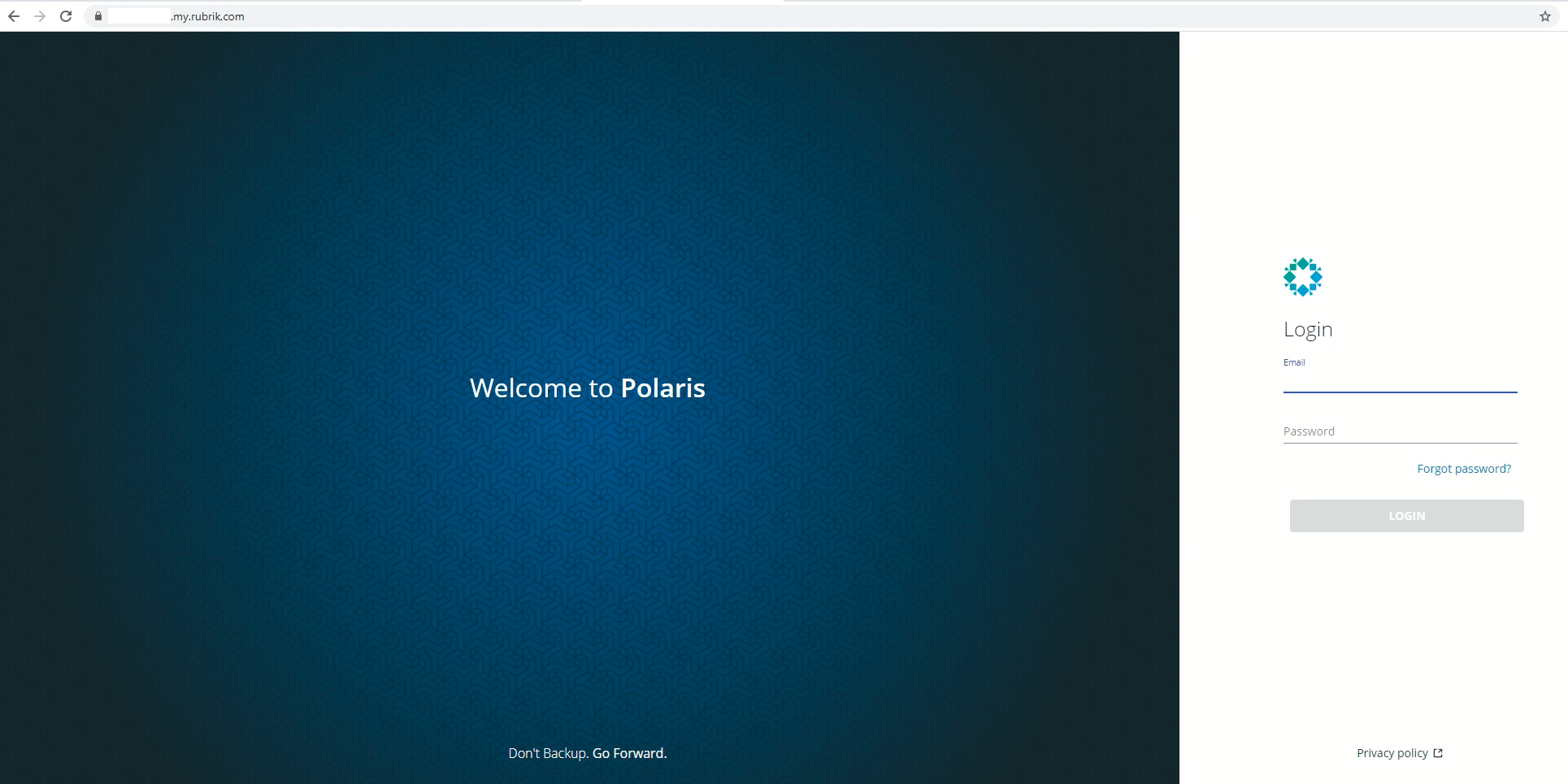
When you get onboard with Rubrik, you’ll get setup with the Polaris portal. Access to this is usually via customer.my.rubrik.com. Login with your credentials.

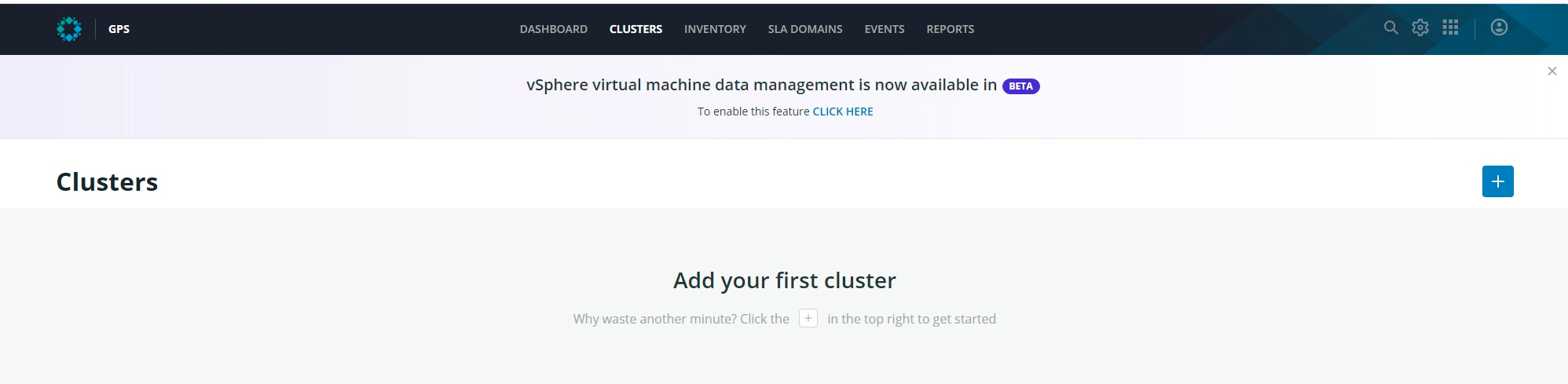
If you haven’t done anything in the environment previously, you’ll be prompted add your first cluster every time you login. Eventually it’ll wear you down and you’ll find yourself clicking on the + sign.

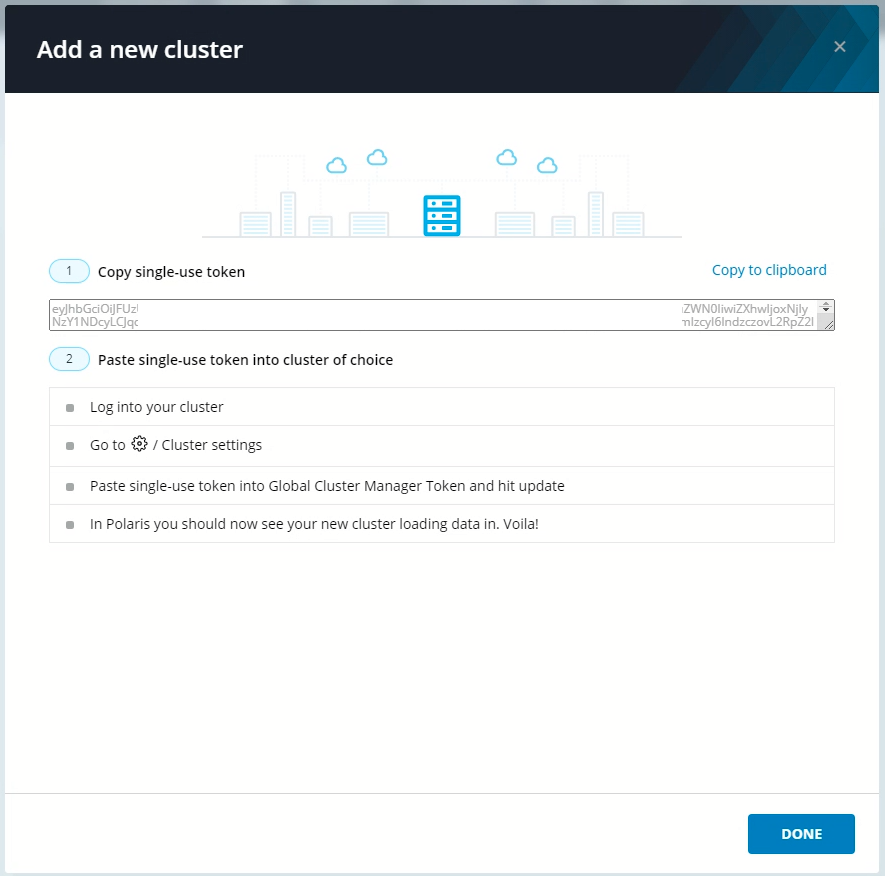
This will give you a single-use token to add to your cluster. Click on Copy to clipboard.

Now login to the Rubrik web UI of the cluster you want to add to Polaris. Click on the Gear icon, and then Cluster Settings (under System Configuration).

Past the token in and click Save.

It might take a minute, but you should be able to see your cluster in the Polaris dashboard.

Rubrik Basics – Add LDAP

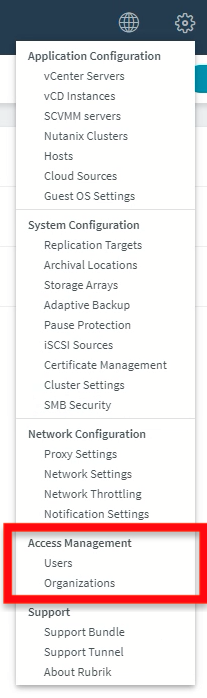
I thought I’d run through the basics of adding LDAP support to a Rubrik Edge cluster. I’ve written previously about multi-tenancy considerations with Rubrik, and thought it might be useful to start down that path in the lab to demonstrate some of the process. It’s not a terribly difficult task, but I did find a little trial and error was required. I suspect that’s because of some environmental issues on my side, rather than the Rubrik side of things. Anyway, let’s get started. Click on the Gear / Settings icon in the Web UI. Then select Users under Access Management.

Click on the LDAP Servers tab and click on “Add LDAP Server”.

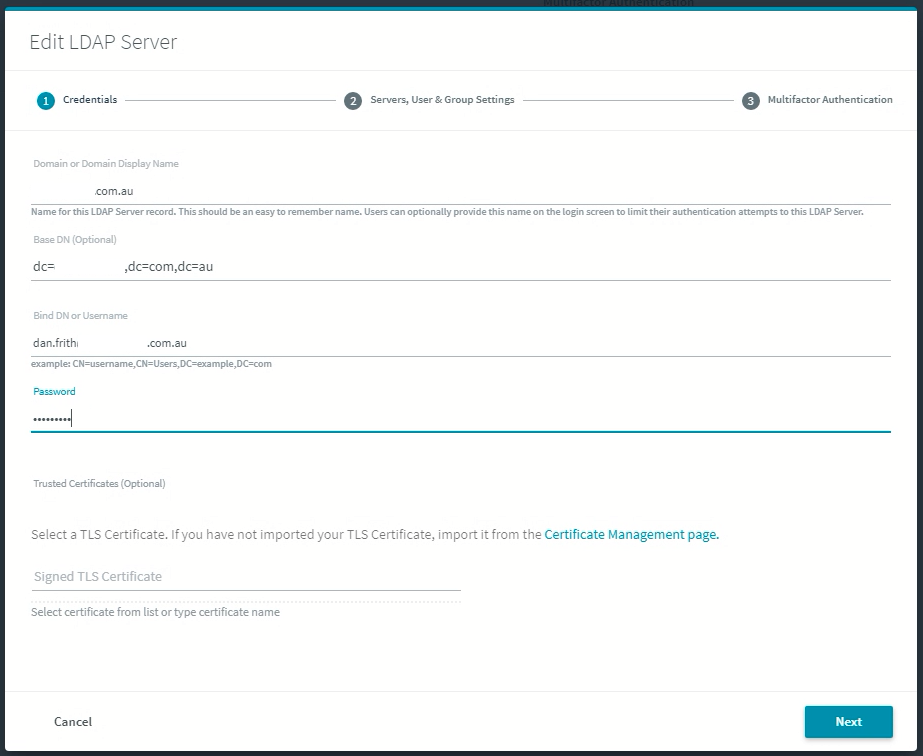
You’ll be presented with the Add LDAP Server workflow window.

I messed this up a few times in my environment, but this is what worked for me.

Domain name: domainname.com.au

Base DN: dc=domainname,dc=com,dc=au

Bind DN or Username: dan.frith@domainname.com.au

Password: *******

Click Next to continue.

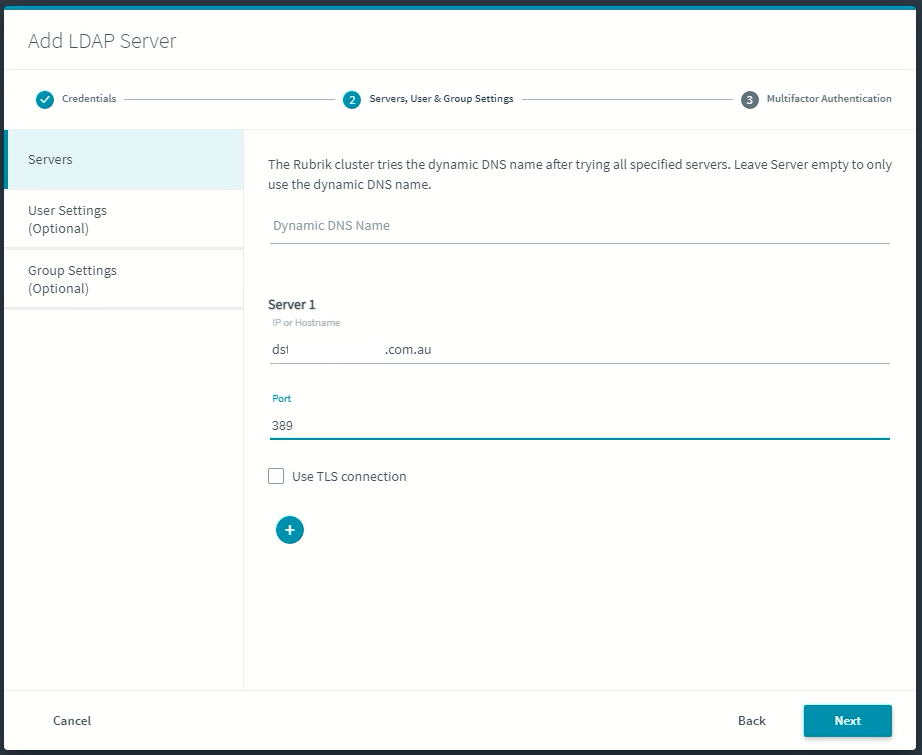
I pointed to one of the Active Directory servers in the environment. This went better when I added the domain name search to the cluster. The port I used was 389, but I’ve seen variations on that in various articles across the Internet.

If that works, you then have the option to enable MFA integration.

Toggling the button will give you the option to add two-step verification. There are some articles on the Internet that provide further guidance on that, and this video is quite useful too.

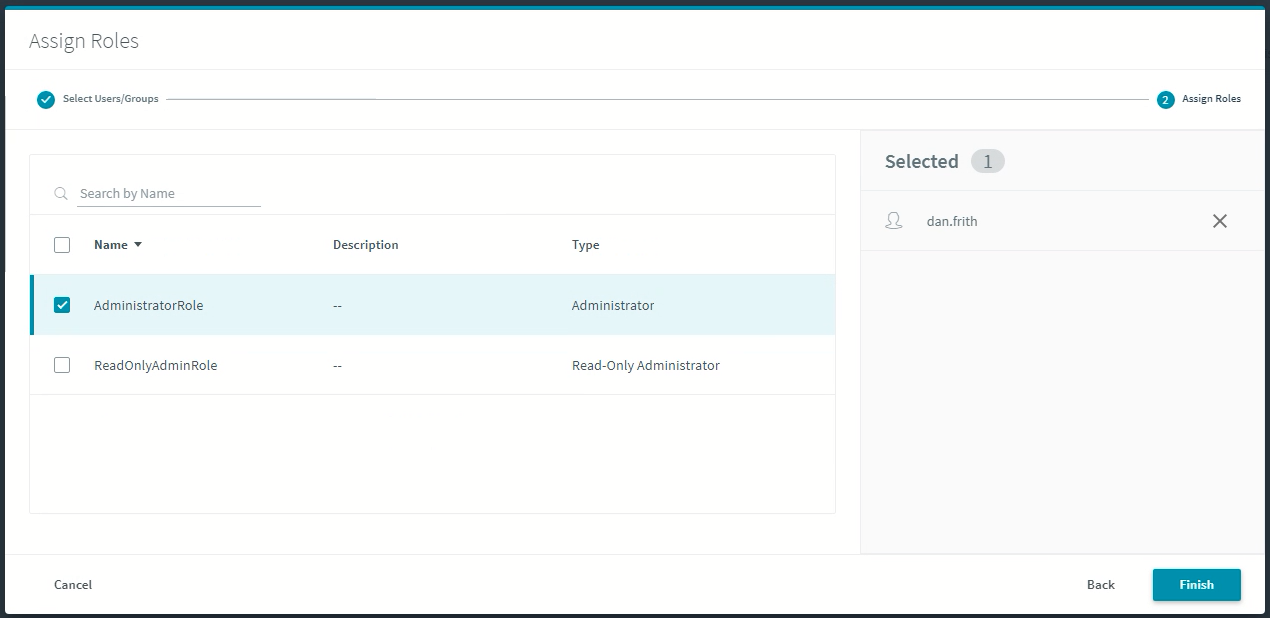
Once you’ve added your directory source, it’s time to assign roles to a user.

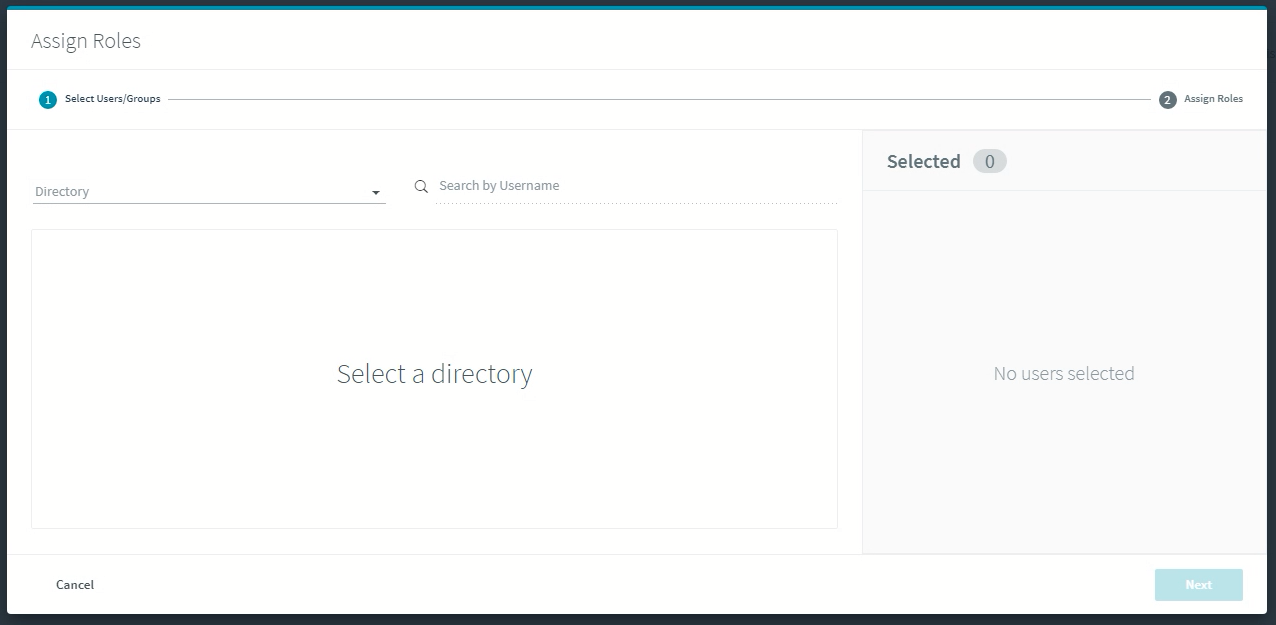
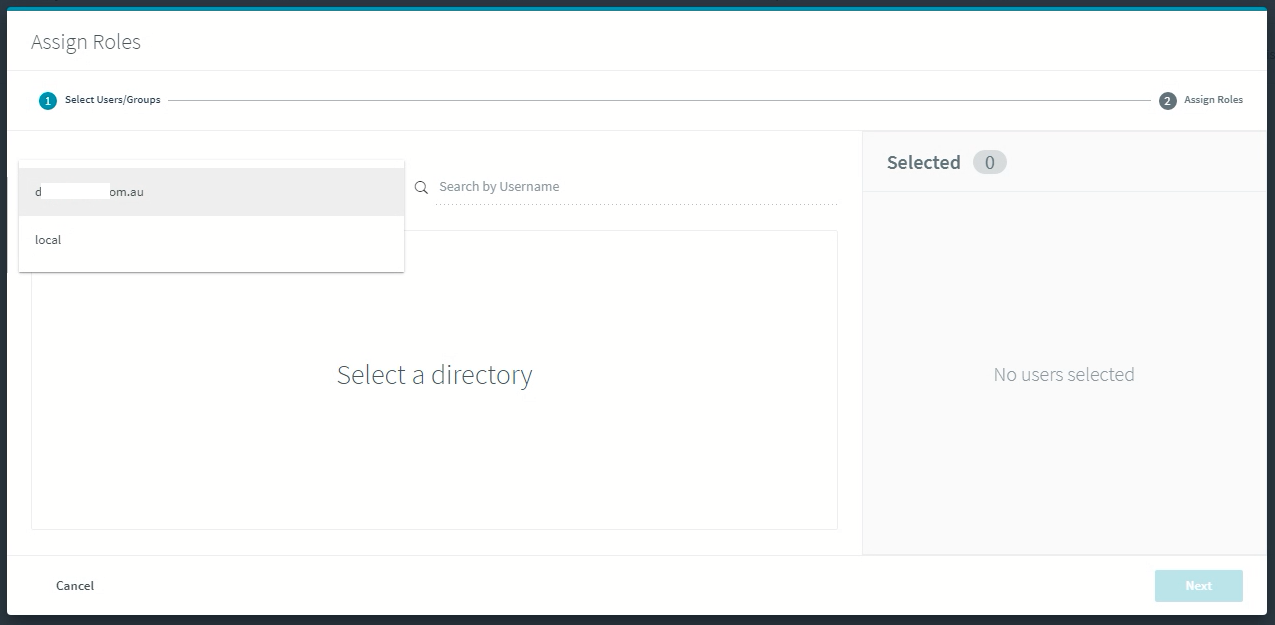
Click on Assign Roles, then drop down the directory you’d like to search in.

In this example, there’s the local user directory, and the domain source that I added previously.

If I search for people called Dan in this directory, it’s not too hard to find my username.

I can then assign a role to my directory username. By default, the configured roles are Administrator and ReadOnlyAdmin.

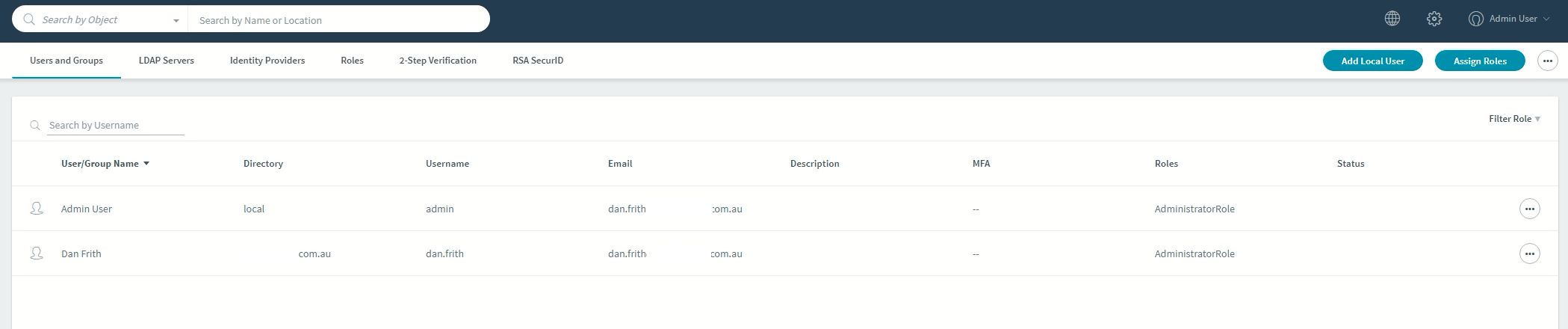
Now my AD account is listed under the users and I can login to CDM using my domain credentials.

And that’s it. If you want to read more about Rubrik and AD integration, including some neat automation, check out this article from Frederic Lhoest.

Rubrik Basics – Edge Deployment

It’s been a while since I’ve posted any basic how-to articles, but I’ve recently been doing some work with Rubrik Edge in the lab and thought I’d run through the basics. There’s a new document outlining the process on the articles page.

If you’re unfamiliar with Rubrik Edge, it’s Rubrik’s RO/BO solution in the form of a virtual appliance that comes in 5 and 10TB versions. The product page is here, and the datasheet can be found here. It runs on VMware vSphere, Nutanix AHV, and Microsoft Hyper-V, so it’s pretty handy in terms of supported hypervisor deployment options. The cool thing about Edge is that you can deploy on reasonably small amounts of hardware, which can be a fairly common scenario in edge deployments. You can also have 100 (I think) Edge appliances replicating data back to a Rubrik physical cluster. You can’t, however, use it as a target for replication.

In any case, I’ll be posting a few of these basics articles over the next few weeks to give readers a feel for how easy it is to get up and running with the platform.

Random Short Take #49

Happy new year and welcome to Random Short Take #49. Not a great many players have worn 49 in the NBA (2 as it happens). It gets better soon, I assure you. Let’s get random.

  • Frederic has written a bunch of useful articles around useful Rubrik things. This one on setting up authentication to use Active Directory came in handy recently. I’ll be digging in to some of Rubrik’s multi-tenancy capabilities in the near future, so keep an eye out for that.
  • In more things Rubrik-related, this article by Joshua Stenhouse on fully automating Rubrik EDGE / AIR deployments was great.
  • Speaking of data protection, Chris Colotti wrote this useful article on changing the Cloud Director database IP address. You can check it out here.
  • You want more data protection news? How about this press release from BackupAssist talking about its partnership with Wasabi?
  • Fine, one more data protection article. Six backup and cloud storage tips from Backblaze.
  • Speaking of press releases, WekaIO has enjoyed some serious growth in the last year. Read more about that here.
  • I loved this article from Andrew Dauncey about things that go wrong and learning from mistakes. We’ve all likely got a story about something that went so spectacularly wrong that you only made that mistake once. Or twice at most. It also reminds me of those early days of automated ESX 2.5 builds and building magical installation CDs that would happily zap LUN 0 on FC arrays connected to new hosts. Fun times.
  • Finally, I was lucky enough to talk to Intel Senior Fellow Al Fazio about what’s happening with Optane, how it got to this point, and where it’s heading. You can read the article and check out the video here.

Rubrik Basics – Cluster Shutdown

It’s been a little while since I’ve done any hands-on work with Rubrik, but I recently had to jump on a cluster and power it down so it could be relocated. The process is simple (particularly if you have the correct credentials), but I’m noting it here more for my own reference than anything else. It’s important to note that if you’re running a version of CDM pre-5.1 and have the cluster shutdown for longer than 24 hours, it will be sad when it comes back online and you’ll need support’s help to get it back online. Note also that 5.1 introduced a new command line structure (support site registration required), so the command is slightly different. This page also has a bunch of useful, publicly visible information.

If you’re not in the DC with the cluster, ssh to one of the nodes to run the commands. For pre-5.1 environments, run

poweroff_cluster

For 5.1 and newer environments, run

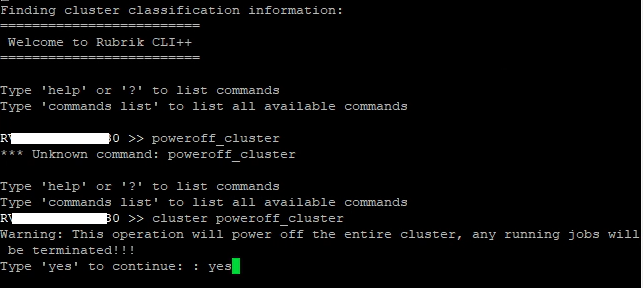
cluster poweroff_cluster

Type yes to continue and you should be good to go.

Here’s a picture of one I prepared earlier.

Exciting? Not really. But useful to know when people are threatening to power off equipment regardless of the state it’s in.

Random Short Take #36

Welcome to Random Short Take #36. Not a huge amount of players have worn 36 in the NBA, but Shaq did (at the end of his career), and Marcus Smart does. This one, though, goes out to one of my favourite players from the modern era, Rasheed Wallace. It seems like Boston is the common thread here. Might have something to do with those hall of fame players wearing numbers in the low 30s. Or it might be entirely unrelated.

  • Scale Computing recently announced its all-NVMe HC3250DF as a new appliance targeting core data centre and edge computing use cases. It offers higher performance storage, networking and processing. You can read the press release here.
  • Dell EMC PowerStore has been announced. Chris Mellor covered the announcement here. I haven’t had time to dig into this yet, but I’m keen to learn more. Chris Evans also wrote about it here.
  • Rubrik Andes 5.2 was recently announced. You can read a wrap-up from Mellor here.
  • StorCentric’s Nexsan recently announced the E-Series 32F Storage Platform. You can read the press release here.
  • In what can only be considered excellent news, Preston de Guise has announced the availability of the second edition of his book, “Data Protection: Ensuring Data Availability”. It will be available in a variety of formats, with the ebook format already being out. I bought the first edition a few times to give as a gift, and I’m looking forward to giving away a few copies of this one too.
  • Backblaze B2 has been huge for the company, and Backblaze B2 with S3-compatible API access is even huger. Read more about that here. Speaking of Backblaze, it just released its hard dive stats for Q1, 2020. You can read more on that here.
  • Hal recently upgraded his NUC-based home lab to vSphere 7. You can read more about the process here.
  • Jon recently posted an article on a new upgrade command available in OneFS. If you’re into Isilon, you might just be into this.

Brisbane VMUG – October 2019

hero_vmug_express_2011

*Update – This meeting has now been moved to the 15th October. 

The October 2019 edition of the Brisbane VMUG meeting will be held on Tuesday 8th October at Fishburners (Level 2, 155 Queen St, Brisbane) from 4pm – 6pm. It’s sponsored by Rubrik and promises to be a great afternoon.

Here’s the agenda:

  • VMUG Intro
  • VMware Presentation
  • Rubrik Presentation: Automating VM Protection in Rubrik with vSphere Tags (and other cool stuff….)
  • Q&A
  • Refreshments and drinks post-event.

Rubrik have gone to great lengths to make sure this will be a fun and informative session and I’m really looking forward to hearing about their solution. After the VMUG wraps up at 6pm, feel free to come along to Brewbrik at The Pool Terrace & Bar on Level 4 at Next Hotel, Queen Street Mall (just down the road from Fishburners). Brewbrik is an informal get together of Rubrik customers, partners, prospects and general hangers-on. Rubrik will be shouting drinks and food. You can find out more information and register for the event here. I hope to see you there. Also, if you’re interested in sponsoring one of these events, please get in touch with me and I can help make it happen.

Rubrik Announces Cloud Data Management 5.0 – Drops In A Shedload Of Enhancements

I recently had the opportunity to hear from Chris Wahl about Rubrik CDM 5.0 (codename Andes) and thought it worthwhile covering here.


Announcement Summary

  • Instant recovery for Oracle databases;
  • NAS Direct Archive to protect massive unstructured data sets;
  • Microsoft Office 365 support via Polaris SaaS Platform;
  • SAP-certified protection for SAP HANA;
  • Policy-driven protection for Epic EHR; and
  • Rubrik works with Rubrik Datos IO to protect NoSQL databases.


New Features and Enhancements

As you can see from the list above, there’s a bunch of new features and enhancements. I’ll try and break down a few of these in the section below.

Oracle Protection

Rubrik have had some level of capability with Oracle protection for a little while now, but things are starting to hot up with 5.0.

  • Simplified configuration (Oracle Auto Protection and Live Mount, Oracle Granular SLA Policy Assignments, and Oracle Automated Instance and Database Discovery)
  • Orchestration of operational and PiT recoveries
  • Increased control for DBAs

NAS Direct Archive

People have lots of data now. Like, a real lot. I don’t know how many Libraries of Congress exactly, but it can be a lot. Previously, you’d have to buy a bunch of Briks to store this data. Rubrik have recognised that this can be a bit of a problem in terms of footprint. With NAS Direct Archive, you can send the data to an “archive” target of your choice. So now you can protect a big chunk of data that goes through the Rubrik environment to end target such as object storage, public cloud, or NFS. The idea is to reduce the amount of Rubrik devices you need to buy. Which seems a bit weird, but their customers will be pretty happy to spend their money elsewhere.

[image courtesy of Rubrik]

It’s simple to get going, requiring a tick of a box to be configured. The metadata remains protected with the Rubrik cluster, and the good news is that nothing changes from the end user recovery experience.

Elastic App Service (EAS)

Rubrik now provides the ability to ingest DBs across a wider spectrum, allowing you to protect more of the DB-based applications you want, not just SQL and Oracle workloads.

SAP HANA Protection

I’m not really into SAP HANA, but plenty of organisations are. Rubrik now offer a SAP Certified Solution which, if you’ve had the misfortune of trying to protect SAP workloads before, is kind of a neat feature.

[image courtesy of Rubrik]

SQL Server Enhancements

There have been some nice enhancements with SQL Server protection, including:

  • A Change Block Tracking (CBT) filter driver to decrease backup windows; and
  • Support for group Volume Shadow Copy Service (VSS) snapshots.

So what about Group Backups? The nice thing about these is that you can protect many databases on the same SQL Server. Rather than process each VSS Snapshot individually, Rubrik will group the databases that belong to the same SLA Domain and process the snapshots as a batch group. There are a few benefits to this approach:

  • It reduces SQL Server overhead, as well as decreases the amount of time a backup requires to be completed; and
  • In turn, allowing customers to take more frequent backups of their databases delivering a lower RPO to the business.

vSphere Enhancements

Rubrik have done vSphere things since forever, and this release includes a few nice enhancements, including:

  • Live Mount VMDKs from a Snapshot – providing the option to choose to mount specific VMDKs instead of an entire VM; and
  • After selecting the VMDKs, the user can select a specific compatible VM to attach the mounted VMDKs.

Multi-Factor Authentication

The Rubrik Andes 5.0 integration with RSA SecurID will include RSA Authentication Manager 8.2 SP1+ and RSA SecurID Cloud Authentication Service. Note that CDM will not be supporting the older RADIUS protocol. Enabling this is a two-step process:

  • Add the RSA Authentication Manager or RSA Cloud Authentication Service in the Rubrik Dashboard; and
  • Enable RSA and associate a new or existing local Rubrik user or a new or existing LDAP server with the RSA Authentication Manager or RSA Cloud Authentication Service.

You also get the ability to generate API tokens. Note that if you want to interact with the Rubrik CDM CLI (and have MFA enabled) you’ll need these.

Other Bits and Bobs

There are a few other enhancements included, including:

  • Windows Bare Metal Recovery;
  • SLA Policy Advanced Configuration;
  • Additional Reporting and Metrics; and
  • Snapshot Retention Enhancements.


Thoughts and Further Reading

Wahl introduced the 5.0 briefing by talking about digital transformation as being, at its core, an automation play. The availability of a bunch of SaaS services can lead to fragmentation in your environment, and legacy technology doesn’t deal with with makes transformation. Rubrik are positioning themselves as a modern company, well-placed to help you with the challenges of protecting what can quickly become a complex and hard to contain infrastructure. It’s easy to sit back and tell people how transformation can change their business for the better, but these kinds of conversations often eschew the high levels of technical debt in the enterprise that the business is doing its best to ignore. I don’t really think that transformation is as simple as some vendors would have us believe, but I do support the idea that Rubrik are working hard to make complex concepts and tasks as simple as possible. They’ve dropped a shedload of features and enhancements in this release, and have managed to do so in a way that you won’t need to install a bunch of new applications to support these features, and you won’t need to do a lot to get up and running either. For me, this is the key advantage that the “next generation” data protection companies have over their more mature competitors. If you haven’t been around for decades, you very likely don’t offer support for every platform and application under the sun. You also likely don’t have customers that have been with you for 20 years that you need to support regardless of the official support status of their applications. This gives the likes of Rubrik the flexibility to deliver features as and when customers require them, while still focussing on keeping the user experience simple.

I particularly like the NAS Direct Archive feature, as it shows that Rubrik aren’t simply in this to push a bunch of tin onto their customers. A big part of transformation is about doing things smarter, not just faster. the folks at Rubrik understand that there are other solutions out there that can deliver large capacity solutions for protecting big chunks of data (i.e. NAS workloads), so they’ve focussed on leveraging other capabilities, rather than trying to force their customers to fill their data centres with Rubrik gear. This is the kind of thinking that potential customers should find comforting. I think it’s also the kind of approach that a few other vendors would do well to adopt.

*Update*

Here’re some links to other articles on Andes from other folks I read that you may find useful:

Rubrik Announces Polaris Radar

Polaris?

I’ve written about Rubrik’s Polaris offering in the past, with GPS being the first cab off the rank.  You can think of GPS as the command and control platform, offering multi-cloud control and policy management via the Polaris SaaS framework. I recently had the opportunity to hear from Chris Wahl about Radar and thought it worthwhile covering here.


The Announcement

Rubrik announced recently (fine, a few weeks ago) that Polaris Radar is now generally available.


The Problem

People don’t want to hear about the problem, because they already know what it is and they want to spend time hearing about how the vendor is going to solve it. I think in this instance, though, it’s worth re-iterating that security attacks happen. A lot. According to the Cisco 2017 Annual Cybersecurity Report ransomware attacks are growing by more than 350% annually. It’s Rubrik’s position that security is heavily focused on the edge, with firewalls and desktop protection being the main tools deployed. “Defence in depth is lopsided”, with a focus on prevention, not necessarily the recovery. According to Wahl, “it’s hard to bounce back fast”.


What It Does

So what does Radar do (in the context of Rubrik Polaris)? The idea is that it is increasing the intelligence to know when you get hit, and helping you to recover faster. The goal of Radar is fairly straightforward, with the following activities being key to the solution:

  • Detection – identify all strains of ransomware;
  • Analysis – understand impact of an attack; and
  • Recovery – restore as quickly as possible.

Radar achieves this by:

  • Detecting anomalies – leverage insights on suspicious activity to accelerate detection;
  • Analysing threat impact – spend less time discovering which applications and files were impacted; and
  • Accelerating recovery – minimise downtime by simplifying manual processes into just a few clicks.


How?

Rubrik tell me they use (drumroll please) Machine Learning for detection. Is it really machine learning? That doesn’t really matter for the purpose of this story.

[image courtesy of Rubrik]

The machine learning model learns the baseline behaviour, detects anomalies and alerts as they come in. So how does that work then?

1. Detect anomalies – apply machine learning on application metadata to detect and alert unusual change activity with protected data, such as ransomware.

What happens post anomaly detection?

  • Email alert is sent to user
  • Radar inspects snapshot for encryption
  • Results uploaded to Polaris
  • User informed of results (via the Polaris UI)

2. Analyse threat impact – Visualise how an attack impacted the system with a detailed view of file content changes at the time of the event.

3. Accelerate recovery – Select all impacted resources, specify the desired location, and restore the most recent clean versions with a few clicks. Rubrik automates the rest of the restore process.


Thoughts and Further Reading

I think there’s a good story to tell with Polaris. SaaS is an accessible way of delivering features to the customer base without the angst traditionally associated with appliance platform upgrades. Data security should be a big part of data protection. After all, data protection is generally critical to recovery once there’s been a serious breach. We’re no longer just protecting against users inside the organisation accidentally deleting large chunks of data, or having to recover from serious equipment failures. Instead, we’re faced with the reality that a bunch of idiots with bad intentions are out to wreck some of our stuff and make a bit of coin on the side. The sooner you know something has gone awry, the quicker you can hopefully recover from the problem (and potentially re-evaluate some of your security). Being attacked shouldn’t be about being ashamed, but it should be about being able to quickly recover and get on with whatever your company does to make its way in the world. With this in mind, I think that Rubrik are on the right track.

You can grab the data sheet from here, and Chris has an article worth checking out here. You can also register to access the Technical Overview here.

Rubrik Basics – SLA Domains

I’ve been doing some work with Rubrik in our lab and thought it worth covering some of the basic features that I think are pretty neat. In this edition of Rubrik Basics, I thought I’d quickly cover off Service Level Agreements (SLA) Domains – one of the key tenets of the Rubrik architecture.


The Defaults

Rubrik CDM has three default local SLA Domains. Of course, they’re named after precious metals. There’s something about Gold that people seem to understand better than calling things Tier 0, 1 and 2. The defaults are Gold, Silver, and Bronze. The problem, of course, is that people start to ask for Platinum because they’re very important. The good news is you can create SLA Domains and call them whatever you want. I created one called Adamantium. Snick snick.

Note that these policies have the archival policy and the replication policy disabled, don’t have a Snapshot Window configured, and do not set a Take First Full Snapshot time. I recommend you leave the defaults as they are and create some new SLA Domains that align with what you want to deliver in your enterprise.


Service Level Agreement

There are two components to the SLA Domain. The first is the Service Level Agreement, which defines a number of things, including the frequency of snapshot creation and their retention. Note that you can’t go below an hour for your snapshot frequency (unless I’ve done something wrong here). You can go berserk with retention though. Keep those “kitchen duty roster.xls” files for 25 years if you like. Modern office life can be gruelling at times.

A nice feature is the ability to configure a Snapshot Window. The idea is that you can enforce time periods where you don’t perform operations on the systems being protected by the SLA Domain. This is handy if you’ve got systems that run batch processing or just need a little time to themselves every day to reflect on their place in the world. Every systems needs a little time every now and then.

If you have a number of settings in the SLA, the Rubrik cluster creates snapshots to satisfy the smallest frequency that is specified. If the Hourly rule has the smallest frequency, it works to that. If the Daily rule has the smallest frequency, it works to that, and so on. Snapshot expiration is determined by the rules you put in place combined with their frequency.


Remote Settings

The second page of the Create SLA Domain window is where you can configure the remote settings. I wrote an article on setting up Archival Locations previously – this is where you can take advantage of that. One of the cool things about Rubrik’s retention policy is that you can choose to send a bunch of stuff to an off-site location and keep, say, 30 days of data on Brik. The idea is that you don’t then have to invest in a tonne of Briks, so to speak, to satisfy your organisation’s data protection retention policy.


Thoughts

If you’ve had the opportunity to test-drive Rubrik’s offering, you’ll know that everything about it is pretty simple. From deployment to ongoing operation, there aren’t a whole lot of nerd knobs to play with. It nonetheless does the job of protecting the workloads you point it at. A lot of the complexity normally associated with data protection is masked by a fairly simple model that will hopefully make data protection a little more appealing for the average Joe or Josie responsible for infrastructure operations.

Rubrik, and a number of other solution vendors, are talking a lot about service levels and policy-driven data protection. The idea is that you can protect your data based on a service catalogue type offering rather than the old style of periodic protection that was offered with little flexibility (“We backup daily, we keep it 90 days, and sometimes we keep the monthly tape for longer”). This strikes me as an intuitive way to deliver data protection capabilities, provided that your business knows what they want (or need) from the solution. That’s always the key to success – understanding what the business actually needs to stay in business. You can do a lot with modern data protection offerings. Call it SLA-based, talk about service level objectives, makes t-shirts with policy-driven on them and hand them out to your executives. But unless you understand what’s important for your business to stay in business when there’s a problem, then it won’t really matter which solution you’ve chosen.

Chris Wahl wrote some neat posts (a little while ago) on SLAs and their challenges on the Rubrik blog that you can read here and here.