

In this edition of Things My Customers Have Asked Me (TMCHAM), I’m going to do a (really) short post on removing external datastores on the VMware-managed VMware Cloud on AWS platform. It might seem like a simple thing, but it can be confusing for customers who haven’t done it before.
The Problem
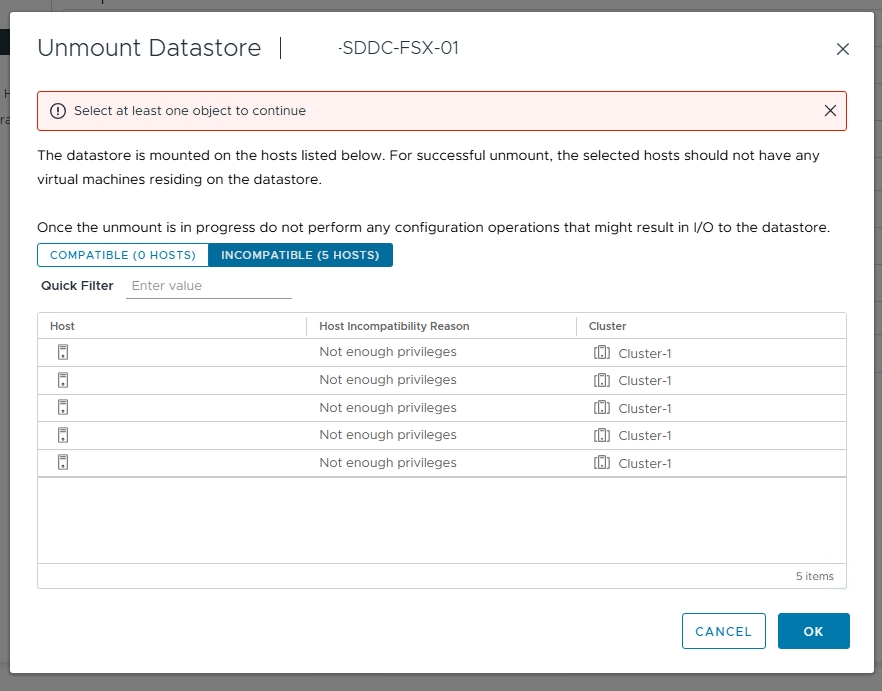
If you’ve used an external datastore (either FSx for NetApp ONTAP or the artist formerly known as VMware Cloud Flex Storage) with your SDDC, you’ll know that management of the connection of the datastores to your SDDC is done via the Cloud Console, and not via vCenter. There might come a time when you want to remove that storage, either because you’ve bought more nodes and want to use vSAN, or you’re possibly shrinking your footprint. Whatever the reason, if you do try to remove the datastore via vCenter (assuming you’ve removed your workloads from the datastore), you’ll get an error about insufficient privileges. At first it might seem like it’s because you have VMs still present on the datastore (and if this is the case, contact Global Support to help you if you can’t find them). It’s more likely, however, that you’re not in the right place to do this activity.
The Solution
The solution is simple. In the VMware Cloud Console, go to the Storage tab of the SDDC you want to remove the datastore from, and click on Detach Datastore. And that’s it. It won’t work if you’ve got workloads running there, so make sure you’ve cleaned everything up / moved it somewhere else before you attempt this one.