
QNAP – Add Cache With SSDs

I recently added some cache to my QNAP NAS at home and thought I’d document the process here. It’s pretty straightforward, but there are nonetheless some things you need to take into consideration. Also, this is more about me satisfying my curiosity. I’m not suggesting you’ll real benefits (particularly the way I’m using it).


The Hardware

Firstly, my NAS is a TS-831X model, with 8 drive bays and the ability to add in a small form-factor PCIe card. As all of the bays are already occupied with spinning disks, I opted to use the PCIe solution. To that end, I purchased a QM2-2S-220A Dual M.2 22110/2280 SATA SSD expansion card from a local supplier. It’s relatively inexpensive, and you get some choice in terms of the storage you install. It also comes with low-profile and normal baseplates as well, so you could load this in a PC if you’re into that sort of thing. Since I’ve been using Apple gear for a while, I’m a little rusty with the screwdriver, but installation was straightforward. Remove the heatsink and fan, add some thermal pads to your M.2 drives, and you’re good to go.
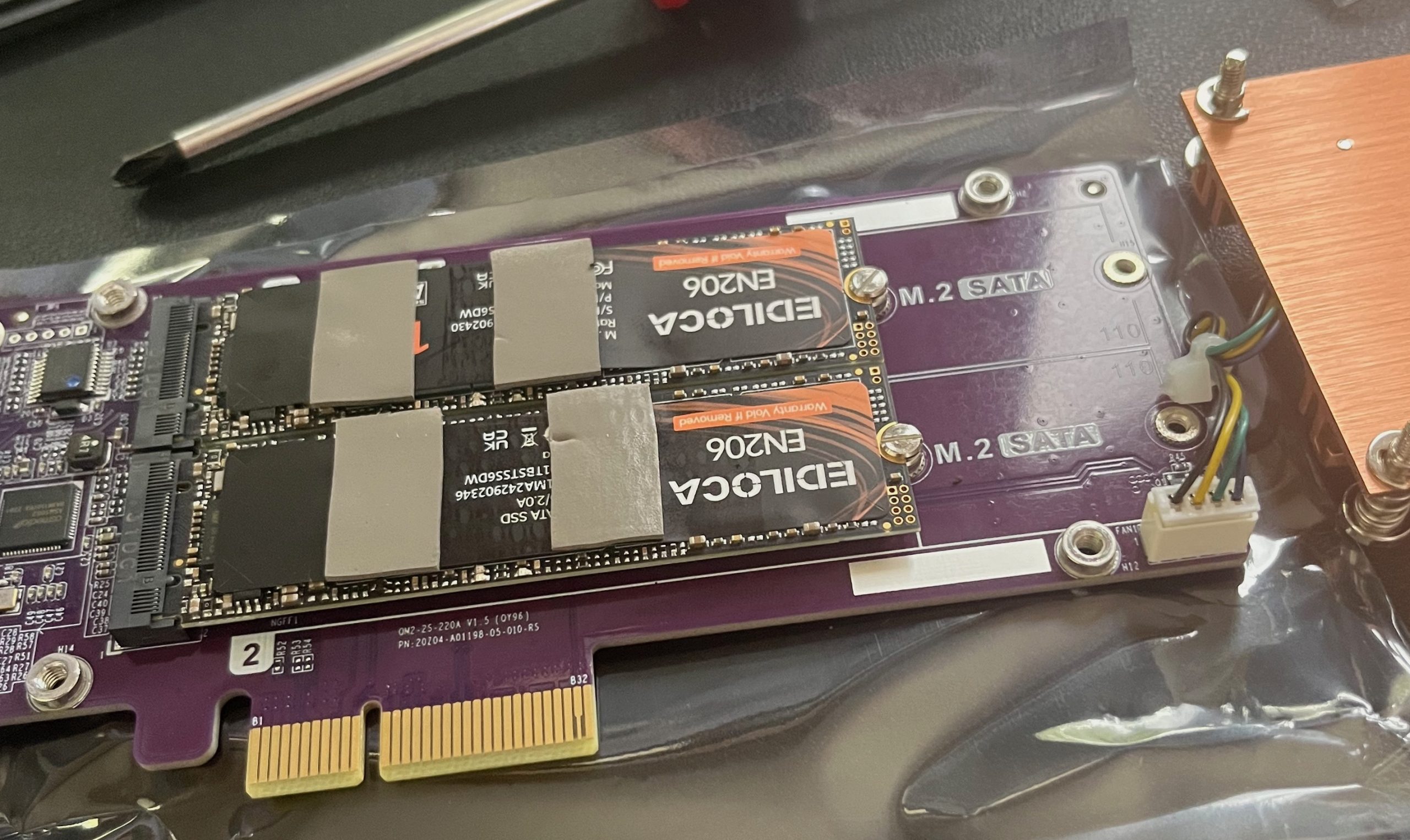
The card slots into the single PCIe slot in the NAS.
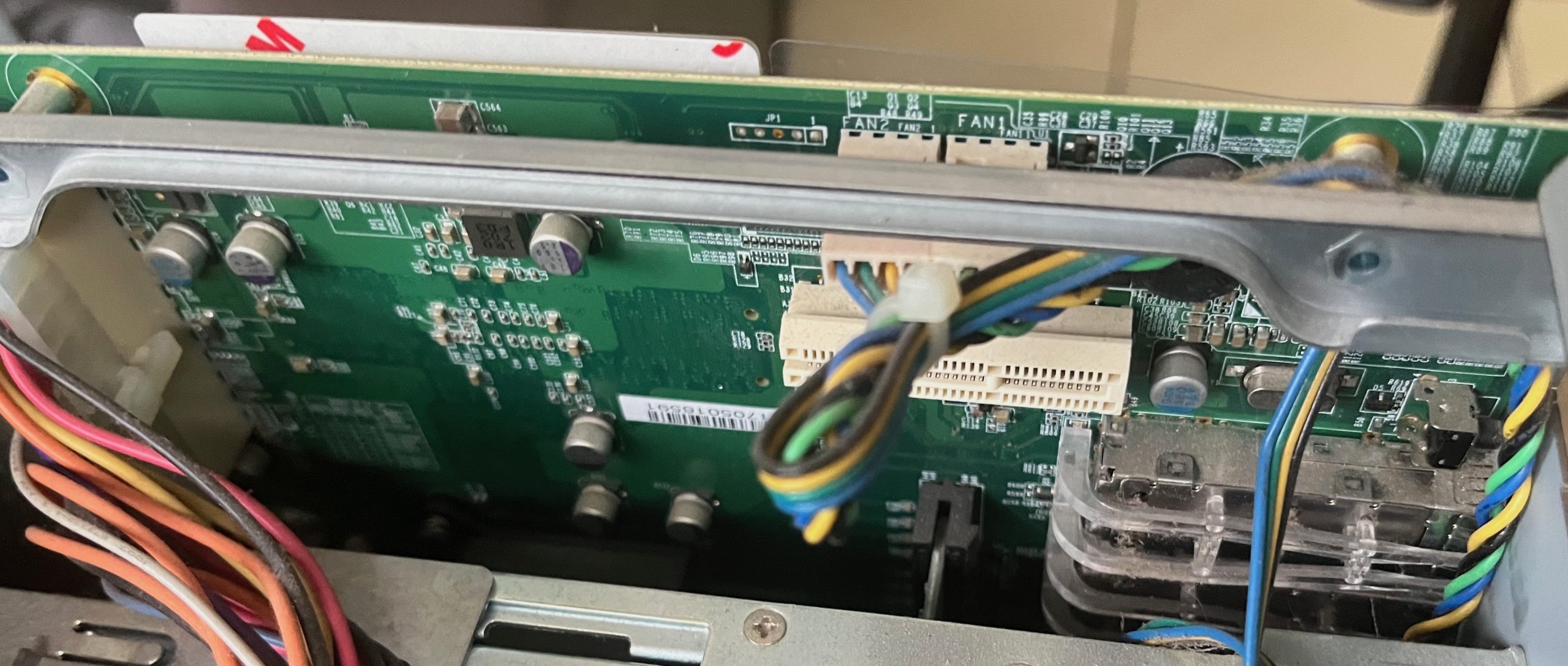
You’ll notice I went with the cheapest 1TB M.2 drives I could find on Amazon. Time will tell (probably sooner rather than later) whether that was really a wise choice.


The Software

Once the NAS has booted up again (and hopefully with no errors), you’re good to start the software configuration. The QNAP documentation covering the process can be found here. While I’m running version 5.2 of QTS, note that other versions may look a little different. There are some things to consider with regard to the amount of RAM you have installed, the version of software you’re running, and the amount of cache you have installed.

To get started, click on Storage & Snapshots.
You’ll see that I have the main enclosure (with 8 drives) and a USB-C enclosure with 4 drives. I also now have two SSDs installed on the QM2 card.

Click on Cache Acceleration to get started. Then click on the big + sign.

You’re then presented with a wizard that will guide you through the configuration process.

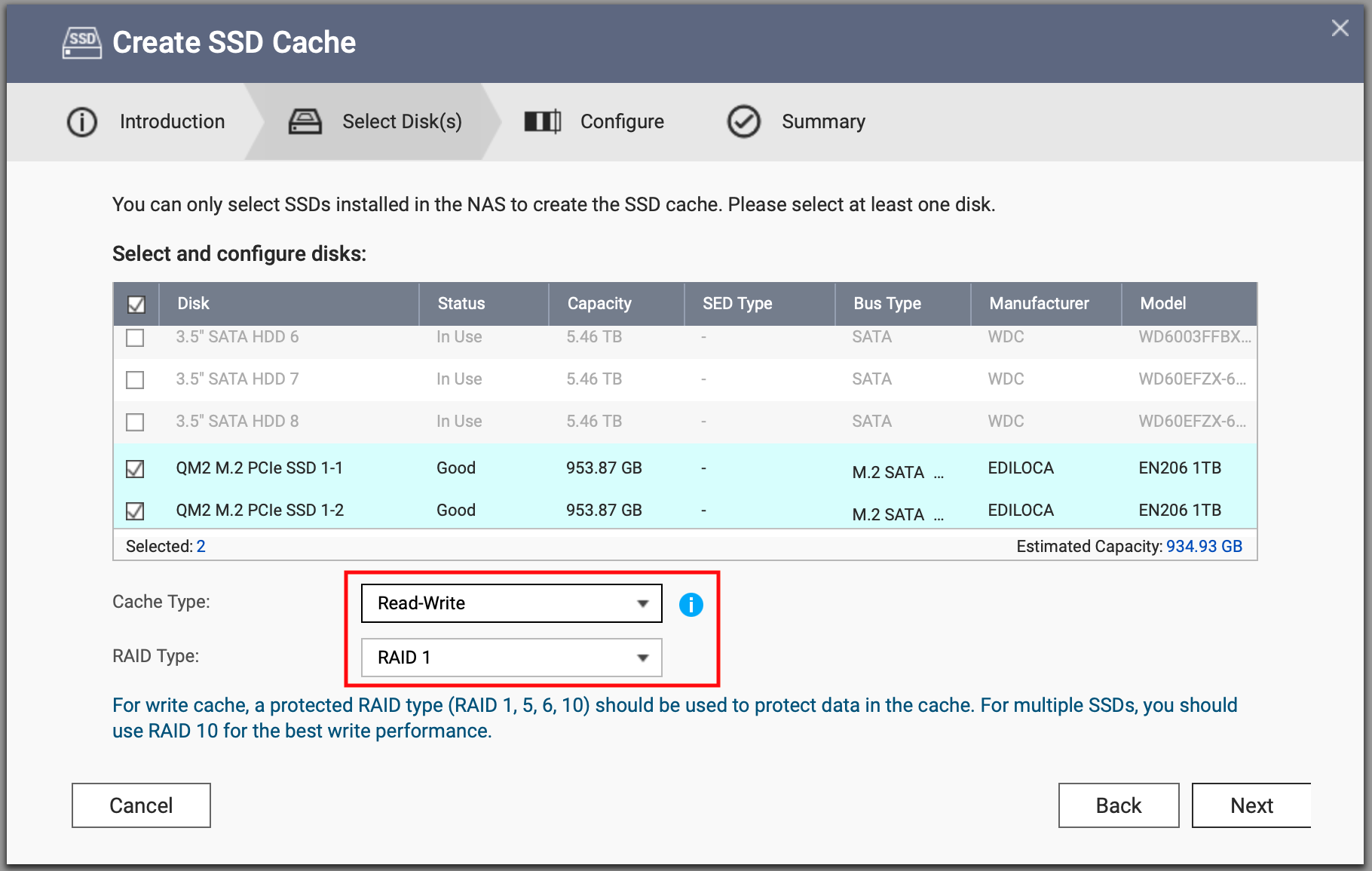
The first thing you’ll need to do is select the disks you want to use for your cache. Note that you can’t select any disks that are already in use.
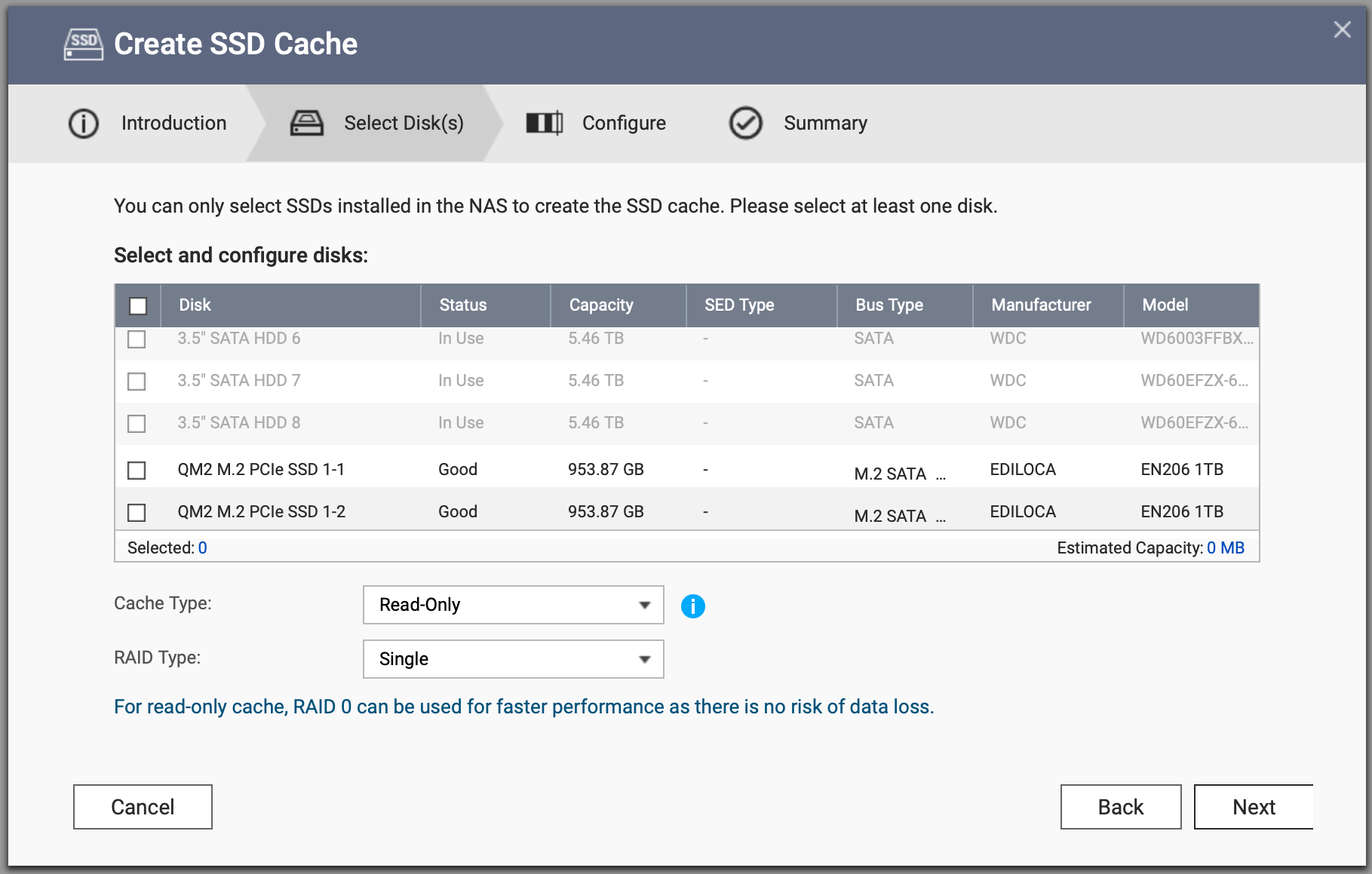
Once you’ve selected the two disks you want to use, you’ll see that the RAID Type changes to RAID 0. You can use this option if you’re only going to configure read cache.

In this example, however, I’m going to configure the cache as read-write.

As I’m configuring the cache as read-write, I need to set the RAID Type to RAID 1, as I don’t want to lose writes if one of my cache devices fails. Once that’s done, click on Next to continue.
On this screen you can configure SSD Over-provisioning, Cache Mode, and Advanced Settings. If you’re confused about the percentage you should set for over-provisioning, there is a tool available in QTS that you can use (the SSD Profiling Tool). Or you can just click click next like I did.

In this example, I’m changing the Cache Mode to All I/O, as this NAS is used primarily for streaming media. I’ll talk about whether it really makes a difference further down.

Under Advanced Settings, you can configure the Bypass Block Size setting (this only comes into play if your Cache Mode is set to Random I/O) and the Cache replacement policy. Click on Next to continue.

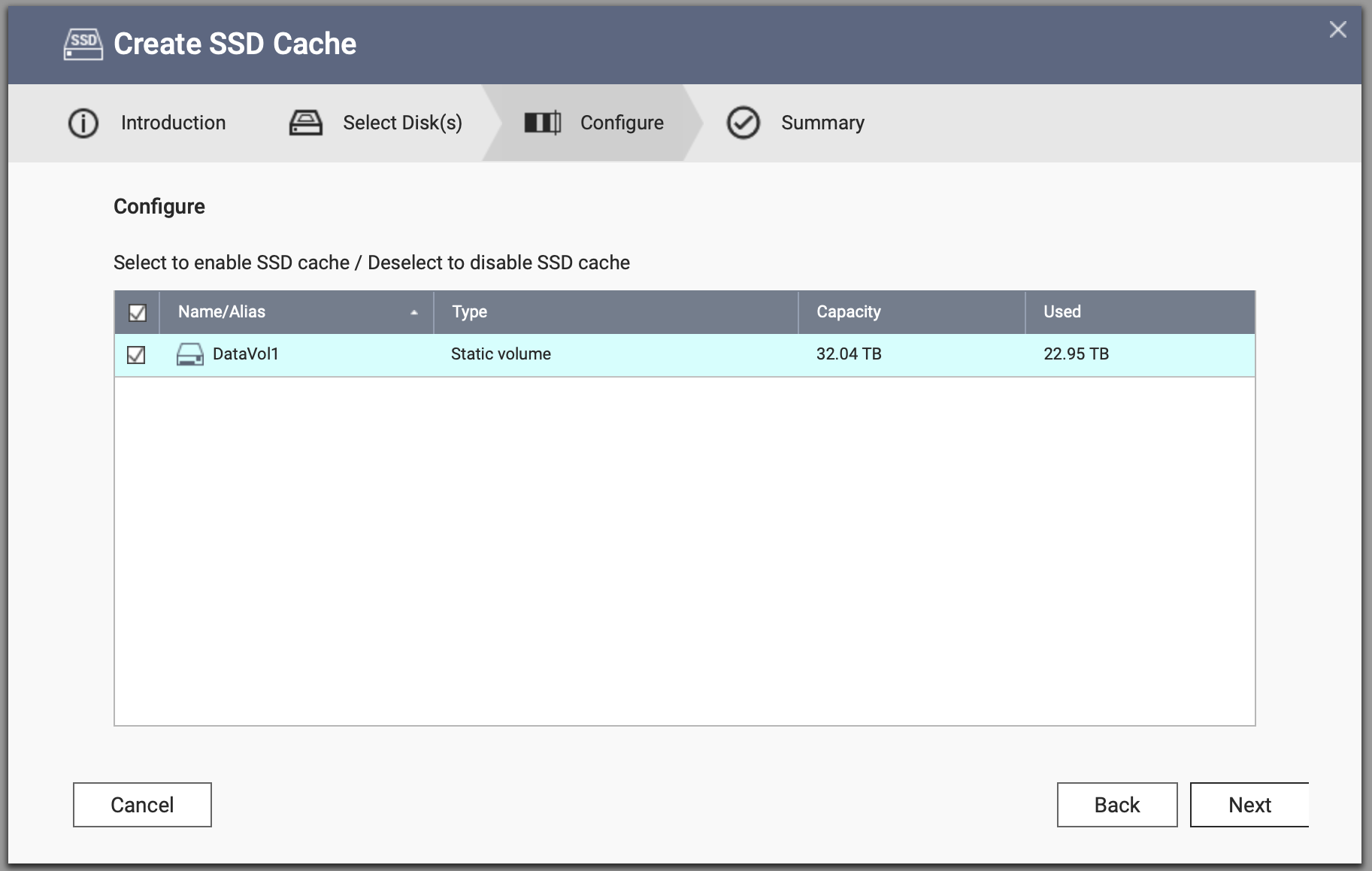
You can now select which volume can use the SSD cache. In this example, even though I have two volumes configured, only the internal one can leverage the cache as it’s configured as read-write. If I wanted to use cache with my external volume, I’d need to set the cache to read-only. Click on Next to continue.
You’ll then be presented with a summary of your configuration options. If you’re happy with how it looks, click on Create.

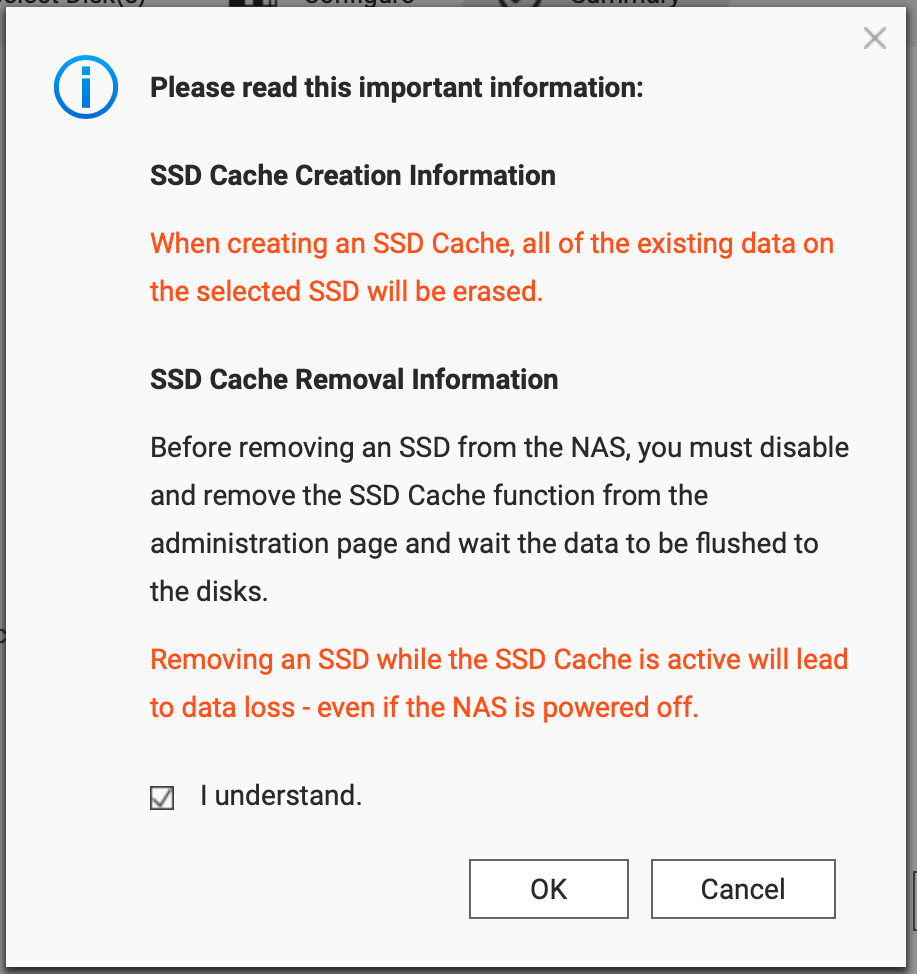
You’ll then be presented with some warnings regarding the cache creation and removal considerations.

Click on I Understand and OK to proceed.
Once you’ve finished you’ll see that the Cache is set to Initializing. It doesn’t take a terribly long time to complete.

And now you’re done and ready to enjoy that cache goodness.


Thoughts

Adding a Terabyte of SSD Cache to my home NAS was a fairly simple process, and relatively inexpensive to boot. I haven’t had much chance to test the performance yet, but I have noticed that the UI in QTS is reporting slightly higher CPU usage than I’d seen previously. While the process is easy, I’m not entirely convinced that I’ll see any real benefits, given that I’m serving up video files over SMB to a Plex server using a gigabit network. Maybe if I had a 10GbE running in the house I’d see it. And the workload has a bit to do with it too. If I was running Virtual Machines on this machine I think I’d see something good from a Random I/O profile, particularly with data coming off the SATA drives. Why didn’t I use Qtier? Because I have static volumes configured, not storage pools. And SSD Caching seemed the easiest thing to do without tearing it all down and starting from scratch. In any case, it was a fun experiment, and I’ll be curious to see whether I notice any real improvements and how long the drives last with normal use.

Time-based Media Art Conservation – A Few Thoughts …

Disclaimer

This post is a little bit off-piste from what I normally cover, but I figured if the ABC can pump out an article on all of the properties owned by politicians in Australia (with much hand-wringing prompted by the Prime Minister buying himself a nice house during a cost of living crisis), then I can write about stuff that isn’t directly related to data centres or my day job.

TL;DR I’ve gotten older and realised that things don’t last forever. A random podcast episode and some dying machinery reminded me of that this week.


What is Time-based Media Art?

I recently came across a podcast from The Met called Immaterial: 5,000 Years of Art, One Material at a Time. I follow a few different “retro” technology accounts on the Internet, and someone posted a link to this particular episode. You can find it on Apple Podcasts here. The reason I listened to this one in particular was that it covered some of the challenges associated with time-based media art conservation. So what’s that exactly? To quote the National Gallery of Australia, it’s “works of art that are dependent on time, duration, or function. This includes: video, film and audio artworks that have a duration; installation artworks; and artworks that function only for the duration of their time on display, such as computer-based and mechanical works of art.” In one of the examples used in the Immaterial episode, the artists had used VideoCD as the primary medium for a piece of art based on Starsky and Hutch episodes. I’m as big a fan of Starsky and Hutch as anyone, but I’m probably not qualified to decide whether something like that is art or not. But the point is more that they’ve used a format to display their art that is now, ostensibly, obsolete. Does that mean it still qualifies as the original art piece? At what point does it fundamentally change?


Is It a Problem?

The thing that struck me most about podcast episode and subsequent reading I did on the impermanence of various art media was the way we consume art (in galleries and at home) is changing as well. To wit,  one of my MiniDisc recorders had recently stopped working and it was such a strange coincidence and strong reminder of the way our enjoyment of art can be directly impacted by technology progression (or the lack thereof). Fortunately, I have a small, portable unit as a backup, but what happens when that one gives up the ghost? I have boxes of LaserDiscs that I can no longer view because both of my players have stopped working. And countless video tapes in a variety of form factors that can’t be viewed anymore because the playback mechanisms are no longer manufactured and getting people who can fix them is becoming more and more difficult. Thankfully my Zip drive still works but I can tell you that SCSI to USB adapters are pretty hard to find so my Jaz drive is all but useless now. At least in my household. It’s become such a problem in the art world that the Met has put together a “Time-Based Media Working Group” to look into ways of dealing with it. And it’s not just hardware that can impact an artwork’s existence, software can have a big impact on its ability to continue into the future as well. Remember all of those early music services with special encryption that relied on the service being around and contactable over the Internet forever?


Is It an Easy Fix?

Not really (and there are plenty of people who know a lot more about this than I do). There are a few different approaches you can take to combat time-based media obsolescence (and I’m thinking more about this in terms of the everyday consumer’s relationship with media rather than media as a piece of art). One approach is to migrate the content from one platform to another. For example, I’ve spent years helping folks progress through various iterations of media lifecycle management by helping them migrate bits and bytes from one storage array to another without losing the data that they treasure so much. From a software / content perspective, some of this is a simple and well understood process, but there are plenty of organisations struggling with moving from one version of critical software to something more modern, particularly when what they had probably worked just fine. And it’s a problem at home too. Thankfully, vinyl records have experienced something of a resurgence, and so there are turntables to be had and the technology is understood and easy enough to procure. I anticipate I’ll be able to play my records for some years to come. The same can’t be said for MiniDisc players, cassette decks (although they’re starting to appear again), and even Blu-ray players and DVD players are becoming harder to come by. Is it the same experience consuming the content on a different format? Does a movie you love from your childhood need to be played back on a video tape? Or is it fine as a digital file on your laptop or consumed via a streaming service? It’s arguably better to watch upgraded versions of content, particularly when it comes to major Hollywood films. Listening to music on cassette sucked, but some of the compressed dross that Spotify serves up is even worse. I have a rack full of Sony Playstation consoles in my home office because I’d rather play the games on the original machines than use emulators. But eventually those consoles will stop working, and then I’ll just be stuck with shelves of dead media after I’ve exhausted my repair options and the secondhand marketplaces. And that can be a tough thing to deal with – the loss of something that you’ve been using for years.  I still have people contact me on this weblog to try and help them resurrect or revive dying EMC CLARiiON and VNX arrays because EMC is no longer interested in helping to keep them alive. Why not just get some cheaper, more efficient storage or put your stuff in the cloud? Is “Every Shot, Every Episode” going to look different if it’s not on Video CD? Not so much, because nowadays it’s running with a different media player and the original Video CD player is purely cosmetic. But there’s something about the particular piece of equipment on display that puts that piece of art in a certain time period. And the same might be said for everyday technology too.


Final Thoughts

Can you count on things being around forever? Probably not, particularly when it comes to media playback technology, and particularly when media studios are pushing for more and more content to be controlled by them, rather than existing free in the world for punters to consume as they see fit. That doesn’t mean that there aren’t thousands of people focussed on conserving not only digital art, but also everyday digital items that might otherwise get lost forever. I sometimes think we’re in a better position than ever to conserve media in its original format and be able to do meaningful things with it years after it was useful. At the same time I think there’s a chance that much of the content getting generated this century may not be retrievable in the next one if we’re not more careful with how we store it. If Keeping Up With the Kardashians disappears it’s probably not a bad thing, but I’m sure there’s a lot of art and media out there that is worthy of our attention.

Random Short Take #98

Welcome to Random Short Take #98. Some of these links have been in my queue for a little while, so apologies if it’s not as fresh as it could be. Let’s get random.

  • Let’s start off with a brilliant article from JB “Going tharn“. We build all these systems to get stuff done, and when it goes wrong it can go ever so wrong. To quote the article, “[t]hat is the terrible power of modern systems, I think. They make us alone, atomise us, and disconnect us from each other. They turn us tharn. They replace those human connections with a User-Platform relationship that feels remarkably similar to the old master-servant relationship in its power imbalance.” I haven’t read something that resonated with me as much as that in quite some time.
  • My friend Damo is heading off on esCarpade later this week, raising money for Camp Quality. If you have some of the folding stuff lying around I urge you to support him.
  • Which disk format? Howard Oakley asks (and answers) the question so I don’t have to ask it anymore.
  • Here are some of the announcements from NetApp Insight 2024.
  • I enjoyed Tom’s article “Semper Gumby“. It’s important to try and be as flexible as possible, even when you get old and crotchety like I am.
  • Preston has started “Preston’s Assorted musings (Episode 1?)” and I believe it’s already a series. Worth checking out if only for the fact that he puts some thought into it rather than just spraying links to random articles everywhere like I do.
  • Paolo put together a handy article on how to configure the Object First VSA as a Veeam Repository if you’re into that kind of thing.
  • Over at El Reg there’s an article on how your Smart TV sucks. And it’s tracking you. No surprises there, but look into blocking yours with a pi-hole if you can (or however you like to restrict access to things that shouldn’t be talking to the big, wide world).

Arcitecta Announces Key Mediaflux Features

I recently had the opportunity to speak to Eric Polet from Arcitecta about the company’s recent Mediaflux announcements. This is some cool stuff, and I figured I’d share some brief thoughts here.


The News?

Artitecta has announced three new features: Mediaflux Multi-Site, Mediaflux Edge and Mediaflux Burst. I’ll share the highlights here.

Mediaflux Multi-Site

Mediaflux Multi-Site provides a single Global Namespace for all your data. Customers can choose between two options: 1) a global file system (GFS) that leverages a single global namespace, and 2) a federated file system (FFS) that uses multiple independent synchronised namespaces for data sets that are separated by greater distances – across oceans, for example. FFS is great for content and creative organisations, where teams may collaborate between New York and Tokyo, or Los Angeles and the United Kingdom.

Mediaflux Edge

According to Arcitecta, MediaFlux Edge significantly reduces redundant data transfers, eases network traffic and meets applications’ low-latency requirements. It uses a hub-and-spoke model for caching data at the edge, and keeps frequently accessed content close to users.  Data is secured by maintaining a copy of the data within a central repository to provide a full recovery capability should a threat or unplanned event occur at the edge.

Mediaflux Burst

Mediaflux Burst allows organisations to expand access to compute resources and processing power in the cloud or any another site that has additional resource availability, when they exceed their current on-premises computing resources. Mediaflux Burst decouples computing from the data’s location, allowing it to be stored for optimal cost or security, while computing tasks are optimised for performance or scalability.

[image courtesy of Arcitecta]


Thoughts

Getting data to the place it’s needed most remains a problem that many organisations still face today. We haven’t magically solved the problem of global data access, at scale, and at speed, with the performance that applications need. Getting data out to the edge can be tricky, and having teams across the world collaborating effectively can be difficult at the best of times, without having to also deal with supporting that data with the right amount of performance, availability, and compute facilities. The great thing about this announcement is that the Arcitecta solution is moving things in the right direction by looking at delivering flexibility within its solution by offering a single global namespace or federated file system access. It helps with the challenges of network traffic, particularly at the edge, by somewhat engineering around the challenge that not every endpoint has 100Gbps of bandwidth available to it. And it looks at more effective use of compute by giving users the ability to easily attach storage (and the data hosted on it) to available compute as required. It’s not exactly automatic at the moment, and relies on user intervention, but I can only imagine this will change in the future.

I’ve been out of the storage game for a little while, but it’s always nice to talk to companies like Arcitecta that are working on solving real problems for customers via innovative means. The company offers per-user (as opposed to capacity-based) licensing, and has also started doing some interesting stuff with Dell Technologies that you can read more about on the Resources page.

Random Short Take #96

Welcome to Random Short Take #96. I’m pouring one out for Geordie Guy this week. Let’s get random.

Finally, and I’m a little late to the party, I just wanted to call out Jetpack for being a bunch of pumpkins and wanting me to upgrade my stats plan because I run a “commercial” site. If you think I want to pay $12.99 a month to see different numbers from those that Google and my hosting provider give me you’re wildly mistaken. And sod knows how I qualify as commercial (unless it’s for posting GoFundMe links for people who are dead or dying) but you can seriously get fucked. Sorry for swearing Mum.

Random Short Take #95

Welcome to Random Short Take #95. Let’s get random.

  • Chris M. Evans put together an editorial on why centralised storage refuses to go away. I thought the point about ransomware was an interesting one, although some of the systems I’ve seen out there haven’t been secured terribly well.
  • Speaking of storage and ransomware, there’s an excellent article over at Backblaze on Object Lock. Worth checking out as I think a lot of people like to talk about Object Lock without understanding what it is (and isn’t).
  • Speaking of storage, Mellor covered a recent presentation by Tom Lyon – eminent Sun alumnus says NFS must die. I came from the block side of things, so NFS was always a little quirky but gee whiz you can do some good (and dumb) stuff with it.
  • I’ve followed Frances for some time, and really enjoyed this article on her experiences in the transition from VMware to Broadcom. I think everyone’s journey has been different, and it’s invariably a little more nuanced than The Register would have us believe. But as I’m an employee that’s probably all I’ll say about that publicly.
  • Speaking of Broadcom, Tony put together this excellent article on Cloud Director Tenancy Container Applications. It’s very thorough, and he’s promised me he’ll be doing more soon.
  • In press release news, Hammerspace are dong stuff with GPU data orchestration capabilities to accelerate access to S3 data. If you haven’t looked into Hammerspace, you really should.
  • In other PR news, Datadobi has unveiled StorageMAP 7.0. I tried to catch up with the Datadobi folks before I went on leave but it didn’t work out. Hopefully I can get hold of them to dive in a little deeper on this in the near future.
  • Finally, JB published a great piece entitled Existential Having. If you follow me on the photos social media you’ll know that I have a lot of records. And basketball jerseys. And sneakers. I don’t know why I have these things, but they bring me comfort. For a period of time. And then I Marie Kondo that crap and start all over.

VMware Cloud on AWS – What’s New – February 2024

It’s been a little while since I posted an update on what’s new with VMware Cloud on AWS, so I thought I’d share some of the latest news.


M7i.metal-24xl Announced

It’s been a few months since it was announced at AWS re:Invent 2023, but the M7i.metal-24xl (one of the catchier host types I’ve seen) is going to the change the way we approach storage-heavy VMC on AWS deployments.

What is it?

It’s a host without local storage. There are 48 physical cores (96 logical cores with Hyper-Threading enabled). It has 384 GiB memory. The key point is that there are flexible NFS storage options to choose from – VMware Cloud Flex Storage or Amazon FSx for NetApp ONTAP. There’s support for up to 37.5 Gbps networking speed, and it supports always-on memory encryption using Intel Total Memory Encryption (TME).

Why?

Some of the potential use cases for this kind of host type are as follows:

  • CPU Intensive workloads
    • Image processing
    • Video encoding
    • Gaming servers
  • AI/ML Workloads
    • Code Generation
    • Natural Language Processing
    • Classical Machine Learning
    • Workloads with limited resource requirements
  • Web and application servers
    • Microservices/Management services
    • Secondary data stores/database applications
  • Ransomware & Disaster Recovery
    • Modern Ransomware Recovery
    • Next-gen DR
    • Compliance and Risk Management

Other Notes

New (greenfield) customers can deploy the M7i.metal-24xl in the first cluster using 2-16 nodes. Existing (brownfield) customers can deploy the M7i.metal-24xl in secondary clusters in the same SDDC. In terms of connectivity, we recommend you take advantage of VPC peering for your external storage connectivity. Note that there is no support for multi-AZ deployments, nor is there support for single node deployments. If you’d like to know more about the M7i.metal-24xl, there’s an excellent technical overview here.


vSAN Express Storage Architecture on VMware Cloud on AWS

SDDC Version 1.24 was announced in November 2023, and with that came support for vSAN Express Storage Architecture (ESA) on VMC on AWS. There’s some great info on what’s included in the 1.24 release here, but I thought I’d focus on some of the key constraints you need to look at when considering ESA in your VMC on AWS environment.

Currently, the following restrictions apply to vSAN ESA in VMware Cloud on AWS:
  • vSAN ESA is available for clusters using i4i hosts only.
  • vSAN ESA is not supported with stretched clusters.
  • vSAN ESA is not supported with 2-host clusters.
  • After you have deployed a cluster, you cannot convert from vSAN ESA to vSAN OSA or vice versa.
So why do it? There are plenty of reasons, including better performance, enhanced resource efficiency, and several improvements in terms of speed and resiliency. You can read more about it here.

VMware Cloud Disaster Recovery Updates

There have also been some significant changes to VCDR, with the recent announcement that we now support a 15-minute Recovery Point Objective (down from 30 minutes). There have also been a number of enhancements to the ransomware recovery capability, including automatic Linux security sensor installation in the recovery workflow (trust me, once you’ve done it manually a few times you’ll appreciate this). With all the talk of supplemental storage above, it should be noted that “VMware Cloud DR does not support recovering VMs to VMware Cloud on AWS SDDC with NFS-mounted external datastores including Amazon FSx for NetApp datastores, Cloud Control Volumes or VMware Cloud Flex Storage”. Just in case you had an idea that this might be something you want to do.


Thoughts

Much of the news about VMware has been around the acquisition by Broadcom. It certainly was news. In the meantime, however, the VMware Cloud on AWS product and engineering teams have continued to work on releasing innovative features and incremental improvements. The encouraging thing about this is that they are listening to customers and continuing to adapt the solution architecture to satisfy those requirements. This is a good thing for both existing and potential customers. If you looked at VMware Cloud on AWS three years ago and ruled it out, I think it’s worth looking at again.

Nexsan Announces Unity NV6000

Nexsan recently announced the Nexsan Unity NV6000. I had the chance to speak to Andy Hill about it, and thought I’d share some thoughts here.


What Is It?

[image courtesy of Nexsan]

I’ve said it before, and I’ll say it again … in the immortal words of Silicon Valley: “It’s a box”. And a reasonably powerful one at that, coming loaded with the following specifications.

Supported Protocols SAN (Fibre Channel, iSCSI), NAS (NFS, SMB 1.0 to 3.0, FTP), Object (S3)
Disk Bays | Rack U 60 | 4U
Maximum Drives with Expansion 180
Maximum Raw Capacity (chassis | total) 1.12 PB Raw | 3.36 PB Raw
System Memory (DRAM) per controller up to 128GB
FASTier 2.5″ SSD Drives (TB) 1.92 | 3.84 | 7.68 | 15.36
3.5” 7.2K SAS Drives (TB) 4 | 6 | 8 | 10 | 12 | 14 | 16 | 18 | 20
2.5″ NVME 1DWPD SSDs (TB) N/A
Host Connectivity 16/32Gb FC | 10/25/40/100 GbE
Max CIFS | NFS File Systems 512
Data Protection: Immutable Snapshots, S3 Object-Locking, and optional Unbreakable Backup.

It’s a dual-controller platform, with each controller containing 2x Intel Xeon Silver CPUs and a 12Gb/s SAS backplane. Note that you get access to the following features included as part of the platform license:

  • Nexsan’s FASTier® Caching – Use solid-state to accelerate the performance of the underlying spinning disks
  • Nexsan Unity software version 7.0, with important enhancements to power, enterprise-class security, compliance, and ransomware protection
  • Enhanced Performance – Up to 100,000 IOPs
  • Third-Party Software Support – Windows VSS, VMware, VAAI, Commvault, Veeam Ready Repository, and more
  • Multi-Protocol Support – SAN (Fibre Channel, iSCSI), NAS (NFS, CIF, SMB1 to SMB3, FTP), Object (S3), 16/32GB FC, 10/25/40/100 GbE
  • High Availability – No single point-of-failure architecture with dual redundant storage controllers, redundant power supplies and RAID


Other Features

Snapshot Immutability

The snapshot immutability claim caught my eye, as immutable means a lot of things to a lot of people. Hill mentioned that the snapshot IP used on Unity was developed in-house by Nexsan and isn’t the patched together solution that some other vendors promote as an immutable solution. There are some other smarts within Unity that should give users comfort that data can’t be easily gotten at. Once you’ve set retention periods for snapshots, for example, you can’t log in to the platform and the set the date forward and have those snapshots expire. The object storage componet also supports S3 Object Lock, which is good news for punters looking to take advantage of this feature.

Unified Protocol Support

It’s in the name, and Nexsan has done a good job of incorporating a variety of storage protocols and physical access methods into the Unity platform. There’s File, Block, and Object, and support for both FC and speedy Ethernet as well. In other words, something for everyone.

Assureon Integration

One of the other features I like about the Unity is the integration with Assureon. If you’re unfamiliar with Assureon, you can check it out here. It takes storage security and compliance to another level, and is worth looking into if you have a requirement for things like regulatory compliant storage, the ability to maintain chain of custody, and fun things like that.


Thoughts and Further Reading

Who cares about storage arrays any more? A surprising number of people, and with good reason. Some folks still need them in the data centre. And folks are also looking for storage arrays that can do more with less. I think this is where the Nexsan offering excels, with multi-protocol and multi-transport support, along with some decent security chops and an all-inclusive licensing model, it provides for cost-effective storage (thanks to a mix of spinning rust and solid-state drives) that competes well with the solutions that have traditionally dominated the midrange market. Additionally, integration with solutions like Assureon makes this a solution that’s worth a second look, particularly if you’re in the market for object storage with a lower barrier to entry (from a cost and capacity perspective) and the ability to deal with backup data in a secure fashion.

Arcitecta Announces Mediaflux Universal Data System

I had the opportunity to speak to Jason Lohrey and Robert Murphy from Arcitecta a little while ago about the company’s Mediaflux announcement. It was a great conversation, and I’m sad that I hadn’t heard about the company beforehand. In any case I figured I’d share some thoughts on the announcement.


What Is It?

The folks at Arcitecta describe the Mediaflux Universal Data System as “a convergence of data management, data orchestration, multi-protocol access, and storage in one platform”. The idea is that the system manages your data across all of your storage platforms. It’s not just clustered or distributed storage. It’s not just a control plane that gives you multi-protocol access to your storage platforms. It’s not just an orchestration engine that can move your data around as required. It’s all of these things and a bit more too. Features include:

  • Converges data management, orchestration and storage within a single platform – that’s right, it’s all in the one box.
  • Manages every aspect of the data lifecycle: On-premises and cloud, with globally distributed access.
  • Offers multi-protocol access and support. The system supports NFS, SMB, S3, SFTP and DICOM, among many others.
  • Empowers immense scalability. Mediaflux licensing is decoupled from the volume of data stored so organisations can affordably scale storage needs to hundreds of petabytes, accommodating hundreds of billions of files without the financial strain typically associated with such vast capacities. Note that Mediaflux’s pricing is based on the number of concurrent users.
  • Provides the option to forego third-party software and clustered file systems.
  • Supports multi-vendor storage environments, allowing customers to choose best-of-breed hardware.

Seem ambitious? Maybe, but it also seems like something that would be super useful.


Global Storage At A Worldwide Scale

One of the cool features of Mediaflux is how it handles distributed file systems, not just across data centres, but across continents. A key feature of the platform is the ability to deliver the same file system to every site.

[image courtesy of Arcitecta]

It has support for centralised file locking, as well as replication between sites. You can also configure variable retention policies for different site copies, giving you flexibility when it comes to how long you store your data in various locales. According to the folks at Arcitecta, it’s also happy to make the most of your bandwidth, and able to use up to 95% of the available bandwidth.


Thoughts And Further Reading

There have been a few data management / orchestration / unified control plane companies that have had a tilt at doing universal storage access well, across distances, and with support for multiple protocols. Sometimes the end result looks like an engineering project at best, and you have to hold your mouth right to have any hope of seeing your data again once you send it on its way. Putting these kinds of platforms together is no easy task, and that’s why this has been something of a journey for the team at Arcitecta. The company previously supported Mediaflux on top of third-party file and object systems, but customers needed a solution that was more flexible and affordable.

So why not just use the cloud? Because some people don’t like storing stuff in hyperscaler environments. And sometimes there’s a requirement for better performance than you can reasonably pay for in a cloud environment. And not every hyperscaler might have a presence where you want your data to be. All that said, if you do have data in the cloud, you can manage it with Mediaflux too.

I’m the first to admit that I haven’t had any recent experience with the type of storage systems that would benefit from something like Mediaflux, but on paper it solves a lot of the problems that enterprises come across when trying to make large datasets available across the globe, while managing the lifecycle of those datasets and keeping them readily available. Given some of the reference customers that are making use of the platform, it seems reasonable to assume that the company has been doing something right. As with all things storage, your mileage might vary, but if you’re running into roadblocks with the storage platforms you know and love, it might be time to talk to the nice people in Melbourne about what they can do for you. If you’d like to read more, you can download a Solution Brief as well.

Random Short Take #91

Squeezing this one in before the end of the year. It’s shorter than normal but we all have other things to do. Let’s get random.

  • Like the capacity and power consumption of tape but still want it on disk? Check out this coverage of the Disk Archive Corporation over at Blocks and Files.
  • This was a great series of posts on the RFC process. It doesn’t just happen by magic.
  • Jeff Geerling ran into some issues accessing media recently. It’s a stupid problem to have, and one of the reasons I’m still such a sucker for physical copies of things. I did giggle a bit when I first read the post though. These kind of issues come up frequently for folks outside the US thanks to content licensing challenges and studios just wanting us to keep paying for the same thing over and over again and not have any control over how we consume content.
  • My house was broken into recently. It’s a jarring experience at best. I never wanted to put cameras around my house, but now I have. If you do this in Queensland you can let the coppers know and they can ask for your help if there’s a crime in the area. I know it’s not very punk rock to surveil people but fuck those kids.
  • You didn’t think I’d get to 91 and not mention Dennis Rodman, did you? One of my top 5 favourite players of all time. Did everything on the court that I didn’t: played defence, grabbed rebounds, and gave many a high energy performance. So here’s some highlights on YouTube.

That’s it for this year. Stay safe, and see you in the future.