VMware Cloud on AWS – TMCHAM – Part 1 – PCI DSS

I’m starting a new series on the blog. It’s called “Things My Customers Have Asked Me” (or TMCHAM for short). There are frequently occasions where the customer collateral I present on VMware Cloud on AWS doesn’t cover every single use case that my customers are interested in, or perhaps it doesn’t dive deeply enough into some of the material people would like to know more about. The idea behind these posts is that if I have one customer asking about this stuff, chances are another one might like to know about it too. I won’t be talking about internal-only stuff, or roadmap details in these posts (or anywhere publicly, for that matter), but hopefully these articles will be a useful point of information consolidation for folks who are into that sort of thing.


PCI DSS?

The Payment Card Industry Data Security Standard (PCI DSS) is the security standard adhered to by organisations handling credit card information from the major card vendors. You can find the official Attestation of Compliance (AoC) in the VMware Cloud Trust Center, and there’s also a comprehensive whitepaper here.

Getting Started on VMware Cloud on AWS

The capability was covered in March 2021, and you can see some of the details in the VMware Cloud on AWS Release Notes. You can also read my learned colleague Greg Vinton’s take on it here, and there’s a YouTube video for people who prefer that sort of thing. To enable PCI compliance on your Organization, you need to request the capability via your VMware account team. It’s not just something that’s configured by default, as some of the requirements around PCI DSS might be considered an unnecessary overhead by some folks. The account team will get it enabled on your Organization, and you can then deploy your SDDC. It’s important to note that your Organization needs to be empty – PCI DSS can’t be enabled on an Organization with SDDCs that are already deployed.

Configuration Changes

There are a number of configuration changes needed to ensure that your SDDC is PCI-compliant too. This includes disabling add-on services like HCX and Site Recovery. To do this, go to Inventory – Settings, and scroll down to Compliance Hardening.

Note that you’ll only see the “Compliance Hardening” section if your Organization has been configured for PCI DSS compliance. You’ll need to finish your HCX migrations before your Organization is compliant. You’ll also need to change your NSX configuration (Network & Security Tab Access). There is some more info on that here and there’s a blog post that also runs through it step by step that you can read here. Note that you’ll need to use the API to change the local NSX Manager user password every 90 days. Information on that can be found here.

Other Considerations

One final thing to note is that this process doesn’t automatically make your Virtual Machines PCI compliant. You’ll still need to ensure that you’ve done the work in that respect. And I can’t repeat this enough – your Organization will only pass a PCI audit if you’ve done these additional steps. Merely requesting that VMware enable this at an Organization level won’t be enough.

VMware Cloud on AWS – A Few Notes

If you’ve been following along at home, you may have noticed that the blog has been a little quiet recently. There were a few reasons for that, but the main one was that I joined VMware this year as a Cloud Solutions Architect focussed on VMware Cloud on AWS. It’s an interesting role, and an interesting place to work. I’ve been busy onboarding and thought I’d share some brief notes on VMware Cloud on AWS. I still intend to talk about other things on this blog too, but figured this has been front of mind for me recently, and it might be useful to someone looking to find out more. If you have any questions, or want to know more about something, I’m happy to help where I can. And it doesn’t need to be a sales call.


Overview

In short, VMware Cloud on AWS is “an integrated cloud offering jointly developed by Amazon Web Services (AWS) and VMware.” The idea is that you run VMware’s SDDC stack on AWS bare metal hosts and enjoy the best of both worlds – VMware’s software and access to a broad range of AWS services. I won’t be covering too much of the basics here, but you can read more about it on the product website. I do recommend checking out the product walkthroughs, as these are a great way to get familiar with how the product behaves. Once you’ve done that, you should also check out the solutions index – it’s a great collection of information about various things that run on VMware Cloud on AWS, including things like SQL performance, DNS configuration, and stuff like that. Once you’ve got a handle on the platform and some of the things it can do, it’s also worth running through the Evaluation Guide. This will give you the opportunity to perform a self-guided evaluation of the platform’s features and functionality. There’s also a pretty comprehensive FAQ that you can find here.


Hardware

Node Types

There are 2 types of nodes available at this time: i3.metal and i3en.metal. The storage for nodes is provided by VMware vSAN.

i3.metal i3en.metal
Intel Xeon Broadwell @ 2.3GHz, 36 Cores (Hyper-Threading Disabled) Intel Xeon Cascade Lake @ 2.5GHz, 48 Cores (Hyper-Threading enabled providing 96 Cores)
512 GiB RAM 768 GiB RAM
10 TiB NVMe (RAW) 45 TiB NVMe (RAW)
High IOPS High IOPS, High Bandwidth

Custom Core Counts

One of the neat things is support for custom core counts on a per-cluster basis. You still pay full price for the hosts, but the idea is that your core licensing for BigDBVendor, or whatever, is under control. Note that you can’t change this core count once your hosts are deployed.

Other Cool Features 

Elastic DRS lets you expand your SDDC as required, based on configured thresholds for CPU, RAM, and storage. You can read more about that here.


Configuration Backups

If you’re using HCX, you might want to back up your HCX Manager. You can read more on that here. There’s also a VMware Fling that provides a level of SDDC import / export capability. You can check that out here. (Hat tip to my colleague Michael for telling me about these).


Sizing It Up

If you’re curious about what your current on-premises estate might look like from a sizing perspective, you can run it through the online sizing tool. This has a variety of input options, including support for RVTools imports. It’s fairly easy to use,  but for complex scenarios I’d always recommend you get VMware or a partner involved. Pricing for the platform is also publicly available, and you can check that out here. There are a few different ways to consume the platform, including 1-year, 3-year, and on-demand options, and the discounting levels vary according to the commitment.

Note that there are a number of other capabilities sold separately, including:

  • VMware Site Recovery
  • VMware Cloud Disaster Recovery
  • VMware NSX Advanced Firewall
  • VMware vRealize Automation Cloud
  • VMware vRealize Operations Cloud
  • VMware vRealize Log Insight Cloud
  • VMware vRealize Network Insight Cloud
  • VMware Tanzu Standard


Lifecycle

One of the things I like about VMware Cloud on AWS is that the release notes for the platform are publicly available, and provide a great summary of new features as they get rolled out to customers.


What Now?

I’ve barely scratched the surface of what I’d like to talk about with VMware Cloud on AWS, and I hope in the future to post articles on some of the stuff that gets me excited, like migration options with HCX, and using VMware Cloud Disaster Recovery. In the meantime, the team (it’s mainly Greg doing the hard work, if I’m being honest) is running a series of webinars next week. If you’re interested in VMware Cloud on AWS and want to know more, you could do worse than checking these out. Details below, and registration is here.

Design and Deploy a VMware Cloud on AWS SDDC
28 February 2022, Monday
9:30am IST | 12:00pm SGT | 1:00pm KST | 3:00pm AEDT
Join us as we walk through the process of Architecting and Deploying a VMware Cloud on AWS SDDC. We will cover: SDDC sizing for an application, sizing of the management CIDR block, connectivity design, VPN vs direct connect, basic networking and dependencies
Application Migration to VMC on AWS

1 March 2022, Tuesday
9:30am IST | 12:00pm SGT | 1:00pm KST | 3:00pm AEDT
In this session we will demonstrate the process of migrating a live application. Topics include: walk through the HCX architecture, HCX deployment process, HCX configuration, extending an L2 network, mobility (location) aware networking, migration types – conversation
Disaster Recovery – Protecting VMC on AWS or On-Prem Based Applications

2 March 2022, Wednesday 
9:30am IST | 12:00pm SGT | 1:00pm KST | 3:00pm AEDT
Listen to experts demonstrate the process of Architecting and Deploying a VMware Cloud Disaster Recovery (VCDR), with VMC on AWS to protect an application. We will cover: walk through the VCDR architecture, VCDR deployment process, considerations around VCDR, building a protection group, building a DR plan, executing DR and discuss failback options

Random Short Take #65

Welcome to Random Short take #65. Last one for the year I think.

  • First up, this handy article from Steve Onofaro on replacing certificates in VMware Cloud Director 10.3.1.
  • Speaking of cloud, I enjoyed this article from Chris M. Evans on the AWS “wobble” (as he puts it) in us-east-1 recently. Speaking of articles Chris has written recently, check out his coverage of the Pure Storage FlashArray//XL announcement.
  • Speaking of Pure Storage, my friend Jon wrote about his experience with ActiveCluster in the field recently. You can find that here. I always find these articles to be invaluable, if only because they demonstrate what’s happening out there in the real world.
  • Want some press releases? Here’s one from Datadobi announcing it has released new Starter Packs for DobiMigrate ranging from 1PB up to 7PB.
  • Data protection isn’t just something you do at the office – it’s a problem for home too. I’m always interested to hear how other people tackle the problem. This article from Jeff Geerling (and the associated documentation on Github) was great.
  • John Nicholson is a smart guy, so I think you should check out his articles on benchmarking (and what folks are getting wrong). At the moment this is a 2-part series, but I suspect that could be expanded. You can find Part 1 here and Part 2 here. He makes a great point that benchmarking can be valuable, but benchmarking like it’s 1999 may not be the best thing to do (I’m paraphrasing).
  • Speaking of smart people, Tom Andry put together a great article recently on dispelling myths around subwoofers. If you or a loved one are getting worked up about subwoofers, check out this article.
  • I had people ask me if I was doing a predictions post this year. I’m not crazy enough to do that, but Mellor is. You can read his article here.

In some personal news (and it’s not LinkedIn official yet) I recently quit my job and will be taking up a new role in the new year. I’m not shutting the blog down, but you might see a bit of a change in the content. I can’t see myself stopping these articles, but it’s likely there’ll be less of the data protection howto articles being published. But we’ll see. In any case, wherever you are, stay safe, happy holidays, and see you on the line next year.

22dot6 Releases TASS Cloud Suite

22dot6 sprang from stealth in May 2021. and recently announced its TASS Cloud Suite. I had the opportunity to once again catch up with Diamond Lauffin about the announcement, and thought I’d share some thoughts here.


The Product

If you’re unfamiliar with the 22dot6 product, it’s basically a software or hardware-based storage offering that delivers:

  • File and storage management
  • Enterprise-class data services
  • Data and systems profiling and analytics
  • Performance, scalability
  • Virtual, physical, and cloud capabilities, with NFS, SMB, and S3 mixed protocol support

According to Lauffin, it’s built on a scale-out, parallel architecture, and can deliver great pricing and performance per GiB.

Components

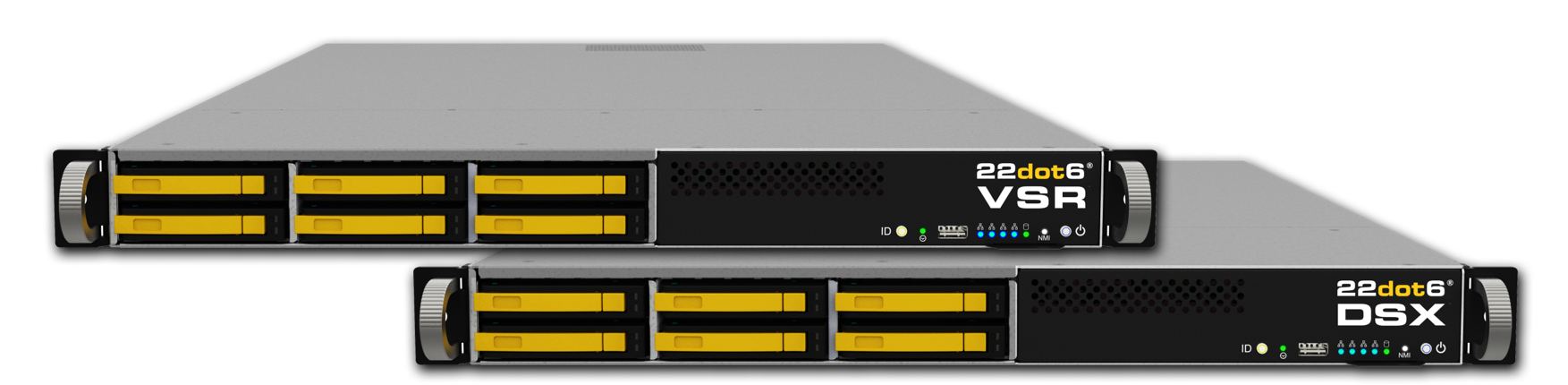
It’s Linux-based, and can leverage any bare-metal machine or VM. Metadata services live on scale-out, redundant nodes (VSR nodes), and data services are handled via single, clustered, or redundant nodes (DSX nodes).

[image courtesy of 22dot6]

TASS

The key to this all making some kind of sense is TASS (the Transcendent Abstractive Storage System). 22dot6 describes this as a “purpose-built, objective based software integrating users, applications and data services with physical, virtual and cloud-based architectures globally”. Sounds impressive, doesn’t it? Valence is the software that drives everything, providing the ability to deliver NAS and object over physical and virtual storage, in on-premises, hybrid, or public cloud deployments. It’s multi-vendor capable, offering support for third-party storage systems, and does some really neat stuff with analytics to ensure your storage is performing the way you need it to.


The Announcement

22dot6 has announced the TASS Cloud Suite, an “expanded collection of cloud specific features to enhance its universal storage software Valence”. Aimed at solving many of the typical problems users face when using cloud storage, it addresses:

  • Private cloud, with a “point-and-click transcendent capability to easily create an elastic, scale-on-demand, any storage, anywhere, private cloud architecture”
  • Hybrid cloud, by combining local and cloud resources into one big pool of storage
  • Cloud migration and mobility, with a “zero stub, zero pointer” architecture
  • Cloud-based NAS / Block / S3 Object consolidation, with a “transparent, multi-protocol, cross-platform support for all security and permissions with a single point-and-click”

There’s also support for cloud-based data protection, WORM encoding of data, and a comprehensive suite of analytics and reporting.


Thoughts and Further Reading

I’ve had the pleasure of speaking to Lauffin about 22dot6 on 2 occasions now, and I’m convinced that he’s probably one of the most enthusiastic storage company founders / CEOs I’ve ever been briefed by. He’s certainly been around for a while, and has seen a whole bunch of stuff. In writing this post I’ve had a hard time articulating everything that Lauffin tells me 22dot6 can do, while staying focused on the cloud part of the announcement. Clearly I should have done an overview post in May and then I could just point you to that. In short, go have a look at the website and you’ll see that there’s quite a bit going on with this product.

The solution seeks to address a whole raft of issues that anyone familiar with modern storage systems will have come across at one stage or another. I remain continually intrigued by how various solutions work to address storage virtualisation challenges, while still making a system that works in a seamless manner. Then try and do that at scale, and in multiple geographical locations across the world. It’s not a terribly easy problem to solve, and if Lauffin and his team can actually pull it off, they’ll be well placed to dominate the storage market in the near future.

Spend any time with Lauffin and you realise that everything about 22dot6 speaks to many of the lessons learned over years of experience in the storage industry, and it’s refreshing to see a company trying to take on such a wide range of challenges and fix everything that’s wrong with modern storage systems. What I can’t say for sure, having never had any real stick time with the solution, is whether it works. In Lauffin’s defence, he has offered to get me in contact with some folks for a demo, and I’ll be taking him up on that offer. There’s a lot to like about what 22dot6 is trying to do here, with the Valance Cloud Suite being a small part of the bigger picture. I’m looking forward to seeing how this goes for 22dot6 over the next year or two, and will report back after I’ve had a demo.

Random Short Take #61

Welcome to Random Short take #61.

  • VMworld is on this week. I still find the virtual format (and timezones) challenging, and I miss the hallway track and the jet lag. There’s nonetheless some good news coming out of the event. One thing that was announced prior to the event was Tanzu Community Edition. William Lam talks more about that here.
  • Speaking of VMworld news, Viktor provided a great summary on the various “projects” being announced. You can read more here.
  • I’ve been a Mac user for a long time, and there’s stuff I’m learning every week via Howard Oakley’s blog. Check out this article covering the Recovery Partition. While I’m at it, this presentation he did on Time Machine is also pretty ace.
  • Facebook had a little problem this week, and the Cloudflare folks have provided a decent overview of what happened. As someone who works for a service provider, this kind of stuff makes me twitchy.
  • Fibre Channel? Cloud? Chalk and cheese? Maybe. Read Chin-Fah’s article for some more insights. Personally, I miss working with FC, but I don’t miss the arguing I had to do with systems and networks people when it came to the correct feeding and watering of FC environments.
  • Remote working has been a challenge for many organisations, with some managers not understanding that their workers weren’t just watching streaming video all day, but actually being more productive. Not everything needs to be a video call, however, and this post / presentation has a lot of great tips on what does and doesn’t work with distributed teams.
  • I’ve had to ask this question before. And Jase has apparently had to answer it too, so he’s posted an article on vSAN and external storage here.
  • This is the best response to a trio of questions I’ve read in some time.

CTERA – Storage The Way Your Users Want It

Disclaimer: I recently attended Storage Field Day 22.  Some expenses were paid for by Tech Field Day. There is no requirement for me to blog about any of the content presented and I am not compensated in any way for my time at the event.  Some materials presented were discussed under NDA and don’t form part of my blog posts, but could influence future discussions.

CTERA recently presented at Storage Field Day 22. You can see their videos from Storage Field Day 22 here, and download a PDF copy of my rough notes from here.


CTERA?

In a nutshell, CTERA is:

  • Enterprise NAS over Object
  • 100% Private
  • Multi-cloud, hybrid consistent
  • Delivers data placement policy and mobility
  • Caching, not tiering
  • Zero-trust


The Problem

So what’s the problem we’re trying to solve with unstructured data?

  • Every IT environment is hybrid
  • More data is being generated at the edge
  • Workload placement strategies are driving storage placement
  • Storage must be instrumented and accessible anywhere

Seems simple enough, but edge storage is hard to get right.

[image courtesy of CTERA]

What Else Do You Want?

We want a lot from our edge storage solutions, including the ability to:

  • Migrate data to cloud, while keeping a fast local cache
  • Connect branches and users over a single namespace
  • Enjoy a HQ-grade experience regardless of location
  • Achieve 80% cost saving with global dedupe and cloud economics.


The Solution?

CTERA Multi-cloud Global File System – a “software-defined file over object with distributed SMB/NFS edge caching and endpoint collaboration”.

[image courtesy of CTERA]

CTERA Architecture

  • Single namespace connecting HQ, branches and users with ACL support
  • Object-native backend with cache accelerated access for remote sites
  • Multi-cloud scale-out to customer’s private or public infrastructure
  • Source-based encryption and global deduplication
  • Multi-tenant administration scalable to thousands of sites
  • Data management ecosystem for content security, analytics and DevOps automation

[image courtesy of CTERA]

Use Cases?

  • NAS Modernisation – Hybrid Edge Filer, Object-based Filesystem, Elastic scaling, Built-in Backup & DR
  • Remote Workforce – Endpoint Sync, Share, Backup & Cached Drive Distributed VDI clusters Small-form-factor Filer Mobile Collaboration
  • Media – Large Dataset Handling, Ultra-Fast Cloud Sync, MacOS Experience, Cloud Streaming
  • Multi-site Collaboration – Global File System Distributed Sync Scalable Central Mgt.
  • Edge Data Processing – Integrated HCI Filers Distributed Data Analysis Machine-Generated Data
  • Container-native – Global File System Across Distributed Kubernetes Clusters and Tethered Cloud Services


Thoughts and Further Reading

It should come as no surprise that people expect data to be available to them everywhere nowadays. And that’s not just sync and share solutions or sneaker net products on USB drives. No, folks want to be able to access corporate data in a non-intrusive fashion. It gets worse for the IT department though, because your end users aren’t just “heavy spreadsheet users”. They’re also editing large video files, working on complicated technical design diagrams, and generating gigabytes of log files for later analysis. And it’s not enough to say “hey, can you download a copy and upload it later and hope that no-one else has messed with the file?”. Users are expecting more from their systems. There are a variety of ways to deal with this problem, and CTERA seems to have provided a fairly robust solution, with many ways of accessing data, collaborating, and storing data in the cloud and at the edge. The focus isn’t limited to office automation data, with key verticals such as media and entertainment, healthcare, and financial services all having solutions suited to their particular requirements.

CTERA’s Formula One slide is impressive, as is the variety of ways it works to help organisations address the explosion unstructured data in the enterprise. With large swathes of knowledge workers now working more frequently outside the confines of the head office, these kinds of solutions are only going to become more in demand, particularly those that can leverage cloud in an effective (and transparent) fashion. I’m excited to see what’s to come with CTERA. Check out Ray’s article for a more comprehensive view of what CTERA does.

Random Short Take #60

Welcome to Random Short take #60.

  • VMware Cloud Director 10.3 went GA recently, and this post will point you in the right direction when it comes to planning the upgrade process.
  • Speaking of VMware products hitting GA, VMware Cloud Foundation 4.3 became available about a week ago. You can read more about that here.
  • My friend Tony knows a bit about NSX-T, and certificates, so when he bumped into an issue with NSX-T and certificates in his lab, it was no big deal to come up with the fix.
  • Here’s everything you wanted to know about creating an external bootable disk for use with macOS 11 and 12 but were too afraid to ask.
  • I haven’t talked to the good folks at StarWind in a while (I miss you Max!), but this article on the new All-NVMe StarWind Backup Appliance by Paolo made for some interesting reading.
  • I loved this article from Chin-Fah on storage fear, uncertainty, and doubt (FUD). I’ve seen a fair bit of it slung about having been a customer and partner of some big storage vendors over the years.
  • This whitepaper from Preston on some of the challenges with data protection and long-term retention is brilliant and well worth the read.
  • Finally, I don’t know how I came across this article on hacking Playstation 2 machines, but here you go. Worth a read if only for the labels on some of the discs.

Cohesity DataProtect Delivered As A Service – SaaS Connector

I recently wrote about my experience with Cohesity DataProtect Delivered as a Service. One thing I didn’t really go into in that article was the networking and resource requirements for the SaaS Connector deployment. It’s nothing earth-shattering, but I thought it was worthwhile noting nonetheless.

In terms of the VM that you deploy for each SaaS Connector, it has the following system requirements:

  • 4 CPUs
  • 10 GB RAM
  • 20 GB disk space (100 MB throughput, 100 IOPs)
  • Outbound Internet connection

In terms of scaleability, the advice from Cohesity at the time of writing is to deploy “one SaaS Connector for each 160 VMs or 16 TB of source data. If you have more data, we recommend that you stagger their first full backups”. Note that this is subject to change. The outbound Internet connectivity is important. You’ll (hopefully) have some kind of firewall in place, so the following ports need to be open.

Port
Protocol
Target
Direction (from Connector)
Purpose

443

TCP

helios.cohesity.com

Outgoing

Connection used for control path

443

TCP

helios-data.cohesity.com

Outgoing

Used to send telemetry data

22, 443

TCP

rt.cohesity.com

Outgoing

Support channel

11117

TCP

*.dmaas.helios.cohesity.com

Outgoing

Connection used for data path

29991

TCP

*.dmaas.helios.cohesity.com

Outgoing

Connection used for data path

443

TCP

*.cloudfront.net

Outgoing

To download upgrade packages

443

TCP

*.amazonaws.com

Outgoing

For S3 data traffic

123, 323

UDP

ntp.google.com or internal NTP

Outgoing

Clock sync

53

TCP & UDP

8.8.8.8 or internal DNS

Bidirectional

Host resolution

Cohesity recommends that you deploy more than one SaaS Connector, and you can scale them out depending on the number of VMs / how much data you’re protecting with the service.

If you’re having concerns with bandwidth, you can configure the bandwidth used by the SaaS Connector via Helios.

Navigate to Settings -> SaaS Connections and click on Bandwidth Usage Options. You can then add a rule.

You then schedule bandwidth usage, potentially for quiet times (particularly useful in small environments where Internet connections may be shared with end users). There’s support for upload and download traffic, and multiple schedules as well.

And that’s pretty much it. Once you have your SaaS Connectors deployed you can monitor everything from Helios.


Cohesity DataProtect Delivered As A Service – A Few Notes

As part of a recent vExpert giveaway the folks at Cohesity gave me a 30-day trial of the Cohesity DataProtect Delivered as a Service offering. This is a component of Cohesity’s Data Management as a Service (DMaaS) offering and, despite the slightly unwieldy name, it’s a pretty neat solution. I want to be clear that it’s been a little while since I had any real stick time with Cohesity’s DataProtect offering, and I’m looking at this in a friend’s home lab, so I’m making no comments or assertions regarding the performance of the service. I’d also like to be clear that I’m not making any recommendation one way or another with regards to the suitability of this service for your organisation. Every organisation has its own requirements and it’s up to you to determine whether this is the right thing for you.


Overview

I’ve added a longer article here that explains the setup process in more depth, but here’s the upshot of what you need to do to get up and running. In short, you sign up, select the region you want to backup workloads to, configure your SaaS Connectors for the particular workloads you’d like to protect, and then go nuts. It’s really pretty simple.

Workloads

In terms of supported workloads, the following environments are currently supported:

  • Hypervisors (VMware and Hyper-V);
  • NAS (generic SMB and NFS, Isilon, and NetApp);
  • Microsoft SQL Server;
  • Oracle;
  • Microsoft 365;
  • Amazon AWS; and
  • Physical hosts.

This list will obviously grow as some of the support for particular workloads with DataProtect and Helios improves over time.

Regions

The service is currently available in seven AWS Regions:

  • US East (Ohio)
  • US East (N. Virginia)
  • US West (Oregon)
  • US West (N. California)
  • Canada (Central)
  • Asia Pacific (Sydney)
  • Europe (Frankfurt)

You’ve got some flexibility in terms of where you store your data, but it’s my understanding that the telemetry data (i.e. Helios) goes to one of the US East Regions. It’s also important to note that once you’ve put data in a particular Region, you can’t then move that data to another Region.

Encryption

Data is encrypted in-flight and at rest, and you have a choice of KMS solutions (Cohesity-managed or DIY AWS KMS). Note that once you choose a KMS, you cannot change your mind. Well, you can, but you can’t do anything about it.


Thoughts

Data protection as a service offerings are proving increasingly popular with customers, data protection vendors, and service providers. The appeal for the punters is that they can apply some of the same thinking to protecting their investment in their cloud as they did to standing it up in the first place. The appeal for the vendors and SPs is that they can deliver service across a range of platforms without shipping tin anywhere, and build up annuity business as well.

With regards to this particular solution, it still has some rough edges, but it’s great to see just how much can already be achieved. As I mentioned, it’s been a while since I had some time with DataProtect, and some of the usability and functionality of both it and Helios has really come along in leaps and bounds. And the beauty of this being a vendor-delivered as a Service offering is that features can be rolled out on a frequent basis, rather than waiting for quarterly improvements to arrive via regularly scheduled software maintenance releases. Once you get your head around the workload, things tend to work as expected, and it was fairly simple to get everything setup and working in a short period of time.

This isn’t for everyone, obviously. If you’re not a fan of doing things in AWS, then you’re really not going to like how this works. And if you don’t operate near one of the currently supported Regions, then the tyranny of bandwidth (i.e. physics) may prevent reasonable recovery times from being achievable for you. It might seem a bit silly, but these are nonetheless things you need to consider when looking at adopting a service like this. It’s also important to think of the security posture of these kinds of services. Sure, things are encrypted, and you can use MFA with Helios, but folks outside the US sometimes don’t really dig the idea of any of their telemetry data living in the US. Sure, it’s a little bit tinfoil hat but it you’d be surprised how much it comes up. And it should be noted that this is the same for on-premises Cohesity solutions using Helios. Then again, Cohesity is by no means alone in sending telemetry data back for support and analysis purposes. It’s fairly common and something your infosec will likely already be across how to deal with it.

If you’re fine with that (and you probably should be), and looking to move away from protecting your data with on-premises solutions, or looking for something that gives you some flexible deployment and management options, this could be of interest. As I mentioned, the beauty of SaaS-based solutions is that they’re more frequently updated by the vendor with fixes and features. Plus you don’t need to do a lot of the heavy lifting in terms of care and feeding of the environment. You’ll also notice that this is the DataProtect component, and I imagine that Cohesity has plans to fill out the Data Management part of the solution more thoroughly in the future. If you’d like to try it for yourself, I believe there’s a trial you can sign up for. Finally, thanks to the Cohesity TAG folks for the vExpert giveaway and making this available to people like me.

Random Short Take #53

Welcome to Random Short Take #53. A few players have worn 53 in the NBA including Mark Eaton, James Edwards, and Artis Gilmore. My favourite though was Chocolate Thunder, Darryl Dawkins. Let’s get random.

  • I love Preston’s series of articles covering the basics of backup and recovery, and this one on backup lifecycle is no exception.
  • Speaking of data protection, Druva has secured another round of funding. You can read Mellor’s thoughts here, and the press release is here.
  • More data protection press releases? I’ve got you covered. Zerto released one recently about cloud data protection. Turns out folks like cloud when it comes to data protection. But I don’t know that everyone has realised that there’s some work still to do in that space.
  • In other press release news, Cloud Propeller and Violin Systems have teamed up. Things seem to have changed a bit at Violin Systems since StorCentric’s acquisition, and I’m interested to see how things progress.
  • This article on some of the peculiarities associated with mainframe deployments in the old days by Anthony Vanderwerdt was the most entertaining thing I’ve read in a while.
  • Alastair has been pumping out a series of articles around AWS principles, and this one on understanding your single points of failure is spot on.
  • Get excited! VMware Cloud Director 10.2.2 is out now. Read more about that here.
  • A lot of people seem to think it’s no big thing to stretch Layer 2 networks. I don’t like it, and this article from Ethan Banks covers a good number of reasons why you should think again if you’re that way inclined.
